TB6612 Dual Motor Driver
The lab currently stocks Pololu TB6612FNG dual motor driver modules, Lab Part 0485, which can drive one or two DC motors in either direction.
This page includes a reference circuit, sample control script
to run as code.py, and the tb6612.py driver which must also be copied
onto the Pico.
Sample TB6612 Motor Driver Circuit
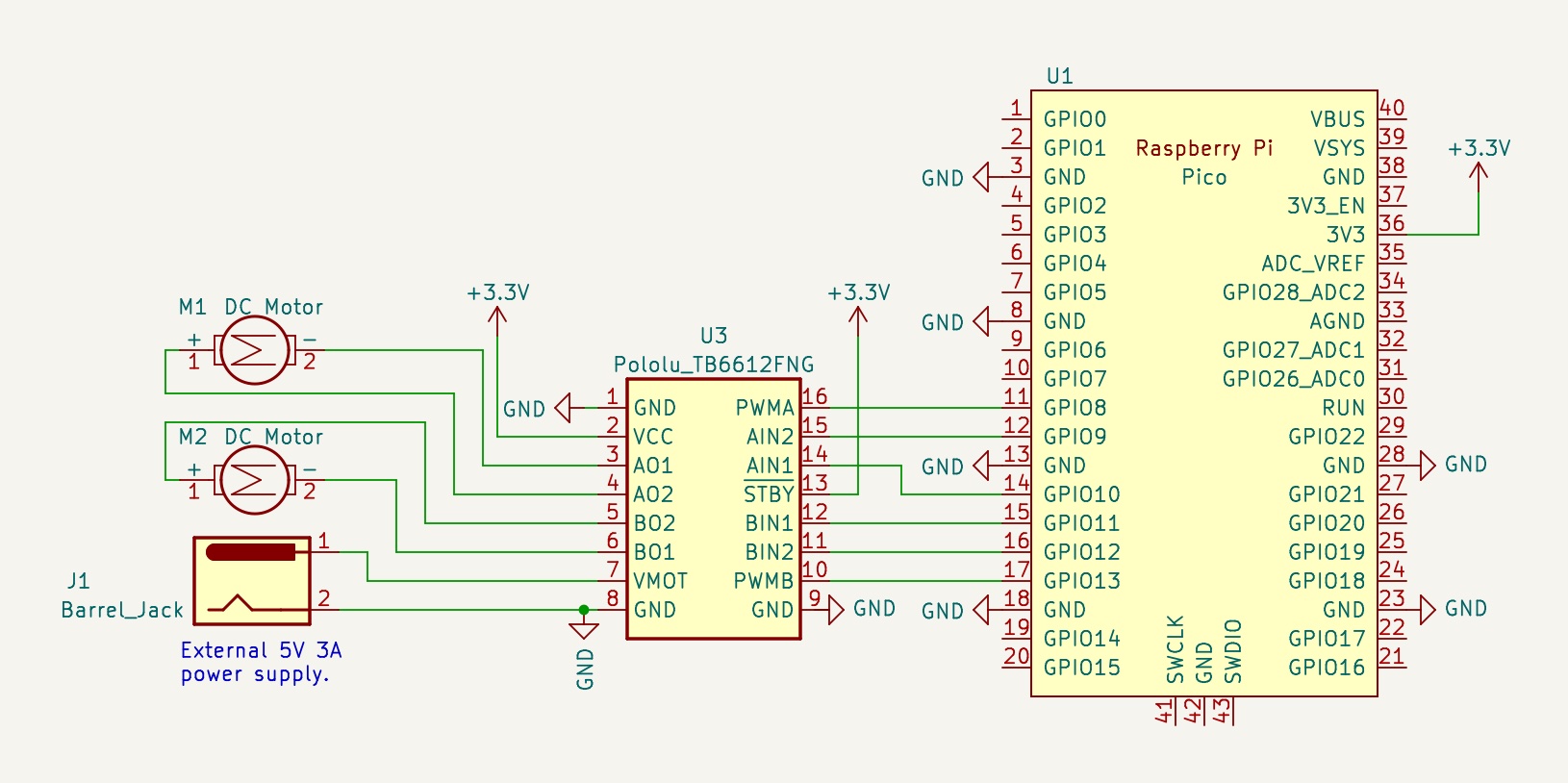
Sample motor driver circuit. The TB6612 is a dual H-bridge driver capable of operating two motors bidirectionally. Note that any six GPIO pins may be used to control the TB6612. Please be careful with the power wiring, motor voltages can destroy the Pico.
tb6612_demo.py
A script demonstrating use of the tb6612 class: tb6612_demo.py.
This should be copied into code.py on the Pico.
 1# tb6612_demo.py
 2# Top-level script to demonstrate use of the tb6612 module.
 3
 4# Enable access to the sleep function.
 5import time
 6
 7# Load the code from tb6612.py and make all attributes available.
 8import tb6612
 9
10# Create a default instance of the driver class.
11driver = tb6612.TB6612()
12
13# Enter an infinite loop driving the two outputs through various directions and speeds.
14while True:
15
16    print("Start")
17    driver.write(0,  1.0)
18    driver.write(1,  0.0)
19    time.sleep(1.0)
20
21    print("next")
22    driver.write(0,  0.5)
23    driver.write(1, -0.5)
24    time.sleep(1.0)
25
26    print("next")
27    driver.write(0, -0.5)
28    driver.write(1,  0.5)
29    time.sleep(1.0)
30
31    print("next")
32    driver.write(0, -1.0)
33    driver.write(1,  1.0)
34    time.sleep(1.0)
35
36    print("next")
37    driver.write(0,  0.0)
38    driver.write(1,  0.0)
39    time.sleep(1.0)
tb6612.py module
This module provides a class for controlling a TB6612 dual H-bridge DC motor driver. This device can drive two low-power DC motor bidirectionally with variable speed. Note that this file will normally be copied to the top-level folder of the CIRCUITPY filesystem so it can be imported by other scripts.
- class tb6612.TB6612
This class represents a single dual H-bridge driver. It configures two pins for PWM output and four pins as digital output and can be used to control two DC motors bidirectionally at variable speed.
N.B. this does not implement any other timing process, it simply sets motor PWM levels but does not apply feedback, duration, or trajectory.
Direct download: tb6612.py.
  1# tb6612.py
  2#
  3# Raspberry Pi Pico - TB6612 dual H-bridge motor driver support
  4#
  5# This module provides a class for controlling a TB6612 dual H-bridge DC motor driver.
  6# This device can drive two low-power DC motors bidirectionally with variable speed.
  7#
  8# A typical usage requires six digital outputs.  The defaults assumes a Pololu
  9# TB6612 dual motor driver has been wired up to the Pico as follows:
 10
 11#   Pico pin 11, GPIO8    -> PWMA
 12#   Pico pin 12, GPIO9    -> AIN2
 13#   Pico pin 14, GPIO10   -> AIN1
 14#
 15#   Pico pin 15, GPIO11   -> BIN1
 16#   Pico pin 16, GPIO12   -> BIN2
 17#   Pico pin 17, GPIO13   -> PWMB
 18#
 19#   any Pico GND          -> GND
 20
 21# TB6612 carrier board: https://www.pololu.com/product/713
 22
 23################################################################
 24# CircuitPython module documentation:
 25# time      https://docs.circuitpython.org/en/latest/shared-bindings/time/index.html
 26# math      https://docs.circuitpython.org/en/latest/shared-bindings/math/index.html
 27# board     https://docs.circuitpython.org/en/latest/shared-bindings/board/index.html
 28# pwmio     https://docs.circuitpython.org/en/latest/shared-bindings/pwmio/index.html
 29# digitalio https://docs.circuitpython.org/en/latest/shared-bindings/digitalio/index.html
 30#
 31# Driver lifecycle documentation:
 32# https://docs.circuitpython.org/en/latest/docs/design_guide.html#lifetime-and-contextmanagers
 33#
 34################################################################################
 35# load standard Python modules
 36import math, time
 37
 38# load the CircuitPython hardware definition module for pin definitions
 39import board
 40
 41# load the CircuitPython pulse-width-modulation module for driving hardware
 42import pwmio
 43
 44#  load the CircuitPython basic digital pin support for driving hardware
 45import digitalio
 46
 47#--------------------------------------------------------------------------------
 48class TB6612:
 49    def __init__(self,
 50                 PWMA=board.GP8,  AIN1=board.GP10, AIN2=board.GP9,   # control pins for motor A
 51                 PWMB=board.GP13, BIN1=board.GP11, BIN2=board.GP12,  # control pins for motor B
 52                 pwm_rate=20000):
 53        """This class represents a single dual H-bridge driver.  It configures
 54        two pins for PWM output and four pins for digital output and can be used
 55        to control two DC motors bidirectionally at variable speed.
 56
 57        N.B. this does not implement any other timing process, it simply sets
 58        motor PWM levels but does not apply feedback, duration, or trajectory.
 59
 60        """
 61        # The PWM pins are used to control driver output power.
 62        self.pwma = pwmio.PWMOut(PWMA, duty_cycle=0, frequency=pwm_rate)
 63        self.pwmb = pwmio.PWMOut(PWMB, duty_cycle=0, frequency=pwm_rate)
 64
 65        # The IN pins are used to set direction.
 66        self.ain1 = digitalio.DigitalInOut(AIN1)
 67        self.ain2 = digitalio.DigitalInOut(AIN2)
 68        self.bin1 = digitalio.DigitalInOut(BIN1)
 69        self.bin2 = digitalio.DigitalInOut(BIN2)
 70
 71        self.ain1.direction = digitalio.Direction.OUTPUT
 72        self.ain2.direction = digitalio.Direction.OUTPUT
 73        self.bin1.direction = digitalio.Direction.OUTPUT
 74        self.bin2.direction = digitalio.Direction.OUTPUT
 75
 76        self.ain1.value = False
 77        self.ain2.value = False
 78        self.bin1.value = False
 79        self.bin2.value = False
 80
 81        return
 82
 83    def write(self, channel, rate):
 84        """Set the speed and direction on a single motor channel.
 85
 86        :param int channel:  0 for motor A, 1 for motor B
 87        :param float rate: modulation value between -1.0 and 1.0, full reverse to full forward."""
 88
 89        # convert the rate into a 16-bit fixed point integer
 90        pwm = min(max(int(2**16 * abs(rate)), 0), 65535)
 91
 92        # the direction control pins are always driven with opposite polarity
 93        if channel == 0 or channel == 'A' or channel == 'a':
 94            self.pwma.duty_cycle = pwm
 95            if rate < 0:
 96                self.ain1.value = False
 97                self.ain2.value = True
 98            else:
 99                self.ain1.value = True
100                self.ain2.value = False
101        else:
102            self.pwmb.duty_cycle = pwm
103            if rate < 0:
104                self.bin1.value = False
105                self.bin2.value = True
106            else:
107                self.bin1.value = True
108                self.bin2.value = False
109
110    def deinit(self):
111        """Manage resource release as part of object lifecycle."""
112        self.pwma.deinit()
113        self.ain1.deinit()
114        self.ain2.deinit()
115
116        self.pwmb.deinit()
117        self.bin1.deinit()
118        self.bin2.deinit()
119
120        self.pwma = None
121        self.ain1 = None
122        self.ain2 = None
123
124        self.pwmb = None
125        self.bin1 = None
126        self.bin2 = None
127
128    def __enter__(self):
129        return self
130
131    def __exit__(self):
132        # Automatically deinitializes the hardware when exiting a context.
133        self.deinit()