DMX Lighting and Power Control
We will be using DMX equipment to control light fixtures and AC-powered equipment such as fans. DMX is a standard protocol in stage and theater, primarily used for controlling lighting, but also used for motion equipment and special effects.
From a software standpoint, a DMX bus looks like an array of up to 512 8-bit integers. The data is transmitted at 250 kbit/sec, so the typical update rate is 44Hz but can be faster for small ‘universe’ sizes. The interpretation of the values is entirely up to the fixtures or dimmer packs.
Each DMX fixture must have a DMX channel address manually configured. Our usual mode uses non-overlapping addresses so each fixture can be individually controlled. The DMX bus uses XLR cables which chain from device to device; each retransmits the data stream, but the configured address is what controls the mapping, not the physical ordering.
Enttec DMXUSB Pro

The ENTTEC DMXUSB Pro is a USB to DMX interface. The hardware is bidirectional and can both send and receive DMX signals, although we generally only use it for output. It is based on a FTDI USB to serial chip and has wide driver support; to a host computer it appears as a serial port.
ADJ DP-DMX20L
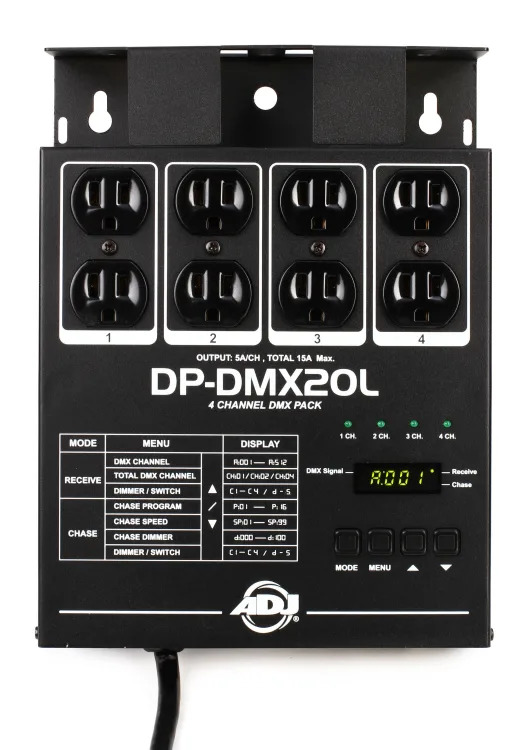
The American DJ (ADJ) DP-DMX20L is a four-channel dimmer pack which we can use to control electric fans or individual incandescent light fixtures.
It can occupy up to four DMX channels. Please configure as follows:
Make sure it is DMX (not chase) mode: press the Mode button until the display begins with ‘A’.
Make sure it is configured for four channels: use the Menu button until you see ‘CH’ followed by digits. Press up or down as needed until it reads ‘CH04’.
Set the address: use the Menu button until you see ‘A’ followed by digits. Press up or down as needed to set the base channel address.
SlimPAR Pro Q USB

The Chauvet SlimPAR Pro Q USB is a four-channel RGBA light fixture with red-green-blue-amber LEDs.
It can occupy four to ten DMX channels. Please configure as follows:
Make sure it is configured for four channels: press the MENU button until you see ‘4-CH’, followed by ENTER.
Set the address: press UP or DOWN buttons until you see ‘d’ followed by the desired channel number, followed by ENTER.
Please note: if you neglect to press ENTER to commit a change, the newly configured setting will revert after a short period.
ADJ Mega Par Profile Plus (with UV)
We used to have a set of these, although they have largely been replaced with the SlimPAR Pro fixtures.
The Mega Par Profile Plus is a four-channel RGB-UV light fixture featuring an array of red, green, and blue LEDs with a single UV LED in the center.
It can occupy four to ten DMX channels. Please configure as follows:
Make sure it is in DMX mode: press the MODE button until you see ‘d’ followed by three digits. The digits represent the current DMX channel address.
Set the address: press UP or DOWN buttons until you see ‘d’ followed by the desired channel number.
Make sure it is configured for four channels: press SETUP followed by UP or DOWN until ‘Ch04’ is displayed.