Campus Client Project
The first project of this semester was a technical exploration to help introduce you to new technologies and techniques. Then you did two weeks of domain-specific skill-building explorations. This final is an opportunity for you to make something for somebody else: an individual member of our campus’s UEIS (University Libraries, Entertainment Technology Center, IDeATe, and Sustainability Initiatives) staff. Your assignment is to create something that is useful and relevant for your client in particular, driven by their wants or needs and nobody else’s.
In three and a half weeks of this project, you will: conduct a needfinding interview with your client; distill and generate meaningful ideas from that discussion; make a thoughtfully designed working prototype to explore potential solutions to an identified problem; get feedback from the client and others on your prototype; and use your findings to create a second (and final) iteration, ideally to be given to the client to keep at the conclusion of the project. You’ll document your process and products along the way. Please see prior semesters’ documentation to get a sense of the range of projects that have been completed for this assignment. (Note: prior semesters of the course have included a variety of clients and different project timelines as well.)
Your final deliverable is meant to serve a useful function for an audience of one: your client.
The project must at least:
- Have some kind of interactivity which is mediated by an Arduino or another similar microcontroller,
- Possess well-considered physical embodiment, i.e. demonstrate some forethought and effort towards questions of aesthetics and design for usability, and
- Be built up to a moderate standard of robustness in its software, electronics, and physical fabrication.
Project structure and page table of contents:
- Project introduction (during class on Monday, October 19th)
- Client site visit and interviews (during class on Monday, October 19th)
- Ideation and convergence on prototyping ideas (ideation sketches due Wednesday, October 21st)
- Prototype development
- In-class presentation and critique of prototypes (Wednesday, October 28th)
- Final work plan (due Friday, October 30th at 5pm)
- Final work period
- Final presentation and critique (Monday, November 9th)
- Final documentation (Monday, November 16th)
Here’s a Gantt chart illustrating the flow of all of the dates listed above, with time ranges marked with green xs and due dates marked with red !s. Class dates are yellow, and weekends are grey.
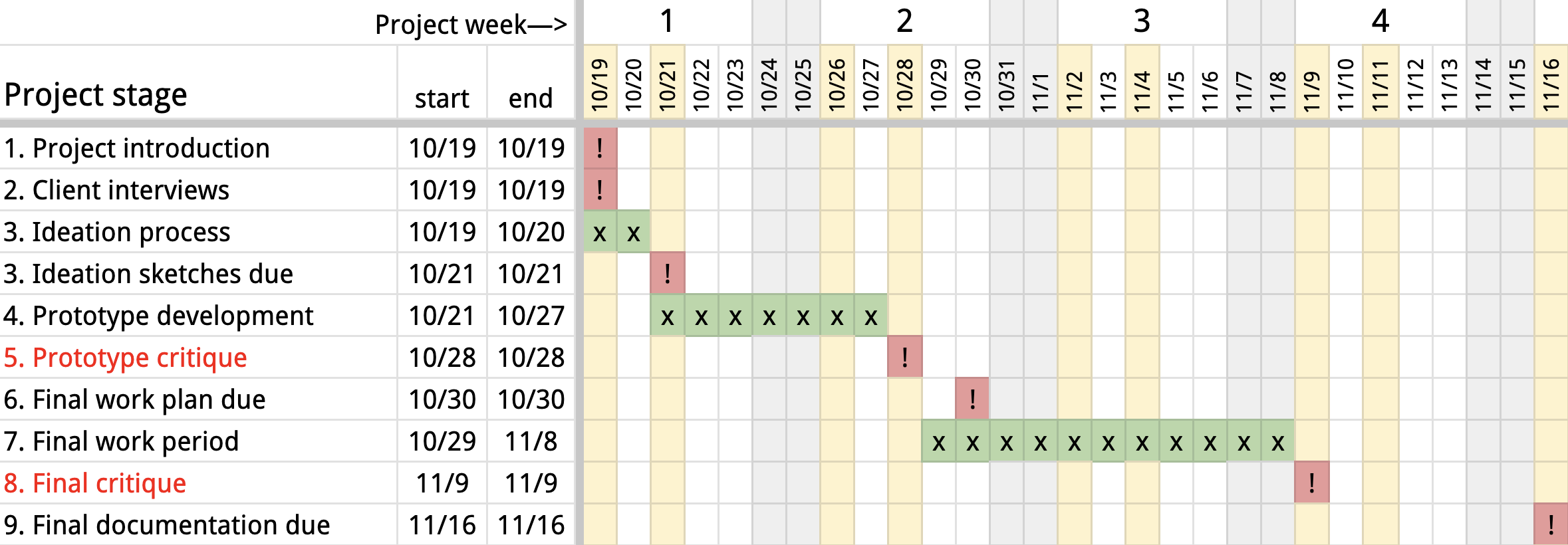
(Right-click and open the image in a new tab if it’s too small to be easily legible in your view)
Last and least: the grading scheme for this project.
2. Interviews with design clients
In class on Monday, October 19th
Your interview with your client is the foundation of this project. The purpose of the meeting is to gather sufficient information about the client’s work environment and habits to be able to identify a need they have that can be fulfilled with a technological solution.
The interview should run for approximately 45 minutes.
You are running this meeting
Please be sure to go into the meeting with the mindset that you, the design team, are running the meeting. You should have a clear plan about what you want to talk about and how you want to talk about it. In the past, some student groups have been somewhat steamrolled by design clients who are very talkative, or who have particular ideas they wish to share with the team to the exclusion of other discussion. This is often quite counterproductive!
If you feel things are going off the rails, don’t be afraid to politely share that you’ve got an agenda that you want to be sure to work through. (And then get back to your agenda!)
Meeting agenda jumping-off point
Below is an outline for your agenda to build off of. You are not yoked to this—consider it as a jumping-off point.
Create your own agenda and note-taking document in your team’s shared Google Drive folder (in our class’s shared drive).
- Introduction/icebreaker (take a few minutes to do this)
- Introduce yourselves by name, sharing something that reflects a personal value, interest, or other bit of relevant data about your life which will help establish a personal connection.
- Ask your client to participate in turn, sharing their name, their role at CMU, and their interest in participating in this class design project.
- Explanation and clarification about project goals (take a minute or two to do this)
- You want to be sure to be on the same page about this project. Explain in clear terms what it is we’re trying to do, and what we’re not trying to do.
- We are:
- Trying to build prototype useful devices
- Engaging in an iterative design process, including gathering formative feedback around the midpoint of the process
- Taking only about three and a half weeks to go from this meeting to a medium-fidelity final product
- Documenting our process
- We are not:
- Professional technologists who are experienced in making polished products
- Planning to build something that will be sold commercially
- Constrained by any practicality outside of usefulness to the person we’re designing for
- Likely to invent a totally novel piece of electronics (we combine many existing available components in new ways, but don’t make components)
- We are:
- Give a quick timeline overview of the process
- Be sure to solicit questions: ask “do you have any questions?” or “does this make sense?”, etc., as you’re going through this section
- You want to be sure to be on the same page about this project. Explain in clear terms what it is we’re trying to do, and what we’re not trying to do.
- Understanding needs and thinking of possible technological interventions (spend about 40 minutes on this)
- This is the meat of the meeting, and it’s also the hardest part.
- There are a variety of approaches that you could take. Some possibilities:
- Ask your client directly if they can share any activity/event/task pertinent to their role or the space they manage that are difficult, frustrating, or otherwise seem like they could use an intervention. This direct question may bear some fruit, but you will probably need to do some probing and ask questions to guide the answering.
- Ask if they’d be willing to demonstrate common tasks or a series of tasks to you during the meeting. They can actually do the task, or they may pantomime the task. The closer to reality this action is, the more likely you are to find a particular aspect of the task that’s harder than it needs to be.
- Once you’ve asked some of these guiding questions, you could use craft materials you have on hand (e.g. modeling clay, tongue depressors, pipe cleeaners, masking tape, etc.) to mock up proposed solutions
- As you’re having this part of the discussion, document it as much as possible. At least one person should be taking notes, and at least one other person should be taking occasional pictures (certainly if the client is demonstrating something it should be documented).
- Share thoughts and ideas as they come up. You’re trying to be as creatively fruitful as possible in a short time!
- Keep, and document, any artifacts generated from this meeting. This includes photos, videos, and saving any drawings/models/etc. These will be part of your final project documentation.
- Conclude (take a minute or two to do this)
- Thank your client for their time and gather any final documentation images/drawings/notes you may need to wrap up before closing.
Some thoughts from an experienced interviewer
Below are some relevant passages from chapter 2 of Steve Portigal’s book Interviewing Users: How to Uncover Compelling Insights (Rosenfeld Media, 2013).
Work toward the tipping point
There’s often a visceral point in the interview where the exchange shifts from a back-and-forth of question-and-answer, question-and-answer to a question-story setup. It’s such a tangible shift in the interview that I feel as if I can point to it when it happens. Stories are where the richest insights lie, and your objective is to get to this point in every interview.
The thing about this tipping point is that you don’t know when it’s coming. So you have to be patient in the question-and-answer part of the interview because you don’t necessarily know that what you’re doing to build rapport is getting you anywhere. You have to trust in the process, which is easier with experience. (p. 24; my emphasis)
Listen by Asking Questions
In addition to demonstrating listening by what you don’t say, you can also demonstrate that you are listening by what you do say. The questions you ask are signifiers that you are listening. Try to construct each question as a follow-up to a previous answer. If you are following up on something other than what the participant just said, indicate where your question comes from. For example, “Earlier, you told us that…” or “I want to go back to something else you said….” Not only does this help the person know that you’re looping back, it also indicates that you are really paying attention to what they are telling you, that you remember it, and that you are interested. If you are going to change topics, just signal your transitions: “Great. Now I’d like to move on to a totally different topic.” (p. 25)
Be Aware of Your Body Language
Make and maintain eye contact with your participant. If you find eye contact personally challenging, take breaks and aim your gaze at their face, their hands, and items they are showing you. Use your eyes to signal your commitment to the interview. Acknowledge their comments with head nods or simple “mm-hmm” sounds. Be conscious of your body position. When you are listening, you should be leaning forward and visibly engaged. When you aren’t listening, your body tells that story, too. (p. 25)
3. Ideation and convergence on an idea for prototyping
Ideation sketches due at start of class Wednesday, October 21st; 5% of project grade
In class on Wednesday, October 21st, we’ll discuss your thoughts coming out of your interviews. The team as a whole is responsible for showing two sketched-out ideas for projects to build. If one person on the team is a strong sketcher, it’s fine for that person to do most or all of the drawings; but the whole of the work should be collaborative. (If one person draws, the others should be sure to write plenty.)
Each project idea should fit on a single 8-1/2” x 11” page. Each ideation page should have:
- at least three drawings or images of the envisioned final physical object,
- a functional block diagram of the envisioned system, and
- ~150 words which may include descriptive text, captions, etc.
The drawings and text may be arranged freely on the page, or in a more tightly structured way—whatever you decide upon as a group. The content matters here much more than the form.
The deliverable for this assignment is a PDF. It should be submitted to this Canvas assignment as a file upload.
4. Prototype development
Wednesday, October 21st through Tuesday, October 27th
A prototype is an experiment designed to answer a question
We are building a prototype so that we can attempt to answer a question. The question may be something somewhat technical or tightly defined, like “where are the right places to put these buttons so that the user knows how to use this device?” or something broader, like “will this feature pique the user’s interest?” or even more existentially for the product, “will this be useful?”
When designing these prototypes, you should at the outset define a question that you’re seeking to answer, and keep it in mind as you progress. As a team of three, you may well decide you have three different questions to ask, and give each of them to one of the teammates to address.
Prototypes come in different flavors
Different types of prototypes serve different purposes; one useful breakdown of a handful of these is given in Graham Pullin’s book Design Meets Disability, p. 138:
- Feels-like: an ergonomic prototype for feeling in hands, etc. This sort of prototype might answer the questions
- “how does the user respond to this size, shape, and weight?” or
- “is this too heavy to be comfortable?”
- Looks-like: an appearance model for form, colors, materials. This sort of prototype might answer the questions
- “are polka dots distracting or fun?” or
- “does the user believe this is sturdier if it’s got a metal exterior finish?”
- Works-like: an engineering prototype for electronics, electromechanics, etc. This prototype might answer the questions
- “can we fit the electronics into a small enough space to make this work?” or
- “will this thing overheat when it’s left running for a few hours?” or
- “is the range of the radio long enough?”
- Behaves-like: an experience prototype which models the fundamental user interactions. This prototype might answer the questions
- “does a user understand how to use this without being given verbal instructions?” or
- “will the user engage with this for more than a few seconds before getting bored?”
As you consider what kind of question you wish to answer, think about these categories of prototypes, which may help guide your thinking.
Wizard of Ozzing
In The Wizard of Oz, the titular Wizard is a big scary loud floating spectre who shoots fireballs. But actually the Wizard is an illusion operated by a man hiding behind a curtain, throwing switches and turning knobs.
For the purpose of this prototyping process, you may need to “Wizard of Oz” some of your user’s interactions with the physical thing that you build. That is to say: you might not be able to actually build out all of the interactive function into this thing that you’d like. For instance: if you wanted to build a device that senses a user’s clapping sound to trigger it to turn on, but you don’t have a microphone, then use a button to “sense” the clapping sound instead. (When your user claps, you’ll press that button.)
The expectation is that you will build some sort of physical embodiment (perhaps out of cardboard, paper, and tape—or whatever is available to you) and then sit that thing in front of a user for testing and feedback. Feel free to get creative with this! Do whatever you need to do to fake (Wizard of Oz) the interactions or behaviors you wish for your prototype to model. It may seem a bit silly, but it’s a perfectly legitimate form of prototyping.
You should take lots of pictures as you’re in your prototype phase. These will be integral to your process documentation later.
5. In-class presentation and critique of prototypes
in class on Wednesday, October 28th; 19% of project grade
A formative critique is one which occurs “mid-stream” in the design process; this is contrasted with a summative critique, which happens at the end. The purpose of a formative critique is to give the designer useful input that they can incorporate into their ongoing process, and that’s exactly what we’re going to aim for with this critique.
12:30–12:50 p.m.: group presentations to the room
Each group, one at a time, presents to the class and design clients. Fill in your own slides in this deck.
Aim to present for just three minutes as a group.
Please modify your slides however you’d like. Change the background color, font, text position and size, add images and videos, etc.
Each group’s slides consist at least of:
- Overall intro: should include your team name and the name of your client.
- Member intros: the team members’ first names, optionally sharing your disciplinary backgrounds at CMU as well, and anything else you’d like to share. Introduce your client, and anything you think they’d like shared about them.
- The client’s problem/challenge you identified as well as your envisioned solution(s).
- For each prototype you’re showing at the critique:
a. The question that this prototype is meant to answer
b. At least two images of each prototype
c. You can do a very quick demo, but photos/videos are easier to see.
12:50–1:30 p.m.: group consultation time with their client
Each group has extended discussion and consultation time to get feedback directly from their client. Group members should show their prototype(s) and allow their client to try it/them out, and solicit feedback with open-ended questions. There’s plenty of time to enjoy an in-depth discussion, talk about shortcomings and possible changes, and spitball future possibilities. Be sure to take notes (and perhaps a few photos) during this meeting, both for documentation and so that you can hold on to as many lessons as possible.
Rubric for the prototype presentation:
| Grade | Prototype presentation: intros |
|---|---|
| Full credit (1 point) | Intro includes: * Name of your team * First name of your client (and optionally anything you think they’d like shared about them) * First names of all team members, and your disciplinary backgrounds |
| No credit (0 points) | Not all full credit criteria met |
| Grade | Prototype presentation: problem/challenge identified |
|---|---|
| Full credit (1 point) | Information about your client’s problem/challenge is presented. Ideally, some image(s) that help tell the story are included. |
| No credit (0 points) | Falling short of full credit criteria |
| Grade | Prototype presentation: prototype(s) |
|---|---|
| Full credit (1 point) | For each prototype you’re showing: * Still or moving image of the prototype * Explicit statement of the question(s) that this prototype is designed to answer |
| No credit (0 points) | Falling short of full credit criteria |
| Grade | Prototype presentation: lessons learned, goals moving forward |
|---|---|
| Full credit (1 point) | * Lessons learned from the prototyping process so far (knowing that you haven’t yet shown the prototypes to the client!) * Your goals moving forward |
| No credit (0 points) | Falling short of full credit criteria |
Rubric for prototype(s):
| Grade range | Prototype |
|---|---|
| Good to excellent (12–19 points) | You bring a prototype(s) which: * Is directly relevant to your process of designing a device for your client * Is designed explicitly to answer a question (or multiple questions) relevant to your design effort: e.g. “what is the best size for this button?” or “would this particular approach be useful to our client’s needs?” * Is obviously the product of meaningful effort on the part of your team building to this deadline |
| Middling (5–11 points) | You bring a prototype(s) which at least: * Models some aspect of the final design intention, though not necessarily with respect to a well-framed question * Explores some design possibilities for your final project, though not necessarily with respect to a well-framed question * Is still obviously relevant to your final design goals |
| Absent to poor (0–4 points) | Your prototypes fall short of the full credit criteria, or you do not show a prototype. |
6. Final work plan
due at 5pm on Friday, October 30th; 1% of project grade
In order to ensure that you are all on the same page regarding timing and completion of key tasks in the runup to final presentations, you’ll collaborate on a document which will describe who is expected to do what, and when.
The document you’ll be building is a “Gantt chart,” a type of visual organization which graphs the timing of milestones and tasks on a horizontal axis of time. Open this Gantt template and select click “Use Template” in the upper right. Change your document name to 60-223 Team name Final project planning Gantt (substituting in your own Team name).
The linked Gantt chart contains some sample content to serve as a starting point. If it’s helpful, here are some more explicit instructions on how to use the Gantt chart to organize your team’s planning:
- Clear the text below the heading row in columns
AthroughEso you’re starting with a blank sheet. - As a team, discuss your major tasks Thursday, October 29th through Monday, November 9th and list them in column
A, with extra vertical space in between them. - Add brief descriptions to each major task.
- Add subtasks (pieces of the major task that can be listed separately) beneath each task, and write descriptions for these.
- Assign people to each task and subtask; people listed on this document are expected to bottom-line their tasks.
- To list a task, write its name in column
A, and its start and finish dates in columnsDandE. - Listing a subtask is the same as listing a task (just give it a name indicating it’s a subtask).
- To list a milestone, write its name in column
A, and use the same date as the start and finish in columnsDandE. - If the bar chart part of the sheet gets screwed up, just select the top row of that section (cells
F2throughV2), and drag the bottom-right corner little square down from there to rewrite all of the formulas; that should fix things.
To complete this assignment, submit a text link to your own Gantt chart via the Canvas assignment, and please be sure that you’ve set the sharing permissions in Google Drive so that rzachari@andrew.cmu.education can add comments to your document.
8. Final presentation and critique
Monday, November 9th; presentation is 7% of overall project grade, and project function/ergonomics/finish sum to 30% of project grade
Projects are graded based on the work that is shown at the time of the critique. Please see the detailed rubric on the relevant Canvas assignment page for a breakdown of the grading standard.
Presentation plan
- 12:30–12:35 p.m. Instructor’s welcome and introduction
- 12:35–12:55 p.m. Each group will present from this slide deck for three minutes
- Slides include:
- group introduction
- identification of the problem and originally proposed solutions
- prototype(s) you made and findings from prototyping
- final work product
- lessons learned and potential next steps (i.e. proposed further development if you had more time and resources)
- Guests and other students are welcome to leave written feedback during this time
- Slides include:
- 12:55–1:30 p.m. Guest critiquers rotate through each group and give them individual verbal and written feedback
During the rotation, guest critiquers will fill out a Google Form to provide written feedback electronically, and also fill out feedback on paper; the paper feedback will get typed up and added to the Google Form after class.
9. Final documentation
due at 5pm on Monday, November 16th; 38% of project grade
Final documentation requirements are currently under revision and will be posted by Monday, November 9th at the latest.
Grading scheme
Students in each group all share the same grade, though in unusual circumstances individuals’ grades may be decoupled from each other; speak with the instructor at your earliest convenience if you have any concerns about the distribution of effort in your group. Small course corrections towards the beginning of this process are far easier to undertake than big shifts towards the end.
Here are the grade subsections:
| portion of project grade | deliverable |
|---|---|
| 5% | Ideation sketches |
| 19% | Prototype crit and presentation |
| 1% | Final work plan |
| 37% | Final crit and presentation |
| 38% | Final documentation |
For detailed rubrics, see specific assignment listings above on this page; the same rubrics as above appear in Canvas as well and are used for grading.
