Curtain
This sample project includes a robot which consists of a row of actuators driving suspended passive chains. This model demonstrates several key concepts: underactuated systems, generative movement, and scripted modeling.
This model is demonstrated in the curtain.wbt world. The base link for all
actuators has a NULL Physics object so it does not move, simulating a rigid
connection to the ground. Each link has a NULL boundingObject so it does not
incur collision detection calculations; as a result each body needs specified
mass properties in the Physics node.
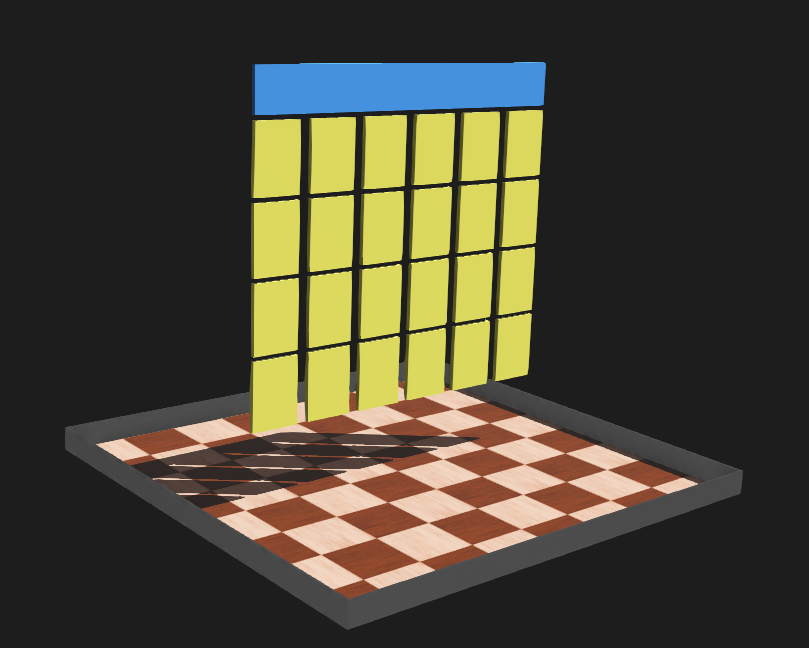
Screenshot of Webots model of the curtain robot.
Sample Robot Control Code
The controller implements keyboard input to trigger generative poses and movements. The structures uses the position controllers implemented in Webots for driven modes, and may also invoke a zero-torque model for free dynamics.
  1# curtain.py
  2#
  3# Sample Webots controller file for driving a
  4# 'curtain' of actuated hanging chains.
  5#
  6# No copyright, 2020-2022, Garth Zeglin.  This file is
  7# explicitly placed in the public domain.
  8
  9print("loading curtain.py...")
 10
 11# Import the Webots simulator API.
 12from controller import Robot
 13from controller import Keyboard
 14
 15# Import the standard Python math library.
 16import math
 17
 18# Define the time step in milliseconds between
 19# controller updates.
 20EVENT_LOOP_DT = 20
 21
 22################################################################
 23
 24# Request a proxy object representing the robot to control.
 25robot = Robot()
 26name = robot.getName()
 27print(f"curtain.py waking up for {name}...")
 28
 29# Query the number of devices.  The curtain.proto model has one joint actuator
 30# and one sensor per chain.
 31num_devices = robot.getNumberOfDevices()
 32chains = num_devices // 2
 33print(f"Found {num_devices} devices, assuming {chains} hanging chains.")
 34
 35# Enable computer keyboard input for user control.
 36keyboard = Keyboard()
 37keyboard.enable(EVENT_LOOP_DT)
 38
 39# Fetch handles for the joint sensors.  The names are generated by the curtain.proto scripting.
 40joints = [robot.getDevice('joint%d' % (jnum+1)) for jnum in range(chains)]
 41
 42# Specify the sampling rate for the joint sensors.
 43for j in joints:
 44    j.enable(EVENT_LOOP_DT)
 45
 46# Fetch handles for the position actuator at the top of each chain.
 47motors = [robot.getDevice('motor%d' % (jnum+1)) for jnum in range(chains)]
 48for m in motors:
 49    m.setPosition(0.0)
 50
 51################################################################
 52# Run an event loop until the simulation quits,
 53# indicated by the step function returning -1.
 54
 55while robot.step(EVENT_LOOP_DT) != -1:
 56
 57    # Read simulator clock time.
 58    t = robot.getTime()
 59
 60    # Read the new joint positions.
 61    q = [j.getValue() for j in joints]
 62
 63    # Read any computer keyboard keypresses.  Returns -1 or an integer keycode while a key is held down.
 64    key = keyboard.getKey()
 65    if key != -1:
 66        # convert the integer key number to a lowercase single-character string
 67        letter = chr(key).lower()
 68
 69        # special case: 'p' will enter a passive zero-torque mode
 70        if letter == 'p':
 71            for m in motors:
 72                m.setTorque(0.0)
 73
 74        # drive to downward reference position
 75        elif letter == 'd':
 76            for m in motors:
 77                m.setPosition(0.0)
 78
 79        # drive all to front
 80        elif letter == 'f':
 81            for m in motors:
 82                m.setPosition(-0.5)
 83
 84        # drive all to back
 85        elif letter == 'b':
 86            for m in motors:
 87                m.setPosition(0.5)
 88
 89        # drive to alternating positions
 90        elif letter == 'l':
 91            for i, m in enumerate(motors):
 92                p = 0.5 if (i&1) == 0 else -0.5
 93                m.setPosition(p)
 94
 95        # drive to opposite alternating positions
 96        elif letter == 'r':
 97            for i, m in enumerate(motors):
 98                p = 0.5 if (i&1) == 1 else -0.5
 99                m.setPosition(p)
100
101        # generate a traveling wave (while 'w' is held down)
102        elif letter == 'w':
103            for i, m in enumerate(motors):
104                p = 0.5 * math.sin(1.5 * t + 0.75 * i)
105                m.setPosition(p)
Proto File
The robot is modeled in a proto file to allow scripted generation of the chains. The number of chains can be varied after creation and the robot model will be regenerated. The proto file is VRML with embedded Javascript.
  1#VRML_SIM R2023b utf8
  2# documentation url: https://courses.ideate.cmu.edu/16-375
  3# Curtain.  A variable number of hanging chains with a single position actuator at top.
  4# license: No copyright, 2020-2026 Garth Zeglin.  This file is explicitly placed in the public domain.
  5# template language: javascript
  6
  7EXTERNPROTO "https://raw.githubusercontent.com/cyberbotics/webots/R2023b/projects/appearances/protos/PaintedWood.proto"
  8EXTERNPROTO "https://raw.githubusercontent.com/cyberbotics/webots/R2023b/projects/appearances/protos/GlossyPaint.proto"
  9
 10PROTO curtain [
 11  field SFVec3f    translation  0 0 0
 12  field SFRotation rotation     0 1 0 0
 13  field SFString   controller   "curtain"
 14  field SFString   name         "curtain"
 15  field SFInt32    numchains    6
 16  field SFString   customData   ""
 17]
 18{
 19  Robot {
 20    # connect properties to user-visible data fields
 21    translation IS translation
 22    rotation IS rotation
 23    controller IS controller
 24    name IS name
 25    customData IS customData
 26
 27    # Calculate derived parameters
 28    %<
 29      let chain_y_spacing = 0.25;
 30      let link_y_width    = 0.2;
 31      let basewidth = (fields.numchains.value - 1) * chain_y_spacing + link_y_width;
 32      let chain1_y = (-0.5 * basewidth) + (0.5 * link_y_width);
 33    >%
 34    children [
 35      # define the non-moving hanging support
 36      Transform {
 37        translation 0 0 1.6
 38        children [
 39          Shape {
 40            appearance DEF baseColor PaintedWood {
 41              colorOverride 0.21529 0.543008 0.99855
 42            }
 43            geometry Box {
 44              size 0.02 %<= basewidth >% 0.18
 45            }
 46          }
 47        ]
 48      }
 49
 50      # loop to create each chain
 51      %< for (let c = 1; c <= fields.numchains.value; c++) { >%
 52      %< let motor_name = "\"motor" + c + "\""; >%
 53      %< let sensor_name = "\"joint" + c + "\""; >%
 54
 55      # template defining an individual chain
 56      HingeJoint {
 57        jointParameters HingeJointParameters {
 58          axis 0 1 0
 59          anchor 0 0 1.5
 60        }
 61        device [
 62          PositionSensor {
 63            name %<= sensor_name >%
 64          }
 65          RotationalMotor {
 66            name %<= motor_name >%
 67            controlPID 10 0 0
 68            maxVelocity 3.14
 69            minPosition -10
 70            maxPosition 10
 71            maxTorque 2
 72          }
 73        ]
 74        endPoint Solid {
 75          translation 0 %<= chain1_y + (c-1) * chain_y_spacing >% 1.5
 76          rotation 0 1 0 0
 77          children [
 78            Transform {
 79              translation 0 0 -0.15
 80              children [
 81                Shape {
 82                  appearance DEF linkColor GlossyPaint {
 83                    baseColor 1 0.975219 0.328771
 84                  }
 85                  geometry Box {
 86                    size 0.02 0.2 0.28
 87                  }
 88                }
 89              ]
 90            }
 91            HingeJoint {
 92              jointParameters HingeJointParameters {
 93                axis 0 1 0
 94                anchor 0 0 -0.3
 95                dampingConstant 0.1
 96              }
 97              device [
 98                # PositionSensor { name "joint1B" }
 99              ]
100              endPoint Solid {
101                translation 5.816463393668452e-06 0 -0.30015172239714644
102                rotation 0 -1 0 0.0016977587231221368
103                children [
104                  Transform {
105                    translation 0 0 -0.15
106                    children [
107                      Shape {
108                        appearance USE linkColor
109                        geometry Box {
110                          size 0.02 0.2 0.28
111                        }
112                      }
113                    ]
114                  }
115                  HingeJoint {
116                    jointParameters HingeJointParameters {
117                      axis 0 1 0
118                      anchor 0 0 -0.3
119                      dampingConstant 0.1
120                    }
121                    device [
122                      # PositionSensor { name "joint1C" }
123                    ]
124                    endPoint Solid {
125                      translation 0 0 -0.3
126                      rotation 0 1 0 0
127                      children [
128                        Transform {
129                          translation 0 0 -0.15
130                          children [
131                            Shape {
132                              appearance USE linkColor
133                              geometry Box {
134                                size 0.02 0.2 0.28
135                              }
136                            }
137                          ]
138                        }
139                        HingeJoint {
140                          jointParameters HingeJointParameters {
141                            axis 0 1 0
142                            anchor 0 0 -0.3
143                            dampingConstant 0.1
144                          }
145                          device [
146                            # PositionSensor { name "joint1D" }
147                          ]
148                          endPoint Solid {
149                            translation 0 0 -0.3
150                            rotation 0 1 0 0
151                            children [
152                              Transform {
153                                translation 0 0 -0.15
154                                children [
155                                  Shape {
156                                    appearance USE linkColor
157                                    geometry Box {
158                                      size 0.02 0.2 0.28
159                                    }
160                                  }
161                                ]
162                              }
163                            ]
164                            name %<= "\"link" + c + "_4\"" >%
165                            physics Physics {
166                              density -1
167                              mass 0.5
168                              centerOfMass [
169                                0 0 -0.15
170                              ]
171                              inertiaMatrix [
172                                0.006 0.004 0.002
173                                0 0 0
174                              ]
175                            }
176                          }
177                        }
178                      ]
179                      name %<= "\"link" + c + "_3\"" >%
180                      physics Physics {
181                        density -1
182                        mass 0.5
183                        centerOfMass [
184                          0 0 -0.15
185                        ]
186                        inertiaMatrix [
187                          0.006 0.004 0.002
188                          0 0 0
189                        ]
190                      }
191                    }
192                  }
193                ]
194                name %<= "\"link" + c + "_2\"" >%
195                physics Physics {
196                  density -1
197                  mass 0.5
198                  centerOfMass [
199                    0 0 -0.15
200                  ]
201                  inertiaMatrix [
202                    0.006 0.004 0.002
203                    0 0 0
204                  ]
205                }
206              }
207            }
208          ]
209          name %<= "\"link" + c + "_1\"" >%
210          physics Physics {
211            density -1
212            mass 0.5
213            centerOfMass [
214              0 0 -0.15
215            ]
216            inertiaMatrix [
217              0.006 0.004 0.002
218              0 0 0
219            ]
220          }
221        }
222      } # end definition of individual chain
223      %< } >% # end loop to create each chain
224    ] # end children of Robot
225  } # end Robot
226}
World File
 1#VRML_SIM R2023b utf8
 2
 3EXTERNPROTO "https://raw.githubusercontent.com/cyberbotics/webots/R2023b/projects/objects/floors/protos/RectangleArena.proto"
 4EXTERNPROTO "../protos/curtain.proto"
 5
 6WorldInfo {
 7}
 8Viewpoint {
 9  orientation 0.12859871179887852 -0.023940037157748277 -0.9914077092420426 3.8572616925142666
10  position 4.0633189701268275 -3.320537956126432 1.983958187570635
11  followType "None"
12}
13Background {
14  skyColor [
15    0.1 0.1 0.1
16  ]
17}
18DirectionalLight {
19  direction -0.4 -0.5 -1
20  intensity 3
21  castShadows TRUE
22}
23RectangleArena {
24  floorSize 2 2
25}
26curtain {
27}