Impeller Array
This sample project includes a robot which consists of a line of actuators with impellers driving balls inside a sloped table. The sample controller may also receive input from a separate computer vision system (see Camera Input).
This model is demonstrated in the impeller-array.wbt world. The base link for all
actuators has a NULL Physics object so it does not move, simulating a rigid
connection to the ground. Each link has a simple box boundingObject for
collision detection and physics mass parameter calculations.
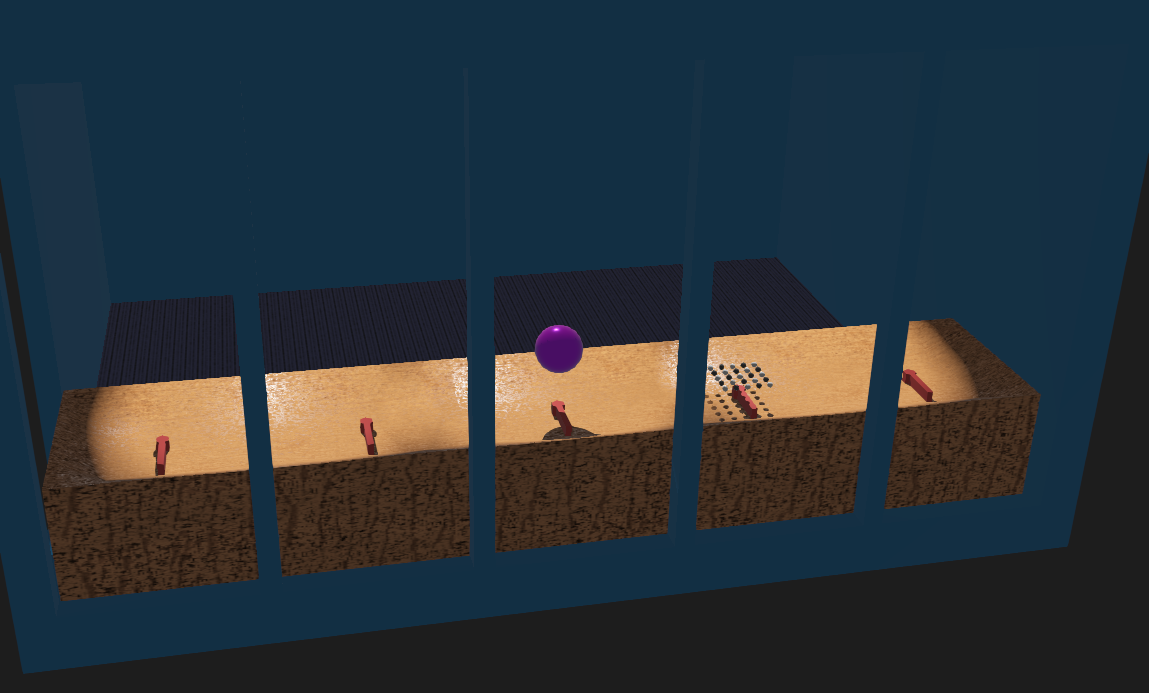
Screenshot of Webots model of the impeller-array robot.
Sample Robot Control Code
  1# impeller_array.py
  2#
  3# Sample Webots controller file for driving the array
  4# of one-DOF impellers.  Optionally uses OSC network input.
  5#
  6# No copyright, 2020-2023, Garth Zeglin.  This file is
  7# explicitly placed in the public domain.
  8
  9print("loading impeller_array.py...")
 10
 11import math
 12import random
 13import queue
 14import threading
 15import numpy as np
 16
 17# Import the Webots simulator API.
 18from controller import Supervisor
 19
 20# Define the time step in milliseconds between controller updates.
 21EVENT_LOOP_DT = 20
 22
 23# Set True to receive data over UDP from the camera system.
 24use_vision = True
 25
 26################################################################
 27if use_vision:
 28    # This uses python-osc to communicate with an OpenCV program
 29    #   installation:      pip3 install python-osc
 30    #   source code:       https://github.com/attwad/python-osc
 31    #   pypi description:  https://pypi.org/project/python-osc/
 32    from pythonosc import udp_client
 33    from pythonosc import dispatcher
 34    from pythonosc import osc_server
 35
 36# Manage a background thread running an OSC server listening for messages on an UDP socket.
 37
 38class OSCListener:
 39    def __init__(self):
 40
 41        # Create a thread-safe queue to communicate data to the robot thread.
 42        self.messages = queue.Queue()
 43
 44        # Initialize the OSC message dispatch system.
 45        self.dispatch = dispatcher.Dispatcher()
 46        self.dispatch.map("/motion", self.message)
 47        self.dispatch.set_default_handler(self.unknown_message)
 48
 49        # Start and run the server.
 50        vision_UDP_port = 22000
 51        self.server = osc_server.ThreadingOSCUDPServer(('127.0.0.1', vision_UDP_port), self.dispatch)
 52        self.server_thread = threading.Thread(target=self.server.serve_forever)
 53        self.server_thread.daemon = True
 54        self.server_thread.start()
 55        print(f"started OSC server on port {vision_UDP_port}")
 56
 57    def message(self, msgaddr, *args):
 58        """Process messages received via OSC over UDP."""
 59        print("Controller received message %s: %s" % (msgaddr, args))
 60        if msgaddr == '/motion':
 61            # convert the vision data into a numpy array and place in the queue
 62            data = np.array(args)
 63            self.messages.put(data)
 64
 65    def unknown_message(self, msgaddr, *args):
 66        """Default handler for unrecognized OSC messages."""
 67        print("Simulator received unmapped message %s: %s" % (msgaddr, args))
 68
 69################################################################
 70# The sample controller is defined as an class which is then instanced as a
 71# singleton control object.  This is conventional Python practice and also
 72# is closer to practices involving the physical hardware.
 73
 74class ArrayRobot(Supervisor):
 75    def __init__(self):
 76
 77        # Initialize the superclass which implements the Robot API.
 78        super().__init__()
 79
 80        robot_name = self.getName()
 81        print("%s: controller connected." % (robot_name))
 82
 83        # Read back the array dimensions.  This is possible because the Robot is
 84        # configured with Supervisor permissions.
 85        num_x = self.getSelf().getField('num_x').value
 86        num_y = self.getSelf().getField('num_y').value
 87        print("Array has %d x %d units." % (num_x, num_y))
 88
 89        # Fetch handles for the motors into a 2D array.  The naming scheme is defined in
 90        # the proto file for the array.
 91        j = []
 92        for x in range(1,num_x+1):
 93            row = []
 94            for y in range(1,num_y+1):
 95                name = "motor%d%d" % (x, y)
 96                # print("Fetching motor", name)
 97                row.append(self.getDevice(name))
 98            j.append(row)
 99        self.joints = j
100
101        # Configure the motors for velocity control by setting
102        # the position targets to infinity.
103        for row in self.joints:
104            for motor in row:
105                motor.setPosition(float('inf'))
106                motor.setVelocity(0.0)
107
108        # Create a numpy array with a velocity for each motor.
109        self.velocity = np.zeros((num_x, num_y))
110        print("Shape of velocity array:", self.velocity.shape)
111
112        # Create some additional constant index arrays useful for generative functions.
113        # Each of these has the same shape as the motor array.
114        # x_mesh varies only the grid 'X' direction, y_mesh varies only along the grid 'Y' direction.
115        self.y_mesh, self.x_mesh = np.meshgrid(np.linspace(0, num_y-1, num_y), np.linspace(0, num_x-1, num_x))
116
117        # Initialize the performance state.
118        self.state = 'init'
119        self.new_state = True
120        self.state_timer = 0
121        self.current_time = 0.0
122
123        # Initialize the camera receiver
124        if use_vision:
125            self.listener = OSCListener()
126        else:
127            self.listener = None
128        return
129
130    #----------------------------------------------------------------
131    # internal method to set the velocity of each motor to the current velocity grid value
132    def _update_motor(self):
133        for vel_row, motor_row in zip(self.velocity, self.joints):
134            for vel, motor in zip(vel_row, motor_row):
135                motor.setVelocity(vel)
136
137    #----------------------------------------------------------------
138    # set every motor to zero velocity
139    def stop_all(self):
140        self.velocity[:,:] = 0.0
141        self._update_motor()
142
143    # set every motor to a specific velocity
144    def unison(self, velocity):
145        self.velocity[:,:] = velocity
146        self._update_motor()
147
148    # set every motor to a reasonable random velocity (positive and negative)
149    def randomize_velocity(self):
150        self.velocity = 3 - 6*np.random.rand(*self.velocity.shape)
151        self._update_motor()
152
153    # set every motor to wave function varying along the X direction.  Note: in the sample model, the
154    # array has been rotated so this is vertical
155    def wave_x(self):
156        period = 3.0
157        phase_velocity = 2*math.pi / period
158        phase = self.x_mesh
159        self.velocity = 3 * np.sin((phase_velocity * self.current_time) + 0.5*phase)
160        self._update_motor()
161
162    # set every motor to wave function varying along the Y direction.  Note: in the sample model, this
163    # is the horizontal direction across the room.
164    def wave_y(self):
165        period = 3.0
166        phase_velocity = 2*math.pi / period
167        phase = self.y_mesh
168        self.velocity = 1.5 + 1.5 * np.sin((phase_velocity * self.current_time) + 0.3*phase)
169        self._update_motor()
170
171    def camera_mirror(self):
172        # use the vision data to drive actuators
173        if self.listener is not None:
174            while not self.listener.messages.empty():
175                motion = self.listener.messages.get()
176                # Note: this reverses the 'image' and samples it, but has the
177                # relative dimensions hard-coded into the indices.
178                self.velocity[0,:] = (3.0/255.0) * motion[15:1:-3]
179                # print("new velocity:", self.velocity)
180                self._update_motor()
181
182    #----------------------------------------------------------------
183    # Implement state machine for the overall performance state, updated
184    # at the main event rate.
185    def poll_performance_state(self):
186
187        # implement a basic timer used by many states
188        timer_expired = False
189        self.state_timer -= 0.001*EVENT_LOOP_DT
190        if self.state_timer < 0:
191            timer_expired = True
192
193        # implement entry flag logic used by many state
194        new_state = self.new_state
195        self.new_state = False
196
197        # -----------------------------------
198
199        # Evaluate the side-effects and transition rules for each state
200        if self.state == 'init':
201            if new_state:
202                self.state_timer = 1.0    # initial pause
203                self.stop_all()
204
205            elif timer_expired:
206                # self._transition('spinny')
207                self._transition('mirror')
208
209        elif self.state == 'mirror':
210            # apply side effects on entry
211            if new_state:
212                print("Entering", self.state)
213                self.state_timer = 30.0
214
215            # apply transition rules
216            elif timer_expired:
217                self._transition('mirror')
218
219            # continuously update targets
220            self.camera_mirror()
221
222        elif self.state == 'spinny':
223            # apply side effects on entry
224            if new_state:
225                print("Entering", self.state)
226                self.state_timer = 3.0
227                self.unison(-5.0)
228
229            # apply transition rules
230            elif timer_expired:
231                self._transition('horizontal_wave')
232
233        elif self.state == 'horizontal_wave':
234            # apply side effects on entry
235            if new_state:
236                print("Entering", self.state)
237                self.state_timer = 6.0
238
239            # apply transition rules
240            elif timer_expired:
241                self._transition('tremble')
242
243            # apply continuous side-effects
244            else:
245                self.wave_y()
246
247        elif self.state == 'tremble':
248            # apply side effects on entry
249            if new_state:
250                print("Entering", self.state)
251                self.state_timer = 3.0
252
253            # apply transition rules
254            elif timer_expired:
255                self._transition('rest')
256
257            # apply continuous side-effects
258            else:
259                self.randomize_velocity()
260
261        elif self.state == 'rest':
262            if new_state:
263                print("Entering", self.state)
264                self.state_timer = 6.0
265                self.stop_all()
266
267            elif timer_expired:
268                self._transition('spinny')
269
270        else:
271            print("Invalid state, resetting.")
272            self.state = 'init'
273
274    # internal methods for state machine transitions
275    def _transition(self, new_state):
276        self.new_state = True
277        self.state = new_state
278        self.state_timer = 0
279
280    #----------------------------------------------------------------
281    def run(self):
282        # Run loop to execute a periodic script until the simulation quits.
283        # If the controller returns -1, the simulator is quitting.
284
285        while self.step(EVENT_LOOP_DT) != -1:
286            # Read simulator clock time.
287            self.current_time = self.getTime()
288
289            # Poll the performance state machine.
290            self.poll_performance_state()
291
292
293################################################################
294# If running directly from Webots as a script, the following will begin execution.
295# This will have no effect when this file is imported as a module.
296
297if __name__ == "__main__":
298    robot = ArrayRobot()
299    robot.run()
Proto File
The robot is modeled in a proto file to allow scripted generation of the units. The number of units can be varied after creation and the robot model will be regenerated. The proto file is VRML with embedded Javascript.
  1#VRML_SIM R2023b utf8
  2# documentation url: https://courses.ideate.cmu.edu/16-375
  3# Array of rotating one-DOF impeller devices for course exercises.  The
  4# collision model and graphics uses an imported STL files for ease of
  5# customization.  Each unit base has NULL physics so it will be fixed in place.
  6# license: No copyright, 2020-2026 Garth Zeglin.  This file is explicitly placed in the public domain.
  7# template language: javascript
  8
  9PROTO impeller-array [
 10  field SFVec3f    translation  0 0 0
 11  field SFRotation rotation     0 1 0 0
 12  field SFString   controller   "impeller_array"
 13  field SFString   name         "impeller_array"
 14  field SFInt32    num_x        1
 15  field SFInt32    num_y        5
 16  field SFFloat    spacing_x    0.8
 17  field SFFloat    spacing_y    0.8
 18  field SFString   customData   ""
 19]
 20{
 21  Robot {
 22    # connect properties to user-visible data fields
 23    translation IS translation
 24    rotation IS rotation
 25    controller IS controller
 26    name IS name
 27    customData IS customData
 28
 29    # enable the bodies within the system to directly interact
 30    selfCollision TRUE
 31
 32    # enable additional API access for the controller to read back parameters
 33    supervisor TRUE
 34
 35    children [
 36      # 2D nested loops to create each motorized unit
 37      %< for (let x = 1; x <= fields.num_x.value; x++) { >%
 38        %< for (let y = 1; y <= fields.num_y.value; y++) { >%
 39
 40          # define individualized names
 41          %< let motor_name = "\"motor" + x + y + "\""; >%
 42          %< let link1_name = "\"link1" + x + y + "\""; >%
 43          %< let shape1_id = "shape1" + x + y; >%
 44
 45          # define the base of each unit representing the individual motor and mounting
 46          Pose {
 47            # locate the base to match each hinge joint location
 48            translation %<= fields.spacing_x.value * (x-1) >% %<= fields.spacing_y.value * (y-1) >% 0.02
 49            children [
 50              Shape {
 51                appearance PBRAppearance {
 52                  baseColor 0.180392 0 1
 53                  metalness 0.5
 54                }
 55                geometry Cylinder {
 56                  height 0.04
 57                  radius 0.1
 58                }
 59              }
 60            ] # close children of base Pose
 61          } # close the base Pose
 62
 63          # define the first pivot of each unit, representing a driven motor axis
 64          HingeJoint {
 65            jointParameters HingeJointParameters {
 66              axis 0 0 1
 67              # locate the body origin within the robot coordinates
 68              anchor %<= fields.spacing_x.value * (x-1) >% %<= fields.spacing_y.value * (y-1) >% 0.02
 69            }
 70            device [
 71              RotationalMotor {
 72                name %<= motor_name >%
 73              }
 74            ]
 75            # define the body of the first driven link of each unit
 76            endPoint Solid {
 77              # locate the link1 body origin within the overall robot coordinates
 78              translation %<= fields.spacing_x.value * (x-1) >% %<= fields.spacing_y.value * (y-1) >% 0.05
 79
 80              # provide a unique name for the link1 Solid to avoid warnings
 81              name %<= link1_name >%
 82
 83              physics Physics {
 84                density -1
 85                mass 2
 86              }
 87
 88              # define the link1 graphics
 89              children [ # first link Solid
 90                DEF %<= shape1_id >% Pose {
 91                  # locate the link1 visible model within link2 coordinates
 92                  translation 0 0 -0.003
 93                  children [ # first link Pose
 94                    Shape {
 95                      appearance PBRAppearance {
 96                        baseColor 0.772549 0.2 0.192157
 97                        metalness 0.5
 98                        roughness 0.5
 99                      }
100                      # import the visible geometry; the physics properties and
101                      # collision use the boundingObject field which defines a
102                      # simple box
103                      geometry Mesh {
104                        url ["../stl/large-impeller.stl"]
105                      }
106                    }
107                  ] # close children of first link Pose
108                }
109              ] # close children of first link Solid
110
111              # define the collision and physics properties for link1
112              boundingObject USE %<= shape1_id >%
113
114            } # end the link1 Solid
115          } # end first HingeJoint
116        %< } >% # end inner loop to create each element
117      %< } >% # end outer loop to create each element
118   ] # close children of Robot
119  } # close the Robot definition
120}
World File
  1#VRML_SIM R2023b utf8
  2
  3EXTERNPROTO "../protos/HL-A11-room.proto"
  4EXTERNPROTO "../protos/impeller-array.proto"
  5EXTERNPROTO "../protos/ball_array.proto"
  6EXTERNPROTO "../protos/well-table.proto"
  7
  8EXTERNPROTO "https://raw.githubusercontent.com/cyberbotics/webots/R2023b/projects/appearances/protos/VarnishedPine.proto"
  9
 10WorldInfo {
 11  basicTimeStep 5
 12}
 13Viewpoint {
 14  orientation -0.1198469502720241 -0.0009538446510321846 0.9927919211450486 2.9859745072513038
 15  position 5.95936025644994 -0.8386617204613961 2.5255548073357983
 16}
 17Background {
 18  skyColor [
 19    0.1 0.1 0.1
 20  ]
 21}
 22SpotLight {
 23  attenuation 0 0 1
 24  beamWidth 0.3
 25  cutOffAngle 0.4
 26  direction 1 0 -2
 27  intensity 5
 28  location 0 0 2
 29  castShadows TRUE
 30}
 31SpotLight {
 32  attenuation 0 0 1
 33  beamWidth 0.3
 34  cutOffAngle 0.4
 35  direction 1 0 -2
 36  intensity 5
 37  location 0 -1.2 2
 38  castShadows TRUE
 39}
 40SpotLight {
 41  attenuation 0 0 1
 42  beamWidth 0.3
 43  cutOffAngle 0.4
 44  direction 1 0 -2
 45  intensity 5
 46  location 0 1.2 2
 47  castShadows TRUE
 48}
 49HL-A11-room {
 50}
 51
 52well-table {
 53  translation 0.7 -2.0 0.5
 54  left_end TRUE
 55  name "table1"
 56}
 57
 58well-table {
 59  translation 0.7 -1.2 0.5
 60  name "table2"
 61}
 62
 63well-table {
 64  translation 0.7 -0.4 0.5
 65  name "table3"
 66}
 67
 68well-table {
 69  translation 0.7  0.4 0.5
 70  name "table4"
 71}
 72
 73well-table {
 74  translation 0.7  1.2 0.5
 75  name "table5"
 76  right_end TRUE
 77}
 78
 79DEF ball Solid {
 80  translation 1.1 0 0.8
 81  children [
 82    DEF ballShape Pose {
 83      children [
 84        Shape {
 85          appearance PBRAppearance {
 86            baseColor 0.714443 0 0.998718
 87            roughness 0.2
 88            metalness 0.7
 89          }
 90          geometry Sphere {
 91            radius 0.1
 92            subdivision 2
 93          }
 94        }
 95      ]
 96    }
 97  ]
 98  name "ball"
 99  boundingObject USE ballShape
100  physics Physics {
101    density -1
102    mass 0.25
103  }
104}
105ball_array {
106  translation 1.1 0.8 0.6
107  rows 5
108  cols 5
109  lightRadius 0.0127
110  darkRadius 0.0127
111}
112impeller-array {
113  translation 1.1 -1.6 0.45
114  rotation 0 0 1 0
115}
116
117DEF front_facing Pose {
118  translation 1.5 0 0.350
119  children [
120    Shape {
121      appearance VarnishedPine {
122      }
123      geometry Box {
124        size 0.006 4.0 0.5
125      }
126    }
127  ]
128}