Looking Outwards 3

Project: Cloud Village

Creator: Philip F. Yuan and team

Year of Creation: 2018 for the Venice Architecture Biennale

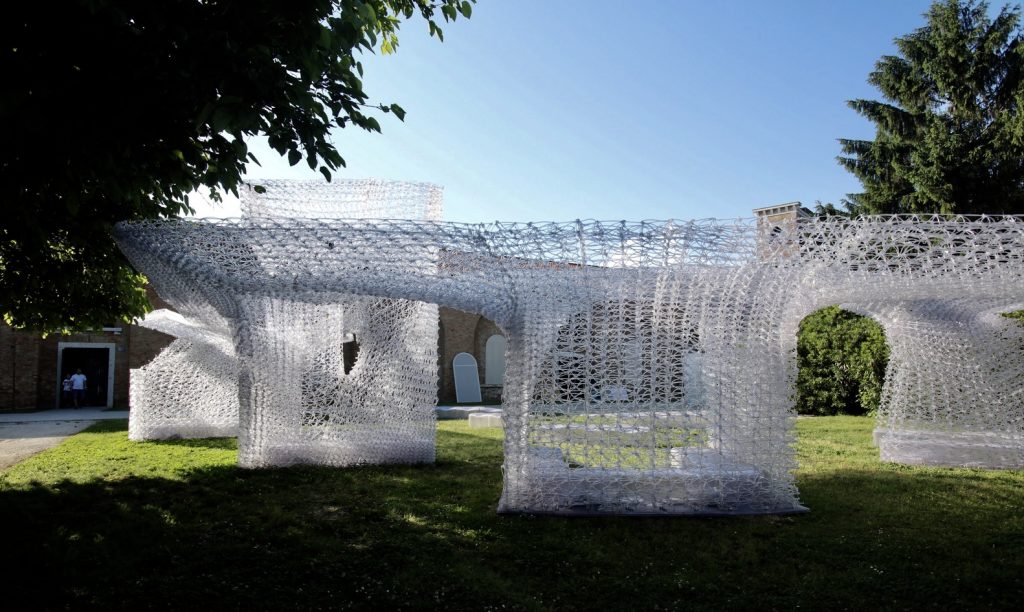
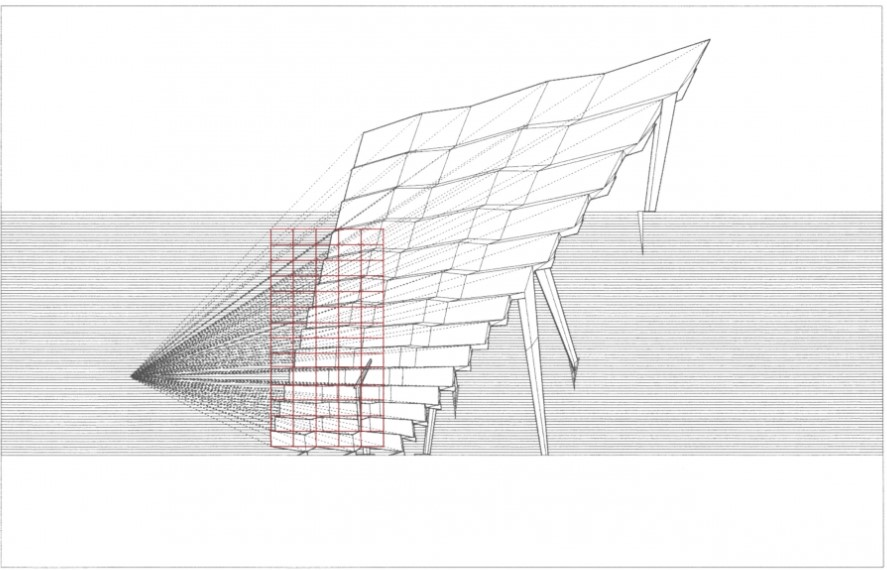
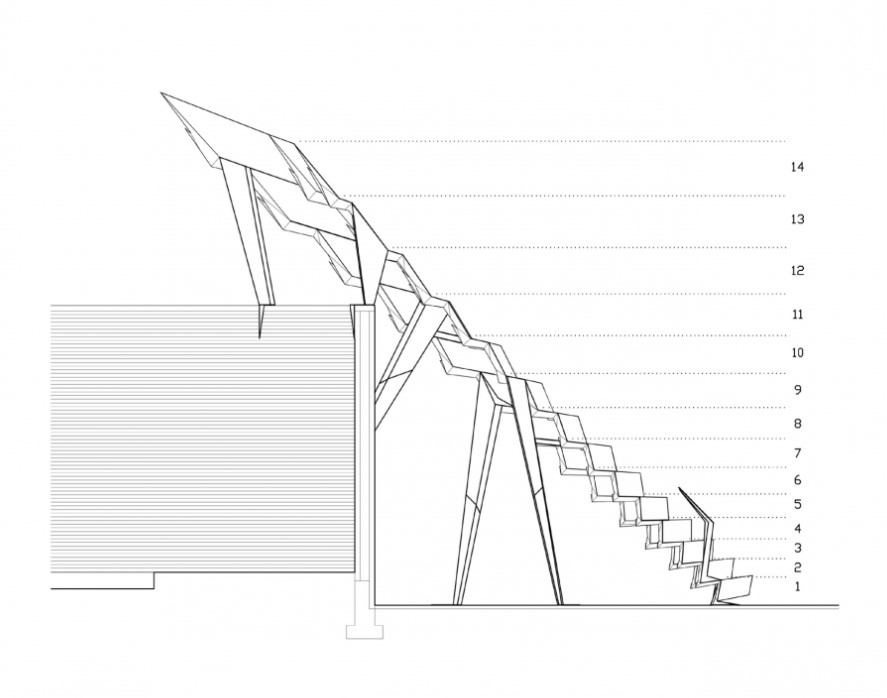
Cloud Village is an abstract architectural piece aimed at representing the metaphor between private and public spaces/realms in China. The project itself contains four separate open room-like spaces, with a twisting roof connecting the spaces to create a curved u-shaped form from top-down. The materiality itself is a permeable recycled plastic structure, with robotic fabrication being used at every step to pre-fabricate each part before it was assembled on site. The architect also used a “topological optimization algorithm” to calculate structural performances within the curved roof. What I admire about this project is that each part of it–from the material choice, to the form or method of fabrication, all tied back to the architect’s intention and theme of the project. While the recycled plastic material allowed for the creation of a  permeable material in the fabrication process, it also tied back to the environmental issues surrounding China and approached architectural building materials from a critical standpoint.

Project – 3 Dynamic Drawing

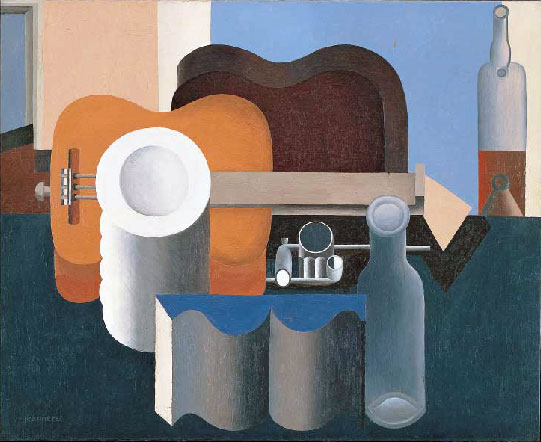
This particular drawing was inspired by the Purist Paintings of Le Corbusier. The interactive painting re-interprets the ideas of transparency and multi-perspectival drawings explored in Cubist and purist paintings.

sketch
//tjchen 
// 15104 section A
var dia =5
var size = 5
var x
var y 
var vertex1 

function setup() {
    createCanvas(1000, 600);
    background(255);
}
function draw () {
    background(0);
    y = height/2;
    x = max(mouseX,width/5);
    vertex1 = max (0+mouseY*4, width/2);
    vertex2 = min (width-mouseY*4, width/2);
    push();
    var yguitar = height /3;
    rectMode(CORNER);
    fill(61, 80, 130);
    beginShape();
    vertex(vertex1,y);
    vertex(vertex2,y);
    vertex(0,height);
    vertex(width,height);
    endShape();

    //moving bottles
    push();
    scale(mouseY/400);
    rectMode(CENTER);
    fill(230,150);
    rect(mouseX+100,y,60,200,30);
    rect(mouseX+100,y-100,20,100,10);
    strokeWeight(1);
    stroke(0);
    circle(mouseX+100,y-150,20);
    fill(255,0,0,70);
    noStroke();
    rect(mouseX+100,y+15,60,170,30);
    stroke(255,0,0,140);
    pop();
   
    //GUITRAR
    noStroke();
    translate(width/2,height/2);
    scale(mouseY/200); 
    fill(140,height-mouseY);
    rectMode(CENTER);
    rect(200,0,150,50);
    rect(0,0,400,200,80);
    fill(mouseX);
    circle(0,0,50);
    fill(61, 80, 130);
    circle(0,(0)+100,80);
    fill(0);
    circle(0,(0)-100,80);
    //can
    pop();
    push();
    scale(1/(mouseX/400));
    fill(230);
    rectMode(CORNER);
    rect(x-25,y-15,50,150,25);
    strokeWeight(1);
    stroke(0);
    circle(x, y, 50);
    fill(150);
    circle(x, y, 30);
    pop();
    // circle 
    fill(41,71,82);
    circle(3*(width/5),mouseX,50);
    //bull nose
    var c =color(178,13,29,(height-mouseY)); 
    strokeWeight(height-mouseY);
    fill(c);
    rectMode(CENTER);
    rect((width/2)+50,height/2, abs(mouseY/4), mouseY/5,abs(mouseY/5));

}


Looking outwards 3 Computational Fabrication

Digital Fabrication/ Computational Fabrication

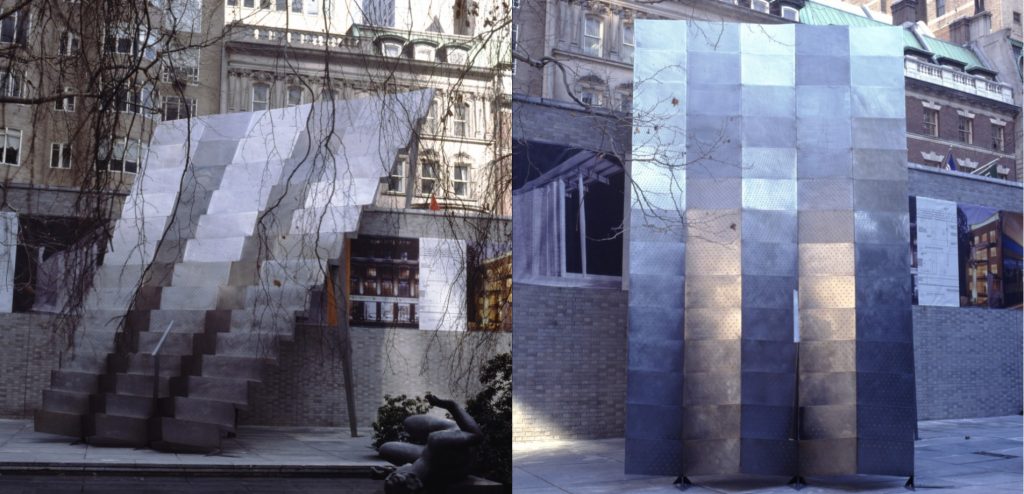
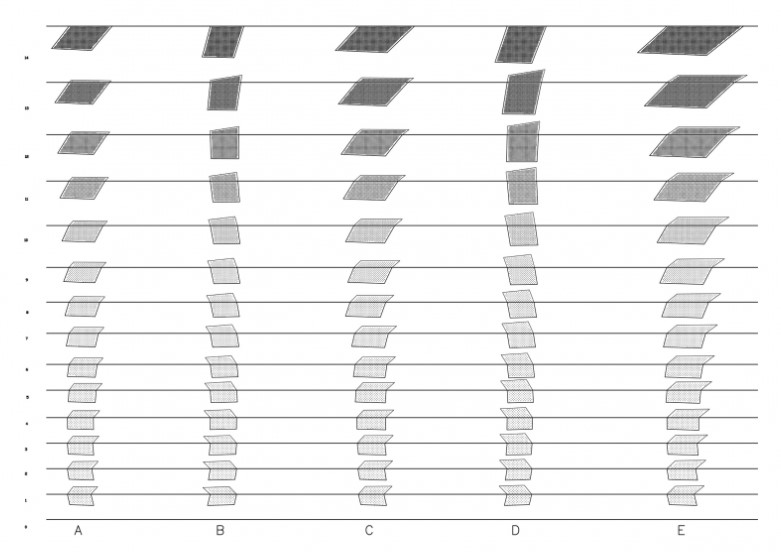
Computational fabrication is a relatively new field in comparison the rest of the discipline of building and making. With the advent of computational design and software the need for fabrication techniques to realize these new fantastical objects arose. Office Da an architectural firm based in Boston led by Nader Tehrani and Monica Ponce de Leon, explored these concepts in their piece “An Installation of folded Steel Plates” at the MoMa. Conceived in 1998 for the show “Fabrications” at the Museum of Modern art, Architecture as a discipline has just began to investigate the infinite possibilities of Digital fabrication with the opening of the Guggenheim Museum a year prior. For a building sized object to consist of many pieces of customized geometries and complex forms became possible with the inquiries the architects have made into computational designs and fabrication. In the installation Tehrani and Ponce de Leon created, they seek to use the fabrication techniques to blur the line between the traditional structural systems of architecture (tectonics) with actual geometrical design. They do this by digitally folding metal panels and stitching them together in very precise ways. The perforations on the panels are also generated via a computational device in order to lower the weight of the metal panels. The installation also relied on computational tools and fabrication to realize it’s optical illusionary characteristics. From certain angles the installation appears to be flat which it is actually conceived of many customized metal panels. This is interesting because the project begins to touch on the idea of mass customization, a process previously possible but costly. Large amounts of customizable pieces and objects can be designed and fabricated with the correct algorithms and machines. Customization, with the discoveries of Computational fabrication is no longer a luxury provided by the craftsman and artisans, but now a new mode of production.

Project 03: Pentachoron

Enjoy the lines and connections and gradient changes. I imagined this to be a screensaver.

sketchDownload
 /*
Nicholas Wong
Section A
*/

var triSize = 100; //Triangle size (arbitrary number)
var rectSize = 400; //Rectangle size (also arbitrary)
var colorChange = false; //True means color value decreases, false means it increases
var shadeNum = 255; //Color value to be manipulated

function setup() {
    createCanvas(450,600);
}
 
function draw() {

	cursor(CROSS); // Changes Cursor to a cross

	//Constrain mouse position to canvas
	let mx = constrain(mouseX, 10, width - 10)
    let my = constrain(mouseY, 10, height - 10)

    //Background gets lighter as mouse moves further from center
	background(dist(mouseX,mouseY,width/2,height/2) * 0.1);

	//Stroke properties for lines
	noFill();
    stroke(255 - (dist(mouseX,mouseY,width/2,height/2) * 0.5)) //Lines get darker as mouse moves from center
    strokeWeight(1.5)

    //Square in background moves with mouse slightly
    square(width/2 - rectSize/2 + 0.1*mx - 20, height/2 - rectSize/2 + my*0.1 - 20, rectSize)

    //Large triangle moves with mouse slightly
    triangle(width/2 - triSize*2 + my*0.25, height/2 - triSize*1.5 + mx*0.25 , width/2 + triSize*2 - mx*0.25, height/2 - triSize*1.5 + my*0.25, width/2 - my*0.25, height/2 + triSize*2 - mx*0.25)

    //Lines that connect 3 corners of the larger triangle to one corner of the smaller triangle

    //Corner 1 (top left smaller triangle)
   	line(width/2 - triSize + mx*0.25, height/2 - triSize + my*0.25,width/2 - triSize*2+ my*0.25, height/2 - triSize*1.5 + mx*0.25)
    line(width/2 + triSize - my*0.25, height/2 - triSize + mx*0.25,width/2 + triSize*2 - mx*0.25, height/2 - triSize*1.5 + my*0.25)
    line(width/2 - mx*0.25, height/2 + triSize - my*0.25, width/2 - my*0.25, height/2 + triSize*2 - mx*0.25)

    //Corner 2 (top right smaller triangle)
    line(width/2 + triSize*2 - mx*0.25, height/2 - triSize*1.5 + my*0.25,width/2 - triSize + mx*0.25, height/2 - triSize + my*0.25)
    line(width/2 - triSize*2 + my*0.25, height/2 - triSize*1.5 + mx*0.25,width/2 + triSize - my*0.25, height/2 - triSize + mx*0.25)
    line(width/2 - triSize*2 + my*0.25, height/2 - triSize*1.5 + mx*0.25,width/2 - mx*0.25, height/2 + triSize - my*0.25)

    //Corner 3 (bottom smaller triangle)
    line(width/2 + triSize*2 - mx*0.25, height/2 - triSize*1.5 + my*0.25,width/2 - mx*0.25, height/2 + triSize - my*0.25)
    line(width/2 - my*0.25, height/2 + triSize*2 - mx*0.25,width/2 - triSize + mx*0.25, height/2 - triSize + my*0.25)
    line(width/2 + triSize - my*0.25, height/2 - triSize + mx*0.25,width/2 - my*0.25, height/2 + triSize*2 - mx*0.25)


    //Connecting 3 corners of the rectangle to one corner of the large triangle

    //Corner 1 (top left large triangle)
    line(width/2 - triSize*2 + my*0.25, height/2 - triSize*1.5 + mx*0.25, width/2 - rectSize/2 + 0.1*mx - 20, height/2 - rectSize/2 + my*0.1 - 20)
    line(width/2 - triSize*2 + my*0.25, height/2 - triSize*1.5 + mx*0.25, width/2 + rectSize/2 + 0.1*mx - 20, height/2 - rectSize/2 + my*0.1 - 20)
    line(width/2 - triSize*2 + my*0.25, height/2 - triSize*1.5 + mx*0.25, width/2 - rectSize/2 + 0.1*mx - 20, height/2 + rectSize/2 + my*0.1 - 20)

    //Corner 2 (top right large triangle)
    line(width/2 + triSize*2 - mx*0.25, height/2 - triSize*1.5 + my*0.25,width/2 - rectSize/2 + 0.1*mx - 20, height/2 - rectSize/2 + my*0.1 - 20)
    line(width/2 + triSize*2 - mx*0.25, height/2 - triSize*1.5 + my*0.25,width/2 + rectSize/2 + 0.1*mx - 20, height/2 - rectSize/2 + my*0.1 - 20)
    line(width/2 + triSize*2 - mx*0.25, height/2 - triSize*1.5 + my*0.25,width/2 + rectSize/2 + 0.1*mx - 20 , height/2 + rectSize/2 + my*0.1 - 20)
    
    //Corner 3 (bottom large triangle)
    line(width/2 - my*0.25, height/2 + triSize*2 - mx*0.25, width/2 - rectSize/2 + 0.1*mx - 20 , height/2 + rectSize/2 + my*0.1 - 20)
    line(width/2 - my*0.25, height/2 + triSize*2 - mx*0.25, width/2 + rectSize/2 + 0.1*mx - 20 , height/2 + rectSize/2 + my*0.1 - 20)


    //Pulsating gradient effect for triangle in middle
	if (shadeNum >= 255){
		colorChange = true; //Change direction of gradient change
	}
	else if (shadeNum <= 0){
		colorChange = false; //Change direction of gradient change
	}

	if (colorChange){ //Color becomes darker
		shadeNum -= 2;
	}
	else{ //Color becomes lighter
		shadeNum += 2;
	}

    //Triangle 3
    fill(shadeNum) //Pulsating gradient shade
    triangle(width/2 - triSize + mx*0.25, height/2 - triSize + my*0.25 , width/2 + triSize - my*0.25, height/2 - triSize + mx*0.25, width/2 - mx*0.25, height/2 + triSize - my*0.25)


    //Stroke properties to lines connected to mouse
    push();
    strokeWeight(4);
    stroke(dist(mouseX,mouseY,width/2,height/2) * 0.25) // Line gets brighter as it moves further from center
    //Lines from smaller triangle that connect to mouse
    line(width/2 - triSize + mx*0.25, height/2 - triSize + my*0.25, mx, my);
    line(width/2 + triSize - my*0.25, height/2 - triSize + mx*0.25, mx, my);
    line(width/2 - mx*0.25, height/2 + triSize - my*0.25, mx, my);
    pop();
}

Looking Outwards: Parametric Architecture

As an architecture student, parametric or generative design is a new field that is slowly gaining traction. This new method of designing allows for unexpected, novel ideas to emerge, and allows for rapid iteration with these completely original forms. The ability to use designs driven by algorithms allows one to bypass the technical constraints of designing forms with highly complex, repetitive elements. Furthermore, generative modeling allows for the creation of more organic and amorphous designs thanks to artificial intelligence being able to resolve complex issues like structural viability/stability.

Currently, parametric design is being used practically mainly for aesthetic design features such as building facades, interior light fixtures, fenestration designs, and so on. However, generative designs will eventually become integral parts of overall structural form-finding for buildings and homes.

LMN Architects’ Voxman Music Building’s ceiling is a prominent example of generative architecture being utilized. The ceiling was parametrically designed, from its organic structure to the small, triangular apertures arranged on its surface. “The design integrates acoustic reflection, stage and house lighting, audiovisual elements,, and fire suppression into a single eye-popping ceiling system” – Architect Magazine.

Concert hall, Voxman School of Music
700-seat concert hall, Voxman School of Music

Project-03: Dynamic Drawing

My project was pretty much inspired by this giant cat I saw outside of my window one night running around in the grass, and so I cut my old project for this one. It started with getting the cat drawn, which was the hardest part by far to keep it symmetrical and looking friendly. After the cat, I wrote the “time” variable which keeps the movement of the sun synced with the color of the background, which lightens as the sun rises. The cat’s eyes follow your mouse as it moves around as well, and as the sun comes up the grass shrinks to show the whole cat.

catto


function setup() {
    createCanvas(600, 450);


}

function draw() {
	var time = min(mouseY, 255) ////controls mouse and background
	var eyemoveX1 = constrain(mouseX, 228, 236)
    var eyemoveX2 = constrain(mouseX, 364, 372)
    var eyemoveY = constrain(mouseY, 170, 182) ////eyes follow mouse
    var grassHeight = constrain(time, 0, 255) + 120 ////grows grass
    var sunHeight = 480 - min(mouseY, 480)    ////moves sun


	background(time / 4, time / 2, time);
    fill(100, 100, 100)
    circle(width / 2, height / 2, 300)
    ////ears
    triangle(188, 120, 240, 84, 136, 24)
    triangle(408, 120, 356, 84, 456, 24)
    ////eyes
    fill(236)
    circle(232, 176, 40)
    circle(368, 176, 40)
    fill(50, 0, 200)
    circle(232, 176, 24)
    circle(368, 176, 24)
    fill(0)
    ellipse(eyemoveX1, eyemoveY, 12)
    ellipse(eyemoveX2, eyemoveY, 12)
    ////nose
    fill(255,182,193)
    triangle(276, 248, 324, 248, width / 2, 272)
    line(width / 2, 272, width / 2, 304)
    ////whiskers
    line(288, 280, 200, 240)
    line(288, 282, 200, 288)
    line(288, 284, 200, 336)
    line(312, 280, 400, 240)
    line(312, 282, 400, 288)
    line(312, 284, 400, 336)
    ////mouth
    line(width / 2, 304, 276, 332)
    line(width / 2, 304, 324, 332)
    ////sun
    fill(255, 247, 16)
    circle(80, sunHeight, 100)
    ////grass
    fill(11, 156, 21)
    triangle(0, 450, 50, 450, 25, grassHeight)
    triangle(50, 450, 100, 450, 75, grassHeight)
    triangle(100, 450, 150, 450, 125, grassHeight)
    triangle(150, 450, 200, 450, 175, grassHeight)
    triangle(200, 450, 250, 450, 225, grassHeight)
    triangle(250, 450, 300, 450, 275, grassHeight)
    triangle(300, 450, 350, 450, 325, grassHeight)
    triangle(350, 450, 400, 450, 375, grassHeight)
    triangle(400, 450, 450, 450, 425, grassHeight)
    triangle(450, 450, 500, 450, 475, grassHeight)
    triangle(500, 450, 550, 450, 525, grassHeight)
    triangle(550, 450, 600, 450, 575, grassHeight)


}


LO-03: Computational Fabrication

I explored the piece Proteus, made by RobotsInArchitecture. It is a display featuring a series of pixel-like structures in which a robot rearranges ferrofluid similar to how a computer screen recolors pixels to form images. Ferrofluid art isn’t particularly rare, but I find that the robotic programming of the piece makes it much more interesting as it coordinates and randomizes how its magnetic array is realigned, rather than simply having a preprogrammed structure it moves. Algorithms which control the magnet array have to feature some sort of group of randomized controls, with preset timers and restrictions on making the same pattern twice, as it is emphasized that the robot constantly shifts between patterns and has a large amount and doesn’t follow any sort of specific order. Patterns most likely aren’t programmed, but magnet movement of course is, meaning that there are technically limits to what the robot can create, but the creators programmed it so that it constantly is shifting, and transitions from pattern to pattern make the art almost limitless. It reflects a lot of the sensibility of RobotsInArchitecture as they constantly look to expand the usage of robots in art, and creating such an intricate robot I believe displays that same spirit of progress. It also reflects the piece’s title, reflecting the shapeshifting sea god of Greek myth who never keeps the same form, just as the robot constantly shifts its ferrofluid.

This video is a brief walkthrough of Proteus, displaying its art and some of the processes behind it

Project-03: Dynamic Drawing

My project for this week is loosely inspired by a kaleidoscope. I wanted to make an intricate design but due to my limited knowledge of p5.js, I decided to stick with just squares and ellipses. By piling them over and over and varying them by sizes, shapes, rotation speed, and colors based on the mouse position, I was able to achieve a fun, colorful kaleidoscope design.

sketch
function setup() {
    createCanvas(600, 450); 
    background(220);
    text("p5.js vers 0.9.0 test.", 10, 15);
}

var x = 0;
var y = 0;
var angle = 0;

function draw() { 
	background(0);
	noStroke();
	push();
	translate(300,225);
	rotate(radians(angle));
	rectMode(CENTER);
	var mX = max(min(mouseX, 600), 0); //constraint of canvas width
	var size = mX * (5/6); //sizes vary based on mouseX
	var mY = max(min(mouseY, 450), 0); //constraint of canvas height
	var sizeY = mY * (5/6); //sizes vary based on mouseY

	//square shapes based on mouseX
	fill(mouseY*255/height, mouseX*255/width, max(mouseX, mouseY)*255/500); //color of object depends on mouse position
	rect(x,y, 3*size/2, 3*size/2);	//biggest square
	fill(mouseX*255/width, mouseY*255/height, max(mouseX, mouseY)*255/500); 
	rect(x,y, size, size);	//big square
	fill(mouseY*255/height, max(mouseX, mouseY)*255/500, mouseX*255/width); 
	rect(x,y, 3*size/4, 3*size/4);  //medium square
	fill(max(mouseX, mouseY)*255/500, mouseX*255/width, mouseY*255/height);
	rect(x,y, 5*size/12, 5*size/12); //small square
	fill(max(mouseX, mouseY)*255/500, mouseY*255/height, mouseX*255/width);
	rect(x,y, size/5, size/5); //smallest square

	//square shapes based on mouseY (same sizes, colors)
	fill(mouseY*255/height, mouseX*255/width, max(mouseX, mouseY)*255/500); 
	rect(x,y, 3*sizeY/2, 3*sizeY/2);
	fill(mouseX*255/width, mouseY*255/height, max(mouseX, mouseY)*255/500); 
	rect(x,y, sizeY, sizeY);	
	fill(mouseY*255/height, max(mouseX, mouseY)*255/500, mouseX*255/width); 
	rect(x,y, 3*sizeY/4, 3*sizeY/4); 
	fill(max(mouseX, mouseY)*255/500, mouseX*255/width, mouseY*255/height);
	rect(x,y, 5*sizeY/12, 5*sizeY/12);
	fill(max(mouseX, mouseY)*255/500, mouseY*255/height, mouseX*255/width);
	rect(x,y, sizeY/5, sizeY/5);

	//ellipse shapes based on mouseX
	noFill();
	strokeWeight(4);
	stroke(mouseX*255/width,min(mouseX, mouseY)*255/500, mouseY*255/height);
	ellipse(x,y, 5*size/2, 2*size);
	ellipse(x,y, 2*size, 5*size/2); //biggest ellipses
	stroke(mouseY*255/height, mouseX*255/width, min(mouseX, mouseY)*255/500);
	ellipse(x,y, 3*size/2, size);
	ellipse(x,y, size, 3*size/2); //big ellipses
	stroke(mouseX*255/width, mouseY*255/height, min(mouseX, mouseY)*255/500);
	ellipse(x,y, size, 2*size/3);
	ellipse(x,y, 2*size/3, size); //medium ellipses
	stroke(mouseY*255/height, max(mouseX, mouseY)*255/500, mouseX*255/width);
	ellipse(x,y, 3*size/5, 3*size/4);
	ellipse(x,y, 3*size/4, 3*size/5); //smaller ellipses
	stroke(max(mouseX, mouseY)*255/500, mouseY*255/height, mouseX*255/width);
	ellipse(x,y, size/3, 2*size/9);
	ellipse(x,y, 2*size/9, size/3); //smallest ellipses

	//ellipse shapes based on mouseY (same size, colors)
	noFill();
	strokeWeight(4);
	stroke(mouseX*255/width,min(mouseX, mouseY)*255/500, mouseY*255/height);
	ellipse(x,y, 5*sizeY/2, 2*sizeY);
	ellipse(x,y, 2*sizeY, 5*sizeY/2);
	stroke(mouseY*255/height, mouseX*255/width, min(mouseX, mouseY)*255/500);
	ellipse(x,y, 3*sizeY/2, sizeY);
	ellipse(x,y, sizeY, 3*sizeY/2);
	stroke(mouseX*255/width, mouseY*255/height, min(mouseX, mouseY)*255/500);
	ellipse(x,y, sizeY, 2*sizeY/3);
	ellipse(x,y, 2*sizeY/3, sizeY);
	stroke(mouseY*255/height, max(mouseX, mouseY)*255/500, mouseX*255/width);
	ellipse(x,y, 3*sizeY/5, 3*sizeY/4);
	ellipse(x,y, 3*sizeY/4, 3*sizeY/5);
	stroke(max(mouseX, mouseY)*255/500, mouseY*255/height, mouseX*255/width);
	ellipse(x,y, sizeY/3, 2*sizeY/9);
	ellipse(x,y, 2*sizeY/9, sizeY/3);

	pop();
	angle += max(mouseX, mouseY)/ 5; //rotation depends on mouse position

}

LO-03: Computational Fabrication

The project I chose was Cumulus from the SOFTlab. This project first captured my attention because of its intricate design and overall aesthetic use of lighting. Upon learning more about Cumulus, I admired how interactive it was and how it is able to link sound and light together. I thought it was a unique aspect since it blends two of the five human senses, hearing and seeing. To create this installation, the creator pieced together over 200 acrylic segments with over 100 3D printed joints into a cloud-like shape with a network of LED strands inside. The interactiveness, that is linking sound to light, was achieved by building a user interface programmed with Processing. Like other projects from SOFTlab, Cumulus also takes on a unique, complex shape and is enhanced by lighting but this time with a combination of sound to achieve its final outcome.

Cumulus (SOFTlab, 2015) is an interactive installation that reacts to sound with light.

Dynamic Drawing

sketch In this program, I decided to play with parameters for the panda and background. The most challenging and interesting part was getting the moon and sun to move in a curved path instead of just across the screen. Along with that I changed background colour, rotated the stars and added clouds. For the panda the expression changes when the bamboo shoot comes by and the eyes change shape based on the y position of the mouse.
//Aadya Bhartia 
//Section A

var t = 0;
var angle = 0;
function setup() {
    createCanvas(600, 480);
    //background(220);
    //text("p5.js vers 0.9.0 test.", 10, 15);
}
function draw() {
	background(120, 200, 220);
	//sun to moon 
    var x1 = 250*cos(PI - t) + 300; // using a curve to map the moon and sun to look like it is rising and setting 
    var y1 = 480 - 420*sin(t);
    //clouds 
    fill(255);
    ellipse(70, 40, 30, 30, 30);
    ellipse(40, 50, 40);
    ellipse(60, 70, 45);
    ellipse(55, 65, 25);
    ellipse(30, 75, 45);
    ellipse(90, 75, 45);
    ellipse(95, 49, 25);
    push();
    translate(380, 30);
    scale(2.0);
    ellipse(70, 40, 30, 30, 30);
    ellipse(40, 50, 40);
    ellipse(60, 70, 45);
    ellipse(55, 65, 25);
    ellipse(30, 75, 45);
    ellipse(90, 75, 45);
    ellipse(95, 49, 25);
    pop();
    push();
    translate(300, 300);
    scale(0.75);
    ellipse(70, 40, 30, 30, 30);
    ellipse(40, 50, 40);
    ellipse(60, 70, 45);
    ellipse(55, 65, 25);
    ellipse(30, 75, 45);
    ellipse(90, 75, 45);
    ellipse(95, 49, 25);
    pop();
    fill(250, 250, 0);
    ellipse(x1, y1, 120);
    if(mouseX>=width/2){ // night time moon and stars 
        background(72, 91, 115);
        ellipse(x1, y1, 120);
    	var moonC = map(x1, 0, height, 80, 0);
    	fill(72, 91, 115);
    	noStroke();
    	ellipse(x1 - moonC - 30, y1, 120);
        //stars 
        push();
        fill(255);
        translate(20, 40);
        rotate(radians(mouseX));
        ellipse(0, 0, 5, 20);
        rotate(radians(mouseX+5));
        ellipse(0, 0, 20, 5);
        pop();
        push();
        fill(255);
        translate(320, 150);
        scale(1.5);
        rotate(radians(mouseX));
        ellipse(0, 0, 5, 20);
        rotate(radians(mouseX+5));
        ellipse(0, 0, 20, 5);
        pop();
        push();
        fill(255);
        translate(400, 350);
        rotate(radians(mouseX));
        ellipse(0, 0, 5, 20);
        rotate(radians(mouseX+5));
        ellipse(0, 0, 20, 5);
        pop();
        push();
        fill(255);
        translate(500, 240);
        scale(0.75);
        rotate(radians(mouseX));
        ellipse(0, 0, 5, 20);
        rotate(radians(mouseX+5));
        ellipse(0, 0, 20, 5);
        pop();
        push();
        fill(255);
        translate(560, 70);
        scale(1.20);
        rotate(radians(mouseX));
        ellipse(0, 0, 5, 20);
        rotate(radians(mouseX+5));
        ellipse(0, 0, 20, 5);
        pop();
        push();
        fill(255);
        translate(150, 80);
        scale(0.7);
        rotate(radians(mouseX));
        ellipse(0, 0, 5, 20);
        rotate(radians(mouseX+5));
        ellipse(0, 0, 20, 5);
        pop();
    }
    t = mouseX*(PI/600);
    //panda figure 
    noStroke();
    fill(0);//ears 
    ellipse(70, 200, 80,80);
    ellipse(230, 200, 80,80);
    ellipse(150, 400, 280);//body
    fill(255);
    ellipse(150, 400, 230, 260);//body
    fill(0);
    ellipse(150, 340, 0.3*mouseX, 130); // patch on body chnage with mouseX
    fill(255);
    ellipse(150, 240, 190);//face
    //eye rotating with size depending on mouseY
    fill(0);
    push();
    translate(110, 223);
    rotate(radians(angle));
    ellipse(5, 5, 5+mouseY/22 , 10+mouseY/14);
    pop();
    push();
    translate(190 , 223);
    rotate(radians(angle));
    ellipse(5, 5, 5+mouseY/22 , 10+mouseY/14);
    pop();
    angle += 5;
    //face smile when mouse comes with bamboo shoot
    if(mouseX>30 & mouseX<=200 && mouseY>=180&& mouseY<=310){
        fill(242, 120, 120);
        ellipse(110, 250, 20);
        ellipse(190, 250, 20);
        fill(245, 80, 70);
        arc(150, 260, 50, 50, 0, PI);
    }
    else{ // general smile and nose 
        fill(0);
        beginShape();
        curveVertex(150, 180);
        curveVertex(130, 270);
        curveVertex(170, 270);
        curveVertex(130, 190);
        endShape();
        noFill();
        stroke(0);
        strokeWeight(3);
        arc(138, 280, 25, 20, 0, PI);
        arc(161, 280, 25, 20, 0, PI);
    }
    //bamboo for mouse
    noStroke();
    fill(20, 220, 100);
    rect(mouseX, mouseY, 10, 50);
    fill(20, 250, 100);
    rect(mouseX, mouseY+55, 10, 20);
    fill(10, 220, 20);
    push();
    translate(mouseX + 25, mouseY + 10);
    rotate(radians(-20));
    ellipse(0, 0, 15, 5);
    ellipse(0, 15, 15, 5);
    pop();
}