Looking Outwards – 3

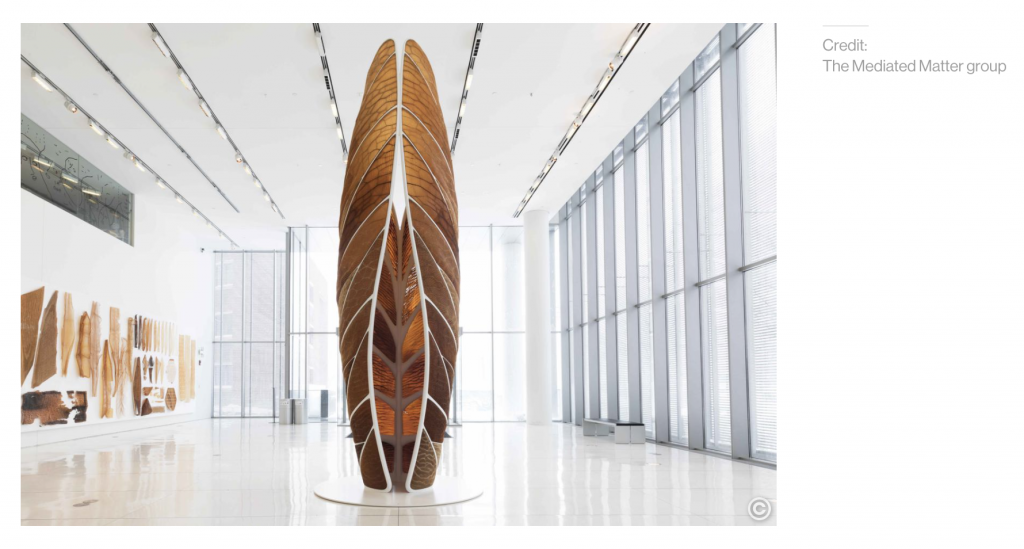
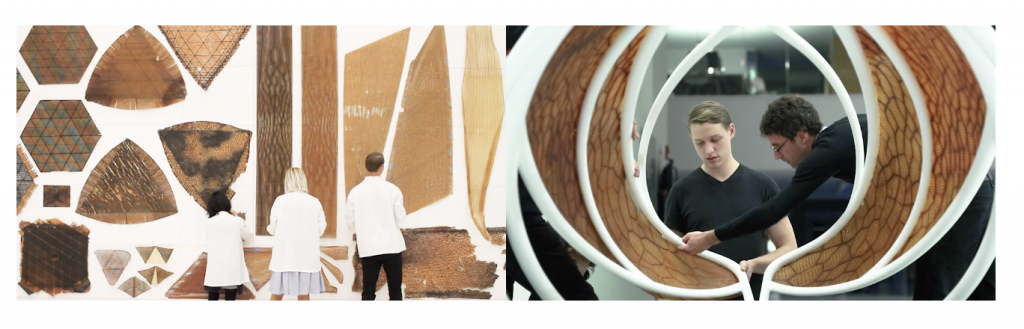
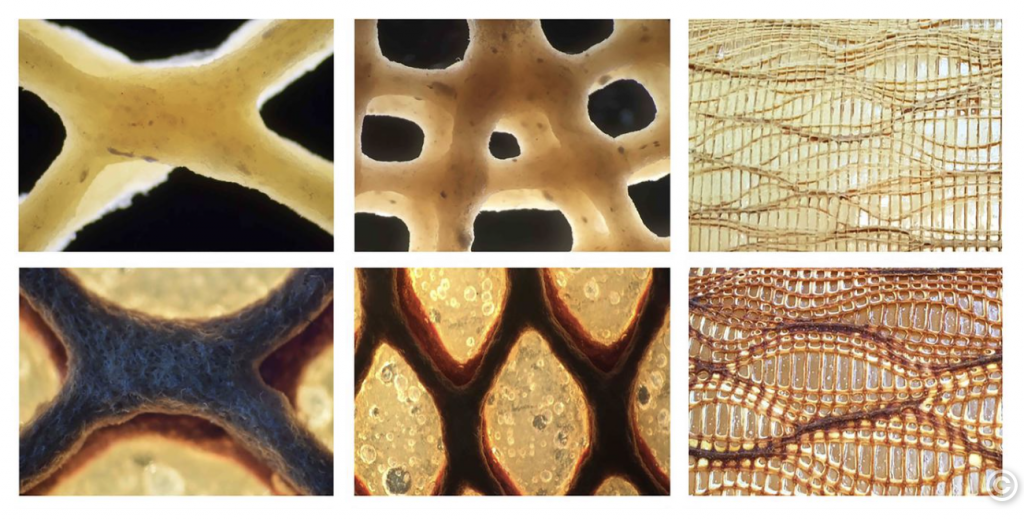
Neri Oxman and MIT developed a collection of Programmable Water-Based Biocomposites for Digital Design and Fabrication across Scales called Aguahoja. This is a project that explored how natural materials that have been put to waste by humans can be digitally designed and computationally fabricated by 3D printers or other robots. Through this project, Oxman and her team hoped to develop a solution to the vicious cycle of material extraction and obsolescence through the creation of biopolymer composites.
This collection is digitally designed and computationally fabricated by 3D printers or other robots made with available materials on earth- materials within trees, insect exoskeletons , apples, and bones- in hopes of avoiding depleting more of Earth’s materials.
https://www.media.mit.edu/projects/aguahoja/overview/


I admire this project for its mindfulness towards the environment and the effort and dedication that has been put into creating each piece and subpart in order to think of a more sustainable tomorrow

project-03

sketchDownload
var angle=0;
var boxWidth = 80;
var boxX = 30;
function setup() {
    createCanvas(600, 450);
    text("p5.js vers 0.9.0 test.", 10, 15);
}

function draw() {
	background(205, 255, 0);
	if (mouseY>height/2){
		background(139, 171, 14);
	}
    //changing color of background
	noStroke();
	 fill(105, 93, 34);
    if (boxX>width){
    	boxX=-boxWidth;
    }
    boxX=boxX+5;
    rect(boxX, height/2, boxWidth, 40);
    //moving rect
    fill(229, 163, 220);
	circle(mouseX, mouseY, 100);
	//pink circle
    fill(255, 213, 0);
    circle(600-mouseX, mouseY*4/5, mouseX*2/3);
    //yellow circle
    fill(149, 120, 229);
    push();
    translate(100, 100);
    rotate(radians(angle));
    rectMode(CENTER);
    rect(0, 0, dist(mouseX, mouseY, width/2, height/2), dist(mouseX, mouseY, width/2, height/2));
    pop();
    angle += 3;
    //rotating square
    fill(243, 142, 220);
    rect(width/2, mouseY, mouseX*3/8, 90);
    //pink rect
}

PROJECT-03 (dynamic drawing)

SEAN SKETCH 03
// SEAN CHEN
// 15-104 A

var size = 125; // overall size of graphic
var flip = 1; // val to control rotation direction
var angle = 1; 
var angle2 = 1;
var angle3 = 1; // individual speed
var diff = 0 // shift from center circle

function setup() {
    smooth();
    createCanvas(400, 400);
    background(255,219,88);
}

function spin(speed, vari) { // white orbiting circles
    push();
    noStroke();
    rotate(radians(angle));
    circle(0, size+diff, size*5/6);
    circle(size+diff, 0, size*5/6);
    circle(-size-diff, 0, size*5/6);
    circle(0, -size-diff, size*5/6); // each big stationary orbit circle
    circle(size*2/3+vari/5, size*2/3+vari/5, size*5/12*vari/200);
    circle(size*2/3+vari/5, -(size*2/3)-vari/5, size*5/12*vari/200); // mouse further from center smaller size
    circle(-(size*2/3)-vari/5, size*2/3+vari/5, size*5/12*vari/200); // mouse further from center distance larger
    circle(-(size*2/3)-vari/5, -(size*2/3)-vari/5, size*5/12*vari/200); // each small moving circles
    angle += speed*flip;
    pop();
}

function spin2(speed, vari) { // same as 'spin' but cyan
    push();
    noStroke();
    fill(0,255,255);
    rotate(radians(angle2));
    circle(0, size+diff, size*5/6);
    circle(size+diff, 0, size*5/6);
    circle(-size-diff, 0, size*5/6);
    circle(0, -size-diff, size*5/6);
    circle(size*2/3+vari/5, size*2/3+vari/5, size*5/12*vari/200);
    circle(size*2/3+vari/5, -(size*2/3)-vari/5, size*5/12*vari/200);
    circle(-(size*2/3)-vari/5, size*2/3+vari/5, size*5/12*vari/200);
    circle(-(size*2/3)-vari/5, -(size*2/3)-vari/5, size*5/12*vari/200);
    angle2 += speed*flip;
    pop();
}

function spin3(speed, vari) { // same as 'spin' but magenta
    push();
    noStroke();
    fill(255,0,255);
    rotate(radians(angle3));
    circle(0, size+diff, size*5/6);
    circle(size+diff, 0, size*5/6);
    circle(-size-diff, 0, size*5/6);
    circle(0, -size-diff, size*5/6);
    circle(size*2/3+vari/5, size*2/3+vari/5, size*5/12*vari/200);
    circle(size*2/3+vari/5, -(size*2/3)-vari/5, size*5/12*vari/200);
    circle(-(size*2/3)-vari/5, size*2/3+vari/5, size*5/12*vari/200);
    circle(-(size*2/3)-vari/5, -(size*2/3)-vari/5, size*5/12*vari/200);
    angle3 += speed*flip;
    pop();
}

function draw() {
    var vari = dist(width/2, height/2, mouseX, mouseY) // distance from center to mouse
    background(0);
    translate(width/2, height/2); // new origin at center
    noStroke();
    circle(0, 0, size); // center circle
    spin3(1*vari/150, vari); // mouse closer to center slower, vice versa
    spin2(1.5*vari/150, vari); // for cyan
    spin(2*vari/150, vari); // for white
    if (mouseIsPressed) {
        flip = -1; // reverse rotation if pressed
    } else {
        flip = 1; // clockwise otherwise
    }
}

LO-03 (computer fabrication)

Computer fabrication in the current digital age is becoming increasingly commonplace as fabrication tools are becoming exponentially more complex than ever. For this LO, I will be discussing the “BLOOM” works by John Edmark. I think this project is an excellent marriage of the human body and art. The algorithms I assume are used to procedurally generate the form of these “blooming” sculptures. But the real magic happens through the combination of rotation speed and manipulating it to match the frame rates of the human eyes. As we can only see at a certain “refresh rate”, the rotation speed of the sculpture can affect the way the sculpture moves or morphs due to the speed in which we see each cell/module, creating unique frame animation styled sculptures. I had the privilege of seeing these works in real life and I can attest that they are quite mesmerizing.

LookingOutwards-03

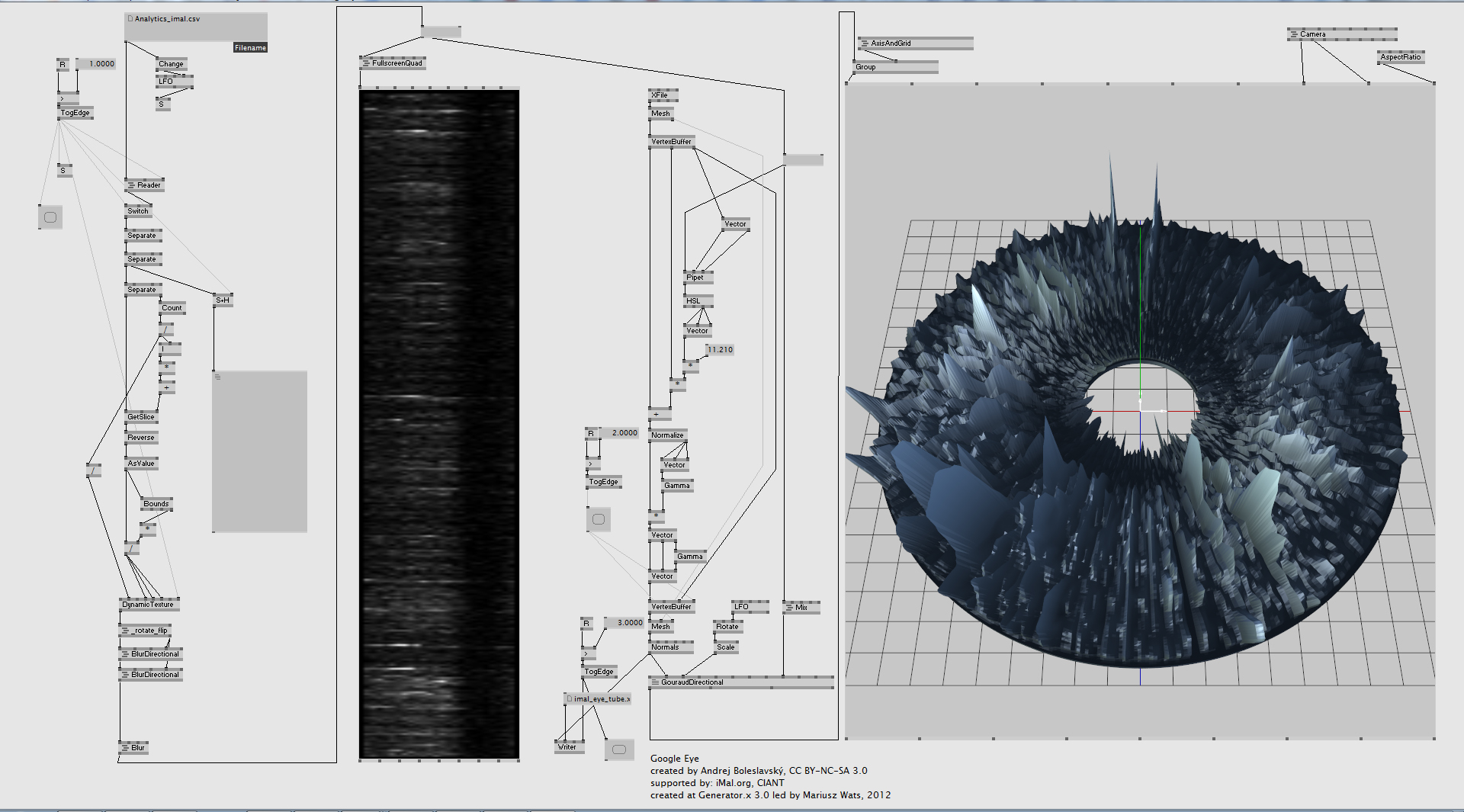
Google Eye
Google Eye

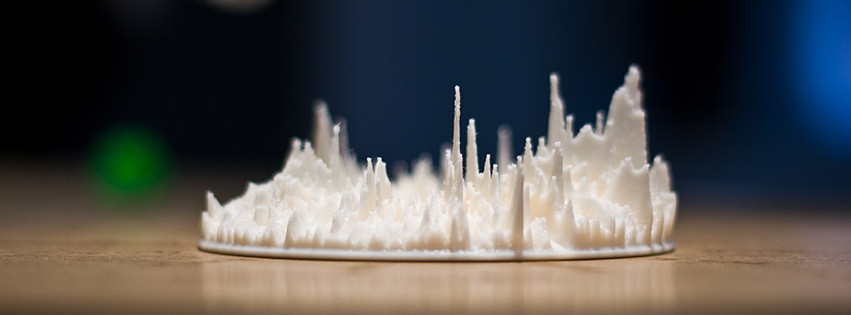
The artwork I find particularly inspirational is “Google Eye” created by Andrej Boleslavsky that visualizes Google Analystics data.  I am fascinated by how different angles of viewing this artwork may lead to disparate implications. Observing it horizontally, we only see a mountain-like region that goes high and low, while from the top of it we see a human eye that indicates “how we are observed by a complex computational system”, inspiring me to consider how to combine several messages in one single artwork. In contrast to numbers and reports, Google Eye directly visualizes them for the audience and directly represents  a one-year-cycle, leading us to reflect on the extend to which we are monitored by the system and how much “privacy” we are left with.

The artist constructed a model that generated by a custom made patch and transformed the dataset into valid model to print them out through 3D printing. While attempting to raise awareness of the invasion from information systems, the artists also realizes that this form enables the audience to gain better insight and makes the hidden patterns obvious. 

Google Eye patch

My Dynamic Factory

This code simulates a dynamic factory environment, with variable elements including functionality of the factory, speed of the factory, the background factories, and the time of day. The idea for gears came from another class of mine in which we used squares to create interesting compositions. One of mine was created by overlaying two squares to create a “gear” so I knew I wanted to visualize it in motion for this project. I coded the gears to that they appear to work together, and appear to create an output when doing so. The rest stemmed from this “factory” theme.

painting
var angle = 0;		//gear turn
var t = 34;		//gear translate
var eSize = 10;		//ball sizes, center gear
var ballY = 409;		//front ball Y position
var recX = 7*t; 		//top piston X translation
var RecX = 7*t;			//bottom piston X tranlation 
var recY=10.5*t;		//pistons Y translation
var dir = 1; 		//top piston direction
var direction = 1;		//bottom piston direction
var speed = 2;			//piston speed
var recSize =  18;		//piston length
var BallY = 125;		//middle ball Y position
var windowSize = 25;	//window size
var Bally = 300;	//furthest ball start
var bright = 0;


function setup() {
    createCanvas(500, 409);
    background(220);
    text("p5.js vers 0.9.0 test.", 10, 15);
}

function draw() {
	background (210,146, 6);		//orange brown
	push();
	if(mouseIsPressed){
		if(mouseButton == RIGHT){		//if the right button is pressed
			background(210-mouseY/2, 146 -mouseY/2, 6- mouseY/2);		//gets darker with higher Y
				if(mouseY>height/2){		//if the mouse Y is greater half the height
			fill(255);		//stars
				ellipse (100,200,1,1);
				ellipse (200,100,5,5);
				ellipse (300,100,3,3);
				ellipse (300,200,5,5);
				ellipse (300,300,3,3);
				ellipse (150,50,5,5);
				ellipse (420,120,2,2);
				ellipse (200,100,5,5);
				ellipse (150,150,5,5);
				ellipse (180,220,2,2);
				ellipse (300,200,1.5,1.5);
				ellipse (300,250,1,1);
				ellipse (450,100,2,2);
				ellipse (100,289,5,5);
				ellipse(50,70,2.5,2.5);
				ellipse (190,120,2.4,2.4);
				ellipse (100,289,5,5);
				ellipse(50,70,2.5,2.5);
				ellipse (200,60,1.2,1.2);
				ellipse(90,90,2,2);
				ellipse (230,200,2.4,2.4);
				ellipse (460,60,5,5);
				ellipse(440,100,2.7,2.7);
				ellipse (250,250,2.4,2.4);
				ellipse (260,200,3,3);
				ellipse(240,220,2.1,2.1);
				ellipse(300,110,1.7,1.7);
				ellipse (280,190,2.3,2.3);
				ellipse (290,140,3.1,3.1);
				ellipse(215,210,2,2);
				ellipse (400,90,2.3,2.3);
				ellipse (410,120,1.5,1.5);
				ellipse(420,50,2,2);
			}
			if(mouseY<height/2){ 		//if mouse Y is lower than the height
				fill(255,255,117);
				ellipse(0,mouseY,60,60);		//sun
			}
		}
	}
pop();
push();
				fill(0,0,0,200);
rectMode(CORNER);
	var m = max(min(mouseX, 250), 0);
	var size = m * 350.0 / 400.0;
				fill(0,0,0,height-mouseY);
	rect(10,height/2-recSize*1.5,75,500);		//left chimney
	rect(0,height/2,size,500);		//left building
size = 350-size;
				fill(0,0,0,mouseY+50);
	rect(110+m*190/400,height/2-recSize*2,size,500);		//back building
		var ballWidth = max(min(mouseY, 100), 0);
	rect(110+m*190/400,height/2-recSize*4,ballWidth,37);		//back chimney
	
	if(BallY<0){		//if ball goes past 0
		BallY=height/2-recSize*4;		//reappear at height of back chimney
}

	BallY = BallY-1;	//move up by 1 point 
		ellipse(110+m*190/400+ballWidth/2,BallY,ballWidth,-ballWidth);		//middle ball

	if(Bally<0){		//if ball goes past 0
		Bally=250;		//reset ball height to 250
}

	Bally = Bally-2	;	//move up by 2 points
			fill(0,0,0,mouseX);		//opacity changes with mouseX
			if(mouseY>200){			//if mouse Y is greater than half the height
				fill(210,146, 6);		//fill changes to background (disappears)
			}

		ellipse(380,Bally,height/4 - ballWidth,height/4 - ballWidth);	//right ball
			fill(0,0,0);


rectMode(CENTER);		//rectangles oriented by center point

			fill(150);
rect(recX,recY+5,3.2*recSize,1/2*recSize);		//top piston still
rect(RecX,recY+25,3.5*recSize,1/2*recSize);		//bottom piston still

if(mouseX<1.5*t & mouseY<1.5*t){		//if mouse is in the top left corner
	if(recX>width-220 || recX

Looking Outwards – Jason Salavon

By Eamonn Burke

I found myself fascinated and inexplicably compelled to Jason Salavon’s Glassware Still Life. What initially grabbed my attention was how tangible the glass appeared with only manipulated light, and how texturally satisfying it seems. His artistic sensibility certainly came in for this, as well as so elegantly showing how the glasses morph into one another, and create recognizable intermediary glass designs in the process. 

On a deeper level, Salavon’s piece attracted me because it’s relatable – unlike many other generative pieces that depict complex and unfamiliar  systems. This piece shows how simple objects in our lives are simply variations of one another following a generative “code”. I admire that he was able to dissect one of these everyday systems and show it so clearly. 

I know that Salavon used custom software, but I would guess that the basic code involves stretching of parameters bounded by “if ” statements. These dictate when a glass stretches (ex. Height=height+1, If height=x -> width =width+1), by how much, and in what direction, while holding certain other dimensions constant. Again, his sensibility comes in knowing when to change which parameters to create interesting intermediary designs. 

Looking Outwards 02

As digital fabrication tools get more and more sophisticated, there’s been calls for the field of architecture to keep up with the technology. Digital fabrication tools and computer algorithms come hand in hand, not only do computer algorithms help the tools realize the physical objects, the algorithms can also help designers and architects visualize and imagine previously impossible geometries. Michael Hansmeyer, a classically trained, architect, walks at the forefront of this endeavor. In is installation Digital Grotesque I, Hansmeyer explore the the expressive formal potentials of digital technologies, the forms, generated by a series of algorithms consists of 260 million geometric facets, an impossible feat via regular explicit modelling. What’s interesting about this is that, the algorithm, other than interpreting classical architectural forms, adds another layer of detail and complexity to it by exploring, ideas such as permutations and infinite scales. The artist demonstrates this on his website with a 3d model of the actual installation, where the piece itself can be zoom in infinitely. An exploration of fractals and endless permutations. Although the idea of infinite is limited by reality and our fabrication abilities and resolution, it is still without a doubt an interesting concept to explore at an architectural scale, that has been thought over by generations of architects. Although it is now, just a slight bit closer to reality, Hansmeyer’s piece can still only capped at a certain resolution. There is still much to discover through the lens of generative design.

http://www.michael-hansmeyer.com/digital-grotesque-I

Project-02: Variable Faces

project-02-variableFaces-lkenny
// Lauren Kenny (lkenny)
// Project 2 - Variable Faces
// Section A

var r = 220;
var g = 220;
var b = 220;
var faceWidth  = 100;
var faceHeight  = 100;
var leftEyeSize = 10;
var rightEyeSize = 10;

function setup() {
    createCanvas(640, 480);
    r = random(256);
    g = random(256);
    b = random(256);
}

function draw() {
    background(r, g, b);
    //ears
    fill(r+50, g+50, b+50);
    stroke(r-50, g-50, b-50);
    ellipse(((width/2)-(faceWidth/2)), (height/2), faceWidth/6, faceHeight/6);
    ellipse(((width/2)+(faceWidth/2)), (height/2), faceWidth/6, faceHeight/6);
    //face
    fill(r+50, g+50, b+50);
    stroke(r-50, g-50, b-50);
    strokeWeight(2);
    ellipse(width/2, height/2, faceWidth, faceHeight);
    //eyes
    ellipse(width/2-20, height/2-20, leftEyeSize, leftEyeSize);
    ellipse(width/2+20, height/2-20, rightEyeSize, rightEyeSize);
    //pupils
    fill(r-50, g-50, b-50);
    noStroke();
    ellipse(width/2-20, height/2-20, leftEyeSize/5, leftEyeSize/5);
    ellipse(width/2+20, height/2-20, rightEyeSize/5, rightEyeSize/5);
    //body
    fill(r+50, g+50, b+50,)
    stroke(r-50, g-50, b-50);
    rect((width/2)-(faceWidth/2), (height/2)+(faceHeight/2)+15, faceWidth, ((height)-(faceHeight)-15), 50, 50);
    //lips
    fill(r+75, 20, 20);
    noStroke();
    arc((width/2-(faceWidth/10)/3), height/2+25, faceWidth/8, faceHeight/10, PI, TWO_PI);
    arc((width/2+(faceWidth/10)/3), height/2+25, faceWidth/8, faceHeight/10, PI, TWO_PI);
    fill(r+95, 50, 50);
    arc((width/2), (height/2+25), faceWidth/6, faceHeight/12, 0, PI);
    //nose
    noFill();
    stroke(r-50, g-50, b-50);
    arc(width/2, height/2, faceWidth/6, 10, 0, PI, OPEN);
}

function mousePressed(){
    r = random(5, 256);
    g = random(5, 256);
    b = random(5, 256);
    faceWidth = random(75, 165);
    faceHeight = random(75, 200);
    leftEyeSize = random(5, 30);
    rightEyeSize = random(5, 30);
}


Looking Outwards-02

See Project Here: http://www.generative-gestaltung.de/2/sketches/?01_P/P_3_1_3_05

See Code Here: https://editor.p5js.org/generative-design/sketches/P_3_1_3_05

This project was made by Niels Poldervaart!

This project is particularly inspiring to me because it uses generative design to explore the relationships between a full text and the individual words which compose it. This project uses visual and interaction design to help people understand the connections between words and the grammar that is behind it all. Understanding the code libraries used to decipher these parts of speech could be really useful for education purposes of teaching grammar and parts of speech.

The algorithm was written in p5.js and used RiTa to analyze the text for parts of speech. The code is based off of for loops, some conditionals, and a lot of variables yet is quite easy to understand. I was shocked to see that something so intricate and complex (to me) was written in only 215 lines of code.

In this work you can see the artist’s love for type and linguistics show through (which aligns with my interests as well!). There are a couple other versions of this concept where they do similar explorations of discourse and individual letters/words shown with different visual configurations. You can really see their understanding and love of visualizing data with simple yet effective methods of type and color.