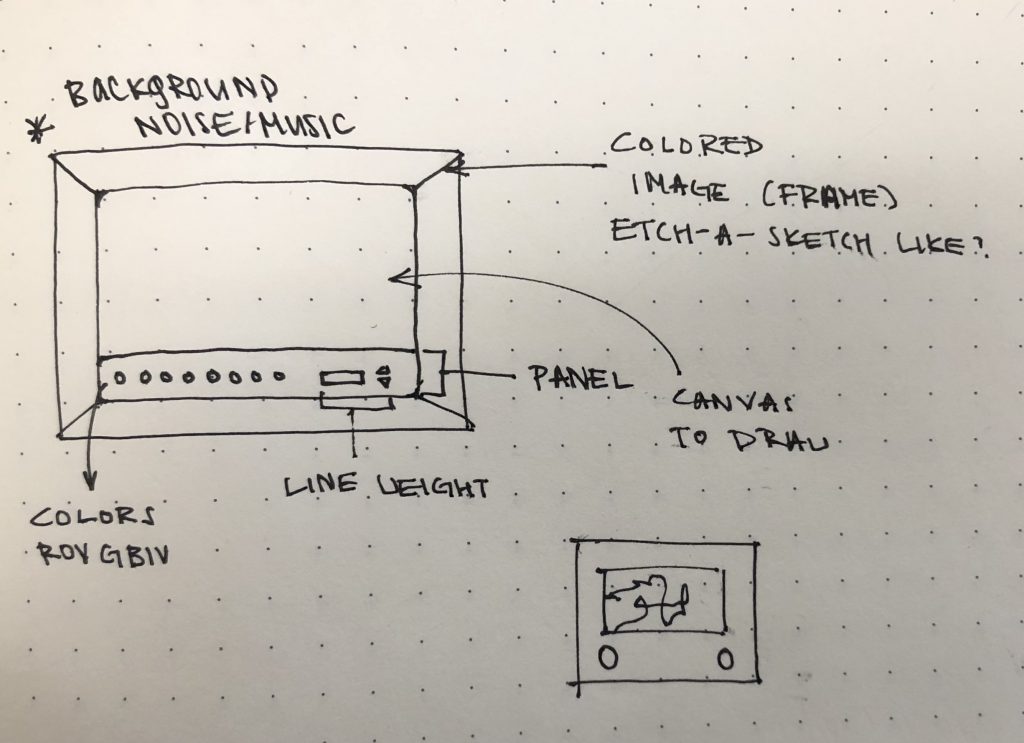
I always liked drawing since I was a child. This project was inspired by Disney’s Magic Artist Studio, my childhood drawing game, and etch-a-sketch. Although I was never good at it, I was always intrigued by the idea of completing a drawing with a single line. To help those who are also interested in one-line drawings but are not good at it, I want to create a program that allows a user to create single-line drawings.
I will create an interactive program that draws turtles using keys W, A, S, and D. Because this idea seems relatively simple, I am planning on adding sound (background music?) and allowing the user to manipulate color and stroke weight while drawing on the program. I am also considering adding an image overlay to frame the canvas and provide a hotkey to erase the drawing. I am excited to see what this would look like in the end.
Global waste crisis is a problem we can no longer avoid. With continuous overproduction and overconsumption practices, we are in need for safe disposal practices. As such, recycling is one of the easiest ways we can all contribute to protect our environment, and I believe this should be further encouraged to become a social and collective effort. Thus, for the final project, I propose to create an interactive environmental game related to the issue of waste management.
I am planning to set up a realistic environment (this could be a forest background or even a city scene), which comprises of various wastes all dispersed. With this, the point of the game is to find the trash and properly sort them by dragging into the correct recycling bin. If it is possible, I hope to incorporate further information if the user accidentally puts the trash into the wrong bin.
This is relevant to our real world as not a lot of people are actually mindful about properly sorting waste by plastic, paper, food, and etc, despite the presence of recycling and trash bins. And apart form solid natural waste, there are other artificial wastes (chemical, e-waste, etc) that are extremely hazardous to our environment. So in a way, this game would be educational for not just showing proper sorting, but also the extreme range of different types of trash.
For this final project, I want to utilize the generative landscape and sound to create an imaginative, colorful world. There are many artists who I will be thinking about over the course of developing this project but there are two that will be prioritized.
One of these artists is Maxim Zhestov who is a media artist who concentrates on film, installation and computational design to stretch the boundaries of visual language. He is famous for his digitally-rendered gallery designs which produce choreographed and calculated movements of elements and shapes using physics and computers.
Computations, Maxim Zhestov
Another one of the artists I would like to explore further along this final project is Mike Tucker who is an interactive designer and director who focuses on audio-visual exploration who co-created the app, Tónandi, which had a feature of a VR experience of a fantasy-like landscape.
A peak into the virtual app created by MagicLeap, Tónandi.
Although Mike Tucker was able to create an environment that was able to interact with his audience, I felt Maxim Zhestov’s piece would have also been more interesting if the audience was able to interact with the visuals as well although fully computer-generated. However, both beautifully generate a new, fantastical world that fascinates me the most.
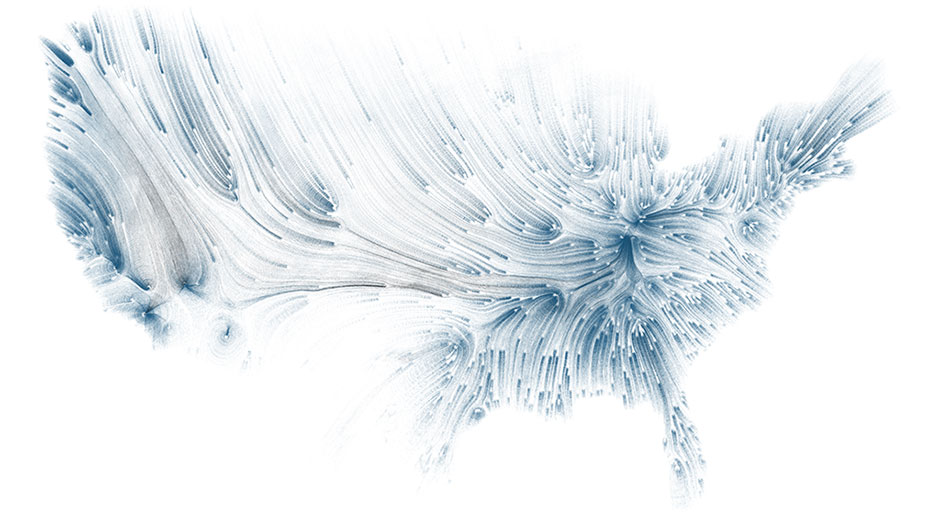
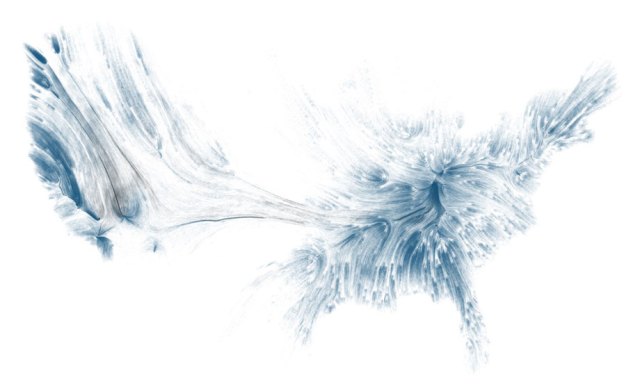
The first precedent project I found relevant to my final project was Drawing Water by David Wicks. The project is a data visualization overlaid on a map of the US that shows the relationship between where rain initially falls and where urban water is most consumed. The result is a series of curves with varying saturations and opacities to further represent the patterns and movement of water. To create the project, Wicks pulled Water consumption data from the USGS and rainfall data from the NOAA/NWS. This data was then input into a series of python scripts to create the final visualization.
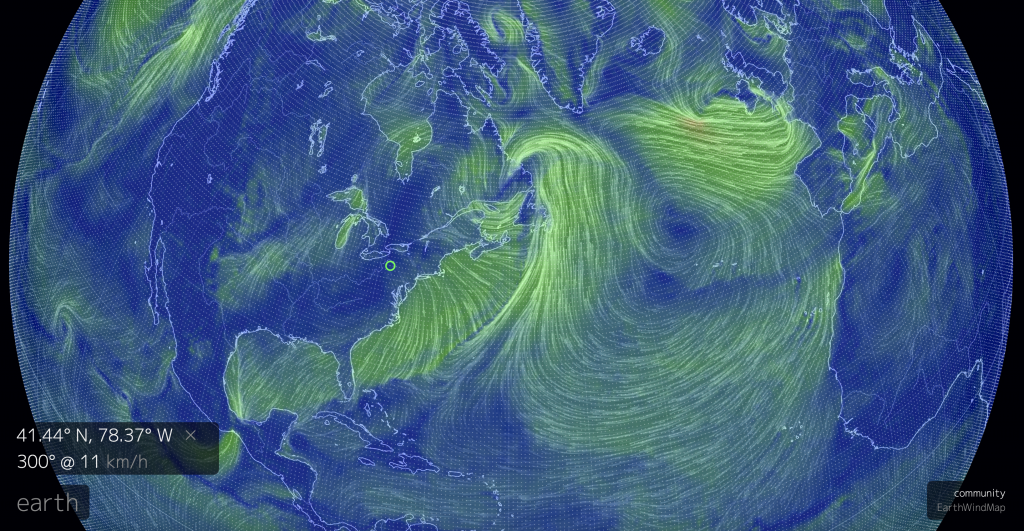
Earth by Cameron Beccario
The second precedent project, Earth by Cameron Beccario, is a near realtime weather visualization on a global scale. Similarly to the previous project, Earth also generates dynamic linear paths that in this project represent wind patterns as well as changing colors to represent various other weather conditions. Earth also pulls weather data but from a wider array of sources and makes use of supercomputers to create and constantly update the visualization.
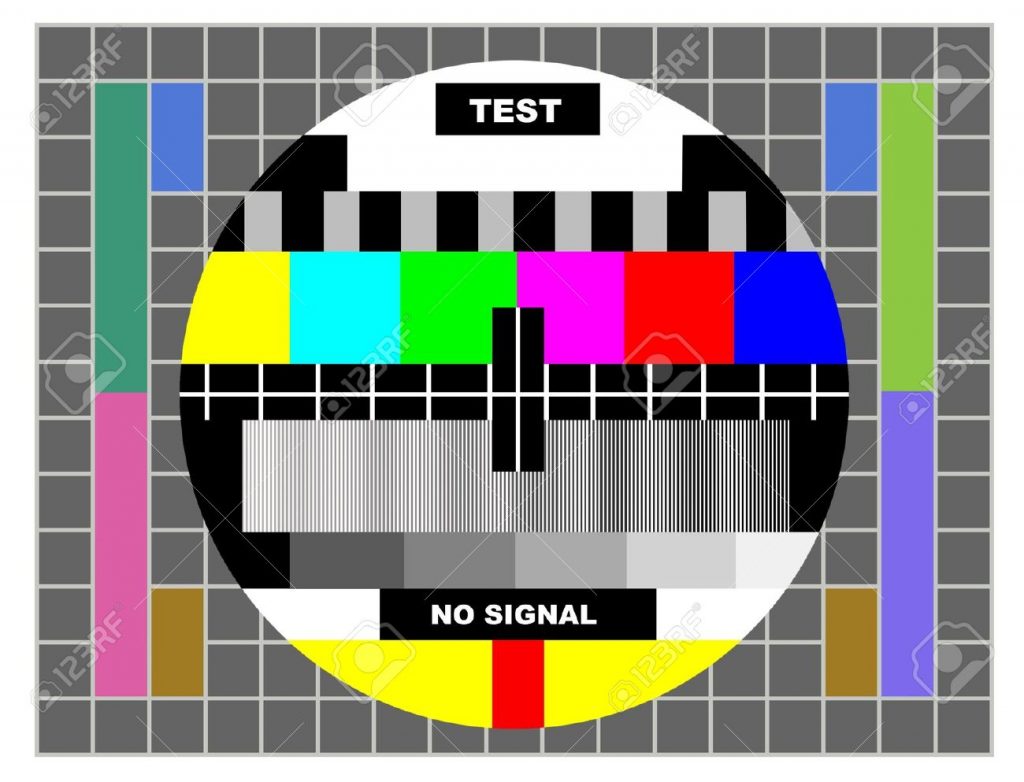
Often during installations as a media designer, you work in unique environments where the technical demands of a system are very specific. I’ve come to find that many programs supply their own stock branded test card that doesn’t reflect the complexity or scope of the project. As I’ve built custom systems and done shows with multiple outputs I’ve realized a need for more customization with the test cards I use.
For my final project in 15104, I’d like to create a test card generator of my own design. Essentially this entails creating a responsive template that accounts for size, and having custom inputs; text, color, maybe even image. My list of features for this project are:
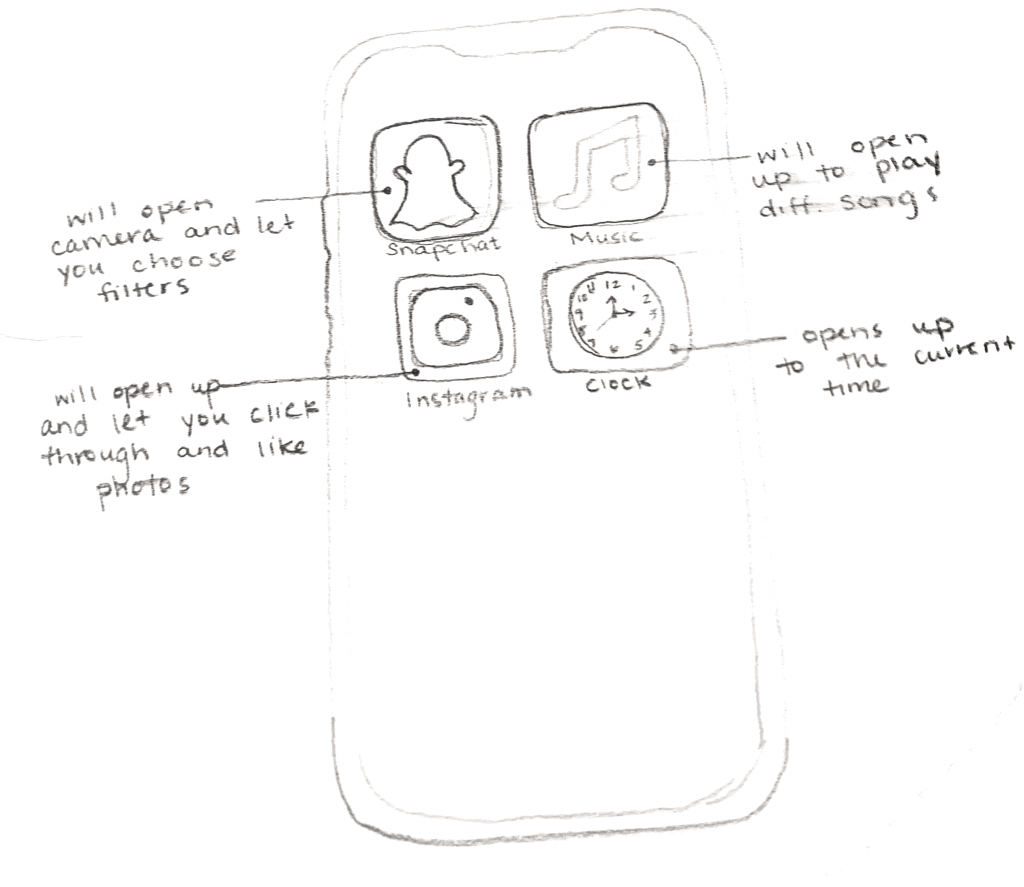
This project will be done by Taisei Manheim, Jai Sawkar, and I. Our project proposal is a smart phone and on the screen there would be different apps. You could click on the apps and they would each do different things. One of the apps would resemble snapchat and allow users to put a few filters on a picture of themselves (using the computer camera). Another app would resemble spotify and allow user to choose different songs to play. There would also be an app that would resemble instagram and allow users to scroll through images and like certain photos. The last app would be the clock app which would allow users to see the time. We will probably add two more apps to the phone so that each of us codes two apps each.
The Two projects discussed in this Looking Outwards are the Zaha Hadid Volu Pavilion and Water Drawing Project.
The Volu Pavilion appears to be made from a continuous piece and features an oval roof that tilts downwards to create a shade for dining. Comprised of a series of structural bands collecting at the spine and expanding overhead, the patterning of the pavilion is optimized to be at mose singly curved.
The Patterning of the single curved Pavilion
The second project is the Drawing Water Project which collects national water consumption data with rainfall data into a series of maps. The data are parsed with python scripts and each line in the drawing corresponds to a daily rainfall measurement. The length of the line and its initial placement are dtermined by the amount of rainfall measured and where it fell. The final placement and color of each line are determined by the influence of urban water consumers. When the rainfall is pulled farther from where it fell, it changes color from blue to black. Such a mapping strategy creates an interesting artistic and informational drawing that tells information in a more direct way.
A scripted generated art by collecting rainfall and water consumption data
What I find the two projects interesting is that both projects demonstrate a strong sense of visual impression, no matter in 3D or 2D forms. Such strategies can be learned to apply to the final project for visual aesthetic pleasure. Meanwhile, both projects give a more interaction based opportunity to investigate either the law of physics may impact on the patterning of the structure or the data of rainfall overtime can change the overal composition of the drawing. Both projects definitely inspire me with such interactive quality and the strong flexibility and enlighten me to make a final project that can be a combination of generative art, interactive art, dynamic drawing, and computational drawings.
It’s final project time! When I read the prompt for the final project, I immediately knew I wanted to do something related to a game. As referenced in my last 2 Looking Outwards, I love video games and I think it would be really cool to try and build a game experience through p5.js. A game that came to mind was Frogger, a classic concept where a character must cross a road with incoming traffic to reach the other side. For this Looking Outwards, I looked at two examples of Frogger-style games: the classic Frogger on the C64, and Crossy Road on the iPhone.
The original Frogger is a clear flash-to-the-past, with insanely retro graphics and color schemes. Frogger was released in 1981 by Konami, and it was an instant hit; players loved the simplicity of the game as well as its addictive appeal. The premise is straightforward: the player, playing as a frog, must weave through traffic and jump across a variety of animal-backs and logs to reach safety on the other side of the screen. The player then goes through a series of levels to try and set their high score without losing all of their lives. Frogger’s simplicity was part of its charm, but I personally felt their was a level of animated complexity lacking; of course, this was likely because of the datedness of the game (1981 was a while ago, and computers have come a long way since!).
The original Frogger on the Commodore 64!
Crossy Road, released in 2014 by the gaming studio Hipster Whale, is an attempt to fix this issue by adding in flashy new graphics, fun animations, and 3D characters. It’s modeled with block/pixel-style characters, seemingly a reference to the game’s historical roots, but it’s clear after playing Crossy Road that gameplay is immensely smoother and more flowy. I’ve played Crossy Road in the past, and it was a great experience. The game was fun, and losing doesn’t even feel bad because of the charm of the game. However, one thing I felt could be improved on is the simplicity of the game; in a weird way, Crossy Road almost does too much to the original frogger to the point where the various rocks, trees, cars, and rivers the player needs to avoid become almost distracting. There’s something sophisticatedly simple about the original Frogger that reduces gameplay distractions, and that’s something I think Crossy Road misses at times.
Some gameplay from Crossy Road, a mobile game released in 2014 that drew from the concept of Frogger.
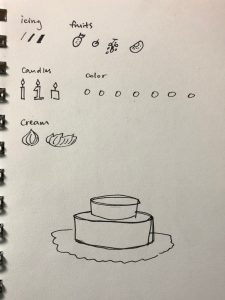
The idea of customization has always been a favorite for people who want to create or own things that are authentic to themselves. For the final project, I want to create a game that allows users to experiment possibilities and create a desert item (cake, drink, or ice cream?) of their own. The main features of the desert would be hand drawn by me on Procreate/Illustrator, and imported to the sketch file. Other features can allow some sort of randomization, such as the sizing and color of small decorations. While decorating the desert, the users could choose the factor that they want, and visualize it by interacting with the keyboard/mousepad. Even though I have not completely settled on the type of desert that I want to create for the project, the project itself will be fun to create with the objective of giving the players a stress relieving experience.
For the final project, I want to create a decorating game that allows users to create something of their own. In the past, customization/decorating games constantly appeared in people of all ages’ interests. I remember playing “Let’s create! Pottery” and discovering the endless possibilities of decorating ceramics. The game was released in 2010, and published by Infinite Dreams. Through the game, people can design realistic potteries with their own desired features. On the other hand, “Zepeto” , an application that allows users to create a 3D avatar of themselves has been very popular during the past year. The app was published by Snow Corporation, and it also have socializing functions that let users to meet others with the avatar they created. The idea of creating something that is one of a kind really interest me, and I hope to create a game that could invite users to discover their own creativity.
![[OLD FALL 2019] 15-104 • Introduction to Computing for Creative Practice](../../../../wp-content/uploads/2020/08/stop-banner.png)