BrandonHyun-LookingOutwards11

According to the

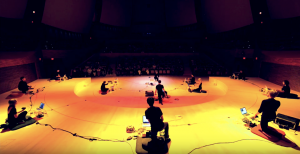
Stanford Laptop Orchestra, ” The Stanford Laptop Orchestra (SLOrk) is a large-scale, computer-mediated ensemble and classroom that explores cutting-edge technology in combination with conventional musical contexts – while radically transforming both. Founded in 2008 by director Ge Wang and students, faculty, and staff at Stanford University’s Center for Computer Research in Music and Acoustics (CCRMA), this unique ensemble comprises more than 20 laptops, human performers, controllers, and custom multi-channel speaker arrays designed to provide each computer meta-instrument with its own identity and presence. The orchestra fuses a powerful sea of sound with the immediacy of human music-making, capturing the irreplaceable energy of a live ensemble performance as well as its sonic intimacy and grandeur. At the same time, it leverages the computer’s precision, possibilities for new sounds, and potential for fantastical automation to provide a boundary-less sonic canvas on which to experiment, create, and perform music. ”
Ge Wang, the founder of Stanford Laptop Orchestra is giving a TED talk to the public on the DIY Orchestra of the future using computers and phone to create digital music.

They are becoming one of the first innovators and pioneers on this area and theyr are performing a lot.

Site for the Stanford Laptop Orchestra(SLOrk) 

yushano_Looking Outwards 11

Florian Hecker: “Event, Stream, Object”

“Event, Stream, Object is a sound installation by German artist Florian Hecker, that has now been acquired for MMK’s collection in Frankfurt. Presented in the exhibition ”Radical Conceptual“ (February 19 – August 22, 2010), the work consists of a loudspeaker system suspended from the ceiling used to convey a computer-generated, eight-channel sound composition. Each individual loudspeaker plays a sequence of sounds allocated to it and, in itself complex, becomes a part of the acoustic whole with its differing frequencies and volumes”.

What I like about this sound installation is that the mirrors that hung from the ceiling can actually alter the atmospheric sounds’ waves, besides that it can reflect the visitors’ appearance. His concept of incorporating space and architecture into music. His projects are not actually traditional music that is composed. Rather, it is more like a interactive sound art because the sound shift and vary depending on the listener. When the audience change their physical locations in the space and also their personal biases and points of reference, the sound will change as well. I think his idea that listing is driven by the desire for understanding is shown here in a very elegant way. Also, the mirrors are able to generate eight channels of sound, which makes the sound very dimensional.
I think the idea of taking the listeners into account of sound generating is really appealing and interesting. It not only attracts the audience to pay attention on or play with your work, but also provides more opportunities for artists in creation.

jamieh-Looking-Outwards-11

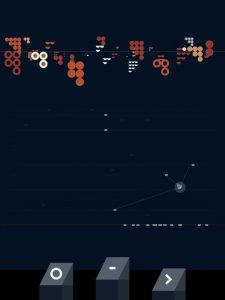
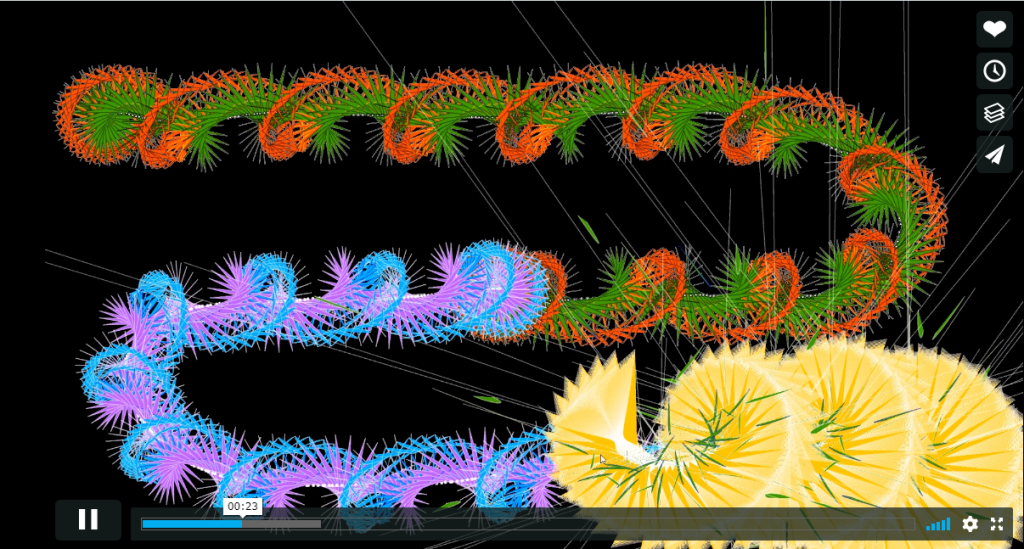
Example of the visualizations of the computer generated music

Atlås, created by Agoston Nagy, “generates music in a conversational cognitive space”. The app basically creates music through programming language in Pure Data and creates graphics with javascript’s p5js library. What I like about this project is that music is not just something that can be heard, but also visualized. The graphics locate the sounds within space, which brings an aspect of cognitive process into the experience of listening. The sounds generated by the machine through coding may seem random and distinct from each other, but through the visuals, such sounds then seem to show a narration and a relationship with each other.


Below is a video example of his work.


adev_LookingOutwards11_SoundArt

Ryoji Ikeda, Supercodex

I chose to talk about Ryoji Ikeda’s live set performance, Supercodex. I had the opportunity of attending this performance in Pittsburgh about a year ago and it is still being performed internationally today. Witnessing this performance was absolutely incredible. This entire live experience takes place in a large, black cube-shaped room, and it is almost hypnotic.

Ryoji Ikeda is an electronic and visual artist and uses physical environments and mathematical notions to create live performances of his work in highly immersive environments.

cduong-project 11-Composition

sketch

//Name: Colleen Duong
//Email: cduong@andrew.cmu.edu
//Section: d
//Assignment-10-b

//  cows = loadImage("https://i.imgur.com/cqxAWPM.jpg");


var cows;
var t1;
var t2;
var t3;
var t4;
var t5;
var t6;

function preload() {
  cows = loadImage("https://i.imgur.com/cqxAWPM.jpg");  //Cow Image Preload
}

function setup() {
  createCanvas(480, 480); //Change
  background(0);
  cows.loadPixels();
  frameRate(2000);
  t1 = makeTurtle(width/2, height/2); //Starts from the center of the canvas
  t2 = makeTurtle(width/2, height/2);
  t3 = makeTurtle(width/2, height/2);
  t4 = makeTurtle(width/2, height/2);
  t5 = makeTurtle(width/2, height/2);
  t6 = makeTurtle(width/2, height/2);
}

function draw() {
    var color1 = cows.get(t1.x, t1.y);  //Get colors of the picture
    var color2 = cows.get(t2.x, t2.y);
    var color3 = cows.get(t3.x, t3.y);
    var color4 = cows.get(t4.x, t4.y);
    var color5 = cows.get(t5.x, t5.y);
    var color6 = cows.get(t6.x, t6.y);
    t1.setColor(color1);  //Sets color for each line
    t2.setColor(color2);
    t3.setColor(color3);
    t4.setColor(color4);
    t5.setColor(color5);
    t6.setColor(color6);
    t1.setWeight(3);
    t2.setWeight(3);
    t3.setWeight(3);
    t4.setWeight(3);
    t5.setWeight(3);
    t6.setWeight(3);

//Turtles move towards the mouse
    t1.forward(10);
    t2.forward(10);
    t3.forward(10);
    t4.forward(10);
    t5.forward(10);
    t6.forward(10);

//Target is mouse location
    var targetX = mouseX;
    var targetY = mouseY;

//
  t1.turnToward(targetX, targetY, 2); //Mouse controls line
  t2.turnToward(targetX, targetY, 4);
  t3.turnToward(targetX, targetY, 6);
  t4.turnToward(random(width), random(height), 8);  //Lines are drawn randomly
  t5.turnToward(random(width), random(height), 10);
  t6.turnToward(random(width), random(height), 12);
//creates circles when drawing over
}


//TURTLE CODE
function turtleLeft(d) {
    this.angle -= d;}
function turtleRight(d) {
    this.angle += d;}
function turtleForward(p) {
    var rad = radians(this.angle);
    var newx = this.x + cos(rad) * p;
    var newy = this.y + sin(rad) * p;
    this.goto(newx, newy);}
function turtleBack(p) {
    this.forward(-p);}
function turtlePenDown() {
    this.penIsDown = true;}
function turtlePenUp() {
    this.penIsDown = false;}
function turtleGoTo(x, y) {
    if (this.penIsDown) {
      stroke(this.color);
      strokeWeight(this.weight);
      line(this.x, this.y, x, y);
    }
    this.x = x;
    this.y = y;}
function turtleDistTo(x, y) {
    return sqrt(sq(this.x - x) + sq(this.y - y));}
function turtleAngleTo(x, y) {
    var absAngle = degrees(atan2(y - this.y, x - this.x));
    var angle = ((absAngle - this.angle) + 360) % 360.0;
    return angle;}
function turtleTurnToward(x, y, d) {
    var angle = this.angleTo(x, y);
    if (angle < 180) {
        this.angle += d;
    } else {
        this.angle -= d;
    }}
function turtleSetColor(c) {
    this.color = c;}
function turtleSetWeight(w) {
    this.weight = w;}
function turtleFace(angle) {
    this.angle = angle;}
function makeTurtle(tx, ty) {
    var turtle = {x: tx, y: ty,
                  angle: 0.0,
                  penIsDown: true,
                  color: color(128),
                  weight: 1,
                  left: turtleLeft, right: turtleRight,
                  forward: turtleForward, back: turtleBack,
                  penDown: turtlePenDown, penUp: turtlePenUp,
                  goto: turtleGoTo, angleto: turtleAngleTo,
                  turnToward: turtleTurnToward,
                  distanceTo: turtleDistTo, angleTo: turtleAngleTo,
                  setColor: turtleSetColor, setWeight: turtleSetWeight,
                  face: turtleFace};
    return turtle;}

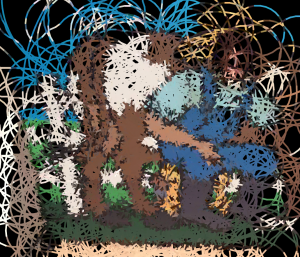
I really enjoyed the concept of the portrait project that we did last so I wanted to do another version of it using turtles instead for this week’s assignment. I also wanted users to somewhat be able to control where the lines go.

Final product-ish

ashleyc1-Section C-Project-11-Composition

sketch

//Ashley Chan
//Section C
//ashleyc1@andrew.cmu.edu
//Assignment-10-B

function turtleLeft(d) {
    this.angle -= d;
}
 
 
function turtleRight(d) {
    this.angle += d;
}
 
 
function turtleForward(p) {
    var rad = radians(this.angle);
    var newx = this.x + cos(rad) * p;
    var newy = this.y + sin(rad) * p;
    this.goto(newx, newy);
}
 
 
function turtleBack(p) {
    this.forward(-p);
}
 
 
function turtlePenDown() {
    this.penIsDown = true;
}
 
 
function turtlePenUp() {
    this.penIsDown = false;
}
 
 
function turtleGoTo(x, y) {
    if (this.penIsDown) {
      stroke(this.color);
      strokeWeight(this.weight);
      line(this.x, this.y, x, y);
    }
    this.x = x;
    this.y = y;
}
 
 
function turtleDistTo(x, y) {
    return sqrt(sq(this.x - x) + sq(this.y - y));
}
 
 
function turtleAngleTo(x, y) {
    var absAngle = degrees(atan2(y - this.y, x - this.x));
    var angle = ((absAngle - this.angle) + 360) % 360.0;
    return angle;
}
 
 
function turtleTurnToward(x, y, d) {
    var angle = this.angleTo(x, y);
    if (angle < 180) {
        this.angle += d;
    } else {
        this.angle -= d;
    }
}
 
 
function turtleSetColor(c) {
    this.color = c;
}
 
 
function turtleSetWeight(w) {
    this.weight = w;
}
 
 
function turtleFace(angle) {
    this.angle = angle;
}
 
 
function makeTurtle(tx, ty) {
    var turtle = {x: tx, y: ty,
                  angle: 0.0, 
                  penIsDown: true,
                  color: color(128),
                  weight: 1,
                  left: turtleLeft, right: turtleRight,
                  forward: turtleForward, back: turtleBack,
                  penDown: turtlePenDown, penUp: turtlePenUp,
                  goto: turtleGoTo, angleto: turtleAngleTo,
                  turnToward: turtleTurnToward,
                  distanceTo: turtleDistTo, angleTo: turtleAngleTo,
                  setColor: turtleSetColor, setWeight: turtleSetWeight,
                  face: turtleFace};
    return turtle;

}

//rainbow shape
function makeShape(turtle) {

    //make one hexagon
    for(i = 0; i < 6; i++) {

        //rainbow colors
        var r = random(100, 255);
        var g = random(100, 255);
        var b = random(100, 255);
      

        turtle.setColor(color(r, g, b));
        turtle.setWeight(1);

        turtle.forward(50);
        turtle.left(60);

    }
}

//cream shape
function makeShape2(turtle2) {

    //make one shape
    for(i = 0; i < 8; i++) {

        turtle2.setColor(color(249, 237, 217));
        turtle2.setWeight(2);

        turtle2.forward(60);
        turtle2.left(80);

    }
}

//perriwinkle shape
function makeShape3(turtle3) {

    for(i = 0; i < 8; i++) {

        turtle3.setColor(color(172, 195, 249));
        turtle3.setWeight(1);

        turtle3.forward(60);
        turtle3.left(100);

    }
}


function setup() {
    createCanvas(480, 480);
    background(0);

     //name spiral motion
    var spiral = makeTurtle(200, 170);
    var shape2 = makeTurtle(320, 300);
    var shape3 = makeTurtle(120, 420);

    var angle = random(60, 140)
    var positionX = 0;

      //make a bunch of repeating shapes
      for(var i = 0; i < 80; i++) {

          makeShape(spiral);

          spiral.penUp();
          spiral.right(angle);
          spiral.forward(positionX);

          //draw again
          spiral.penDown();

          //increase space inbetween initial shapes the more you draw them
          positionX += 1; 
      
      }

      for(var j = 0; j < 10; j++) {

          makeShape2(shape2);

          shape2.penUp();
          shape2.right(angle);
          shape2.forward(6);
          shape2.penDown();
          }
      
        for (var k = 0; k < 80; k++ ) {
          makeShape3(shape3);

          shape3.penUp();
          shape3.right(angle * .5);
          shape3.forward(6);
          shape3.penDown();
          }
}

function draw() {

}

function mouseClicked() {

  setup();

}

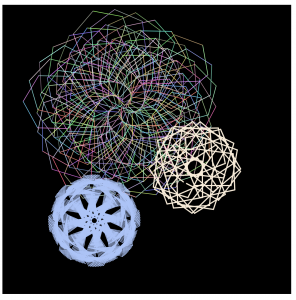
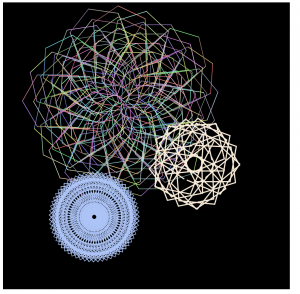
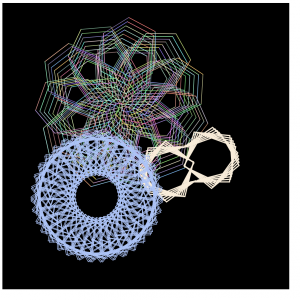
I really like making spirographs. As a kid I doodled them all the time and a lot of the projects I’ve done for this class include spirographs but I like that I’m learning how to draw them through different techniques: this week via turtle graphics.

Slight alterations to the spirographs’ angles and spaces are changed when the mouse is clicked.

Iterations:

nahyunk1 – Looking Outwards 11

https://www.youtube.com/watch?v=S-T8kcSRLL0&feature=share

sound art incorporates sound with an existing visual piece, generating a new meaning through the convergence of the two medium. Music as itself is a singular form of art that can exist on its own and portray a meaning or thought. The project that I found from this week’s looking outwards was Ge Wang’s computational musical instruments in Stanford. He laid out a series of machines in which he could install an app or program a set of codes that loop into a playable instrument. Ge incorporated his computer engineering skills to create a sound machine which people can interact and also utilize in creating music. Throughout the talk, I realized that his project much related to what I was learning in my other class which also incorporates computer language with musical form of art.

akluk – Section A – Looking outwards-11

For week 11’s Looking Outwards, I have decided to write about “If vi was ix” by TRUMPIN or Gerhard Trimpin.

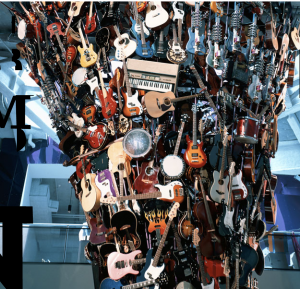
I have written about a project of his in a previous looking outwards. In this project, he created a sound sculpture as the center piece of the Seattle’s Experience Music Project. It is basically a 50 ft sculpture with seven hundred acoustic and electric guitars. He also programmed the guitars to play music from all different kinds of genre from Scottish ballads to punk rock. He also wrote it so that the guitar could tune itself to make sure that it is in tune and in sync. It is also called the guitar tornado because it resembles the shape of a tornado. It doesn’t describe specifically what algorithms are used to create the program that plays different genres of music. What TRUMPIN always seems to do with his work is not only involve music or sound, but also incorporate a very unique visual aesthetic. Attached below is the link to the piece of work.

Link

enwandu-Looking Outwards 11

“To me computer music isn’t really about computers, it’s about people. It’s about how we use technology to change the way we think, do, and make music; maybe even add to how we can connect to each other through music”.     – Ge Wang

Ge Wang is Chinese American musician and programmer responsible for the creation of the ChucK programming language, as well as the founding of the Stanford Laptop and Mobile Phone Orchestras. He is also the co-founder of the mobile music app Smule, and designer for the iPhones Ocarina and Magic Piano. Wang received his B.S. in Computer Science from Duke University, and then went on to get his Ph.D. in Computer Science from Princeton University. He is now an Associate professor at Stanford University in the Center for Computer Research in Music and Acoustics. He operates at the intersection of computer science design, and music.

I found the idea of the laptop orchestra to be a weird, and intriguing concept. The process of bringing to life such a unique experience for everyone involved was also quite fascinating. Using IKEA salad bowls, car speakers, amplifier kits, they created these hemispherical domes, which project the sound of the instrument, from the location of the performer to give the sense of autonomy in performance, and mimic the way sound is produced in a typical orchestra, rather than have the sounds blast through the PA system. The process of setting up the laptop orchestra involved the creation of an instrument called ‘Twilight’:  an instrument which uses the motion of the performers hand to generate sounds. I really admire many of his projects particularly the laptop orchestra because it begins to blur the lines between various disciplines while expanding the minds of their audience to the interdisciplinary possibilities.

afukuda-LookingOutwards-12


[project 1 – Freeform | Interactive Reload Nr.1 by Rosanna Casalnuovo ]

“Freeform | Interactive Reload Nr.1” by Rosanna Casalnuovo is part of a series of interactive graphics with different geometrical compositions and colors realized with generative code. I admire the use of an array of vibrant colors in this project, something that I would hopefully be able to incorporate into my own project. I also find the balance between randomness yet the presence of an underlying structure in this project compelling, successfully making it an interesting interactive piece of work. An opportunity they might have overlooked is having a clear intent of their project. While the project is overall an interesting one, it just seems to be an interactive piece of work that is abstract and most likely programmed recreationally. By incorporating an intent, the project might become stronger and more meaningful.

[project 2 – Ring by Lucas Cabral]

“Ring” by Lucas Cabral, is another dynamic piece of work, in which the program creates distinct rings according to its accompanying sound. It attempts to emphasize that there is in fact a visual component in music as well, and overall plays around with the concept of sound visualization. The dynamic rings that appear on the screen reminded me of a kaleidoscope as well fireworks, which creates a relevance to my final project. I also enjoyed how the visuals changed depending on which part of the song was playing, along with the color of the rings. It would have been great if the artist took a further step forward and created more of these rings, creating a perception of depth and emphasizing the dynamism of the work.

Link | https://vimeo.com/241539505 [project 1]

Work | Rosanna Casalnuovo. Interactive Reload Nr.1. 11.06.2017


Link | https://vimeo.com/240247633 [project 2]

Work | Lucas Cabral. Ring. 10.26.2017