yushano_Project 06 – Abstract Clock

sketch

var xS = []; //for seconds
var yS = [];
var xM = []; //for minutes
var yM = [];
var xL = []; //for hours
var yL = [];
var dxS = []; // velocity in x direction 
var dyS = []; // velocity in y direction
var dxM = []; 
var dyM = []; 
var colS = []; //color array
var colM = [];
var colL = [];
var smR = 15;
var mdR = 25;
var lgR = 35;

function setup() {
    createCanvas(480, 480);  
    
	for (var i = 1; i < 61; i++) { // for loop initializing 60 seconds
        xS[i] = random(width/3+smR,width/3*2-smR);
        yS[i] = random(height/3+smR,width/3*2-smR);
        dxS[i] = random(-5, 5);
        dyS[i] = random(-5, 5);
        var colR = random(102,199);
        var colScale = (colR-137)/(199-137);
        colS[i] = color(colR, 85+(173-85)*colScale, 96+(190-96)*colScale);
    }
    
    for (var i = 1; i < 61; i++) { // for loop initializing 60 minutes
        xM[i] = random(mdR,width-mdR);
        yM[i] = random(mdR,height-mdR);
        while (dist(xM[i],yM[i],width/2,height/2) <= width/4+mdR/2) {
        	xM[i] = random(width);
        	yM[i] = random(height);
        }
        dxM[i] = random(-5, 5);
        dyM[i] = random(-5, 5);
        var colR = random(99,179);
        var colScale = (colR-99)/(179-99);
        colM[i] = color(colR, 59+(143-59)*colScale, 61+(145-61)*colScale);
    }

    for (var i = 1; i < 25; i++) { // for loop initializing 24 hrs
        xL[i] = random(lgR,width-lgR);
        yL[i] = random(lgR,height-lgR);
        while (dist(xL[i],yL[i],width/2,height/2) <= width/4+lgR/2) {
        	xL[i] = random(width);
        	yL[i] = random(height);
        }
        dxM[i] = random(-3, 3);
        dyM[i] = random(-3, 3);
        var colR = random(151,232);
        var colScale = (colR-151)/(232-151);
        colL[i] = color(colR, 120+(215-120)*colScale, 157+(241-180)*colScale);
    }
}

function draw() {
	var H = hour();
	var M = minute();
	var S = second();
	var cirC = [];
	
	background(241,227,228);
	noStroke();
	fill(235,219,204);
	ellipse(width/2, height/2,width/2);
	
    frameRate(4);
	for (var i = 1; i < S+1; i++) {  //for each ellipse - seconds
        fill(colS[i]);
        ellipse(xS[i], yS[i], smR);
        xS[i] += dxS[i];
        yS[i] += dyS[i];
		if (dist(xS[i],yS[i],width/2,height/2)>=width/4-smR/2) {
        	dxS[i] = - dxS[i];
        	dyS[i] = - dyS[i];        	
        }
	}
	for (var j = 1; j < M+1; j++) { //for each ellipse - minutes
		fill(colM[j]);
		ellipse(xM[j], yM[j], mdR);
		xM[j] += dxM[j];
		yM[j] += dyM[j];
		if (dist(xM[j],yM[j],width/2,height/2) <= width/4+mdR/2) {
        	dxM[j] = - dxM[j];
        	dyM[j] = - dyM[j];
        } else if (xM[j]+mdR>width || xM[j]-mdR<0){
        	dxM[j] = - dxM[j];
        	dyM[j] = - dyM[j];
    	} else if (yM[j]+mdR>width || yM[j]-mdR<0){
    		dxM[j] = - dxM[j];
    		dyM[j] = - dyM[j];
    	}
        
	}
	for (var j = 1; j < H+1; j++) { //for each ellipse - hours
		fill(colL[j]);
		ellipse(xL[j], yL[j], lgR);
		xL[j] += dxM[j];
		yL[j] += dyM[j];
		if (dist(xL[j],yL[j],width/2,height/2) <= width/4+lgR/2) {
        	dxM[j] = - dxM[j];
        	dyM[j] = - dyM[j];
        } else if (xL[j]+lgR>width || xL[j]-lgR<0){
        	dxM[j] = - dxM[j];
        	dyM[j] = - dyM[j];
    	} else if (yL[j]+lgR>width || yL[j]-lgR<0){
    		dxM[j] = - dxM[j];
    		dyM[j] = - dyM[j];
    	}
        
	}


}

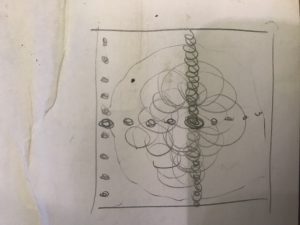
For my project, I used the amount of circles to represent the time. Then central circle represents the seconds that are randomly distributed within the circle. The circles outside of the central circle represents the minutes. The other larger moving circles represent the hours. They have different moving velocity to show the difference among them.
eeryan-lookingoutwards-06

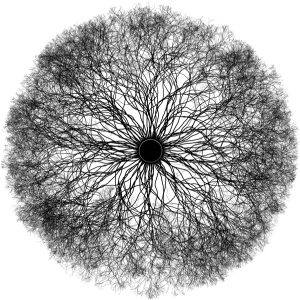
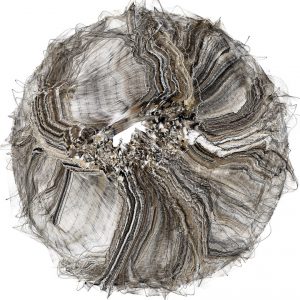
Part of Tarbell’s complexification series

I chose to look at the complexification series by Jared Tarbell, a programmer/artist who also co founded the website Etsy. He creates algorithms that produce pieces with random elements, like the one above. He leaves his code open to modification by interested parties as a way to keep it in execution by distributing the source code, which I think is cool and an interesting way to collaborate. Although I do not know much about the algorithm used to make this specific piece, I like the way that the slight variation and randomness in the threads that make up this piece combine to give the digital work an organic feeling.

ifv-LookingOutwards-06

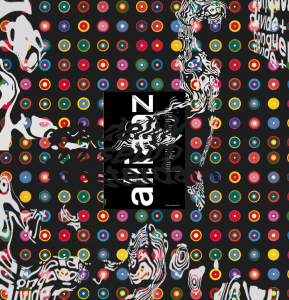
pieces from Dodaro’s project Divide+Conquer

Artist: Jen Dodaro

Project: Divide + Conquer

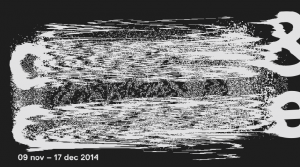
Dodaro used processing to make randomized collages of works from all the artists featured in Stedelijk Museum in Amsterdam. When the user interacts with the piece (by clicking) a new image is generated and projected on the gallery wall. I think the interactivity was good not only for making the viewing experience fun but also for proving the complexity of the program. I admired the posters created by this process because they are visually complex and put an emphasis of aesthetics over legibility. The contrast between the organic marks created through randomness and the utilitarian font is particularly interesting. The artist’s sensibility shows through in how the program collages pieces together and the choice to use pieces from the show.


hqq – secE – project06 – abstract-clock

hamza

//hamza qureshi
//hqq@andrew.cmu.edu
//section e
//project 6

function setup(){
    createCanvas(480,480);
    ellipseMode(CENTER);
}

function draw(){
    background(210,230,220);
    noStroke();

    //body of oscar the walrus
    fill(170);
    var bodw = 0.75*width;
    var bodh = 0.75*height;
    ellipse(bodw,bodh,width,bodh);

    //mouth
    bodw = width/2;  //redefines variables to allow to draw from center
    bodh = height/2;
    var h = hour(); //calls hour function
    if (h == 12){ //resets the hourly measure to convert to 12-hr clock
        h = 0;
    }
    var xH = map(h,0,11,0,40); //remaps range of hours to translation unit
    fill(180);
    ellipse(bodw,bodh+xH,130,250); // lowers mouth as hour increases
    fill(160,100,100);
    ellipse(bodw,bodh+xH,110,230); //"______________________________"

    //head
    fill(190);
    ellipse(bodw,bodh-70,260,250);

    //eyes
    //black
    fill(0);
    ellipse(bodw-50,bodh-100,30,30);
    ellipse(bodw+50,bodh-100,30,30);
    //white
    fill(255);
    ellipse(bodw-55,bodh-105,15,15);
    ellipse(bodw+45,bodh-105,15,15);

    //blink every other second
    var s = second(); //calls second function
    if (s % 2 == 1){ //modulus to determine odd-count second
        fill(170);
        ellipse(bodw-50,bodh-100,31,31); //draws "blink" over original eye
        ellipse(bodw+50,bodh-100,31,31);
        fill(130);
        ellipse(bodw-50,bodh-100,32,10);
        ellipse(bodw+50,bodh-100,32,10);
        push();
        strokeWeight(2);
        stroke(120);
        line(bodw-68,bodh-100,bodw-32,bodh-100);
        line(bodw+68,bodh-100,bodw+32,bodh-100);
        pop();
    }

    //tusks
    fill(252,246,232); //ivory color
    var m = minute(); //calls minute function
    var xM = map(m,0,59,130,240); //remaps minute range to reflect length of tusk
    beginShape();
    curveVertex(bodw-80,bodh);
    curveVertex(bodw-85,bodh+120);
    curveVertex(bodw-80,bodw+xM); //lowers left tusk according to minute
    curveVertex(bodw-65,bodh+120);
    curveVertex(bodw-60,bodh);
    endShape(CLOSE);
    beginShape();
    curveVertex(bodw+80,bodh);
    curveVertex(bodw+85,bodh+120);
    curveVertex(bodw+80,bodw+xM); //lowers right tusk according to minute
    curveVertex(bodw+65,bodh+120);
    curveVertex(bodw+60,bodh);
    endShape(CLOSE);

    //cheeks
    fill(190);
    ellipse(bodw-70,bodh+40,165,140);
    ellipse(bodw+70,bodh+40,165,140);
        //freckles
        fill(90);
        ellipse(bodw-80,bodh+30,7,7);
        ellipse(bodw-100,bodh+60,7,7);
        ellipse(bodw-60,bodh+50,7,7);
        ellipse(bodw+80,bodh+30,7,7);
        ellipse(bodw+100,bodh+60,7,7);
        ellipse(bodw+60,bodh+50,7,7);

    //nose
    fill(0);
    triangle(bodw,bodh-20,bodw+30,bodh-35,bodw-30,bodh-35);

    //whiskers
    strokeWeight(1);
    stroke(0);
    noFill();
    bezier(bodw-140,bodh+30,bodw-160,bodh+25,bodw-180,bodh+30,bodw-200,bodh+40);
    bezier(bodw+140,bodh+30,bodw+160,bodh+25,bodw+180,bodh+30,bodw+200,bodh+40);
    bezier(bodw-130,bodh+50,bodw-150,bodh+45,bodw-170,bodh+40,bodw-190,bodh+60);
    bezier(bodw+130,bodh+50,bodw+150,bodh+45,bodw+170,bodh+40,bodw+190,bodh+60);
    bezier(bodw-120,bodh+70,bodw-140,bodh+65,bodw-160,bodh+50,bodw-180,bodh+70);
    bezier(bodw+120,bodh+70,bodw+140,bodh+65,bodw+160,bodh+50,bodw+180,bodh+70);
}

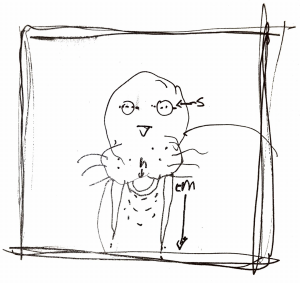
For my abstract clock, I wanted to create an image that was fun and playful, and would not immediately read as a clock unless it was meticulously watched for awhile. I thought of walruses as a fun way to create an image that tells time and used subtle aspects of the walrus’ anatomy to show changes in time. In the script, the eyes blink to correspond to the second, the tusks grow longer as each minute passes, and the mouth drops to correspond with the hour. Much like me, the walrus appears to get happier the later in the morning or evening it becomes, much like I do. However, unlike me, the walrus seems to be pretty good at keeping time.

eeryan-project06-abstract clock

sketch

//erin ryan
//lab c
//eeryan@andrew.cmu.edu
//project 06 variable face

function setup() {
  createCanvas(480,480);
  angleMode(DEGREES);
}

function draw() {//this is a 24 hour clock
  background(0);
  var h = hour();
  var m = minute();
  var s = second();
  for(var x = 0; x < width; x += 30){
    for(var y = 0; y < height; y += 30){
      fill(40,35,249);
      noStroke();
      ellipse(x, height/2, 2, 2);
      ellipse(width/2,y,2,2);
      }
    }
  stroke(255,255,0);
  noFill();
  ellipse(width/2,height/2, 300, 300);
//second indicator
  push();
  translate(width/2, height/2);
  rotate(s*6);
  stroke(255,248,220);
  strokeWeight(2);
  noFill();
  arc(150,150,25,25,180,0,CHORD);
  pop();
//minute indicator
  push();
  translate(width/4, height/4);
  rotate(m*6);
  stroke(205,92,92);
  strokeWeight(4);
  noFill();
  ellipse(0,0,60,60);
  pop();
//hour indicator
  push();
  translate(width/2, height/2);
  rotate(h*30);
  stroke(220,20,60);
  strokeWeight(5);
  noFill();
  line(0,10,0,50);
  pop();
}

I started off by looking at a lot of the clocks by Vincent Toupe. I ended up using three different shapes to represent the hour, minute, and second hands. It’s a 24 hour clock. I tried to find a color palette that worked with the simple, graphic elements of the piece.

ssharada-looking-outwards-06-randomness

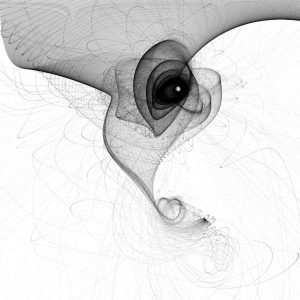
This is the art work of Keith Peters. He is a coder and generative artist that does work in a variety of coding languages. His basic method to creating art is to use the coding software and play around with it until he gets something that looks nice. He has a whole website dedicated to his work called Art for Code.

From his work it is possible to see that there seems to be a lot of mathematics involved or the shapes that are formed look very organic and nature like which to my surprise is not uncommon in this field of generative art because a lot of the employed mathematical models are often those useful in scientific analysis and simulation.

Bettina-Project-06-AbstractClock

sketch

var minuteCounterX = [];
var minuteCounterY = [];
var dy = [];
var col = [];

function setup() {
    createCanvas(150,480);
    background("#469f80");
    for (var m = 0; m < (60 - minute()); m++) {
        minuteCounterX[m] = random (5,140);
        minuteCounterY[m] = random (-10,20);
        dy[m] = random(1,3);
    }
}


function draw() {
    background("#469f80");
    secondsBall();
    for (var r = 0; r < 24 - hour(); r++) { //number of squares is hours left in day
        rectangles(r);
    }
    minutePetalsDraw(minuteCounterX,minuteCounterY);
}
    
function minutePetalsDraw(minuteCounterX,minuteCounterY) { //number of circles equals number of minutes left in the hour
    noStroke();
    for (m = 0; m < (60 - minute()); m++) {
          if (m%4 === 0) {
              fill("#fba919");
        }
          else if (m%4 == 1) {
              fill("#ef5b30");
        }
          else if (m%4 == 2) {
              fill("#96b9e2");
        }
          else {
              fill("#434b9f");
        }
        ellipse(minuteCounterX[m],minuteCounterY[m],10);
        minuteCounterY[m] += dy[m];
        if (minuteCounterY[m] > 480) {
          minuteCounterY[m] = 0;
        }
    }
}


function secondsBall() { //ball appears every other second and grows smaller as the minute passes
    frameRate(60);
    noStroke();
    fill("#e47884");
    if (second()%2 === 0) {
      ellipse(115,30,120 - (second()*2));
    }
}

function rectangles(r) { //number of squares remaining equal number of hours remaining in day
    frameRate(60);
    stroke("#f6f0b8");
    strokeWeight(2);
    noFill();
    rectMode(CENTER);
    push();
    translate(75,30+(r*18)); //each square is 18 pixels apart from center
    angleMode(DEGREES);
    rotate(millis()/45+(r*10)); //each square is 10 degrees apart from the other; number chosen for aesthetics
    rect(0,0,25,25);
    pop();
}

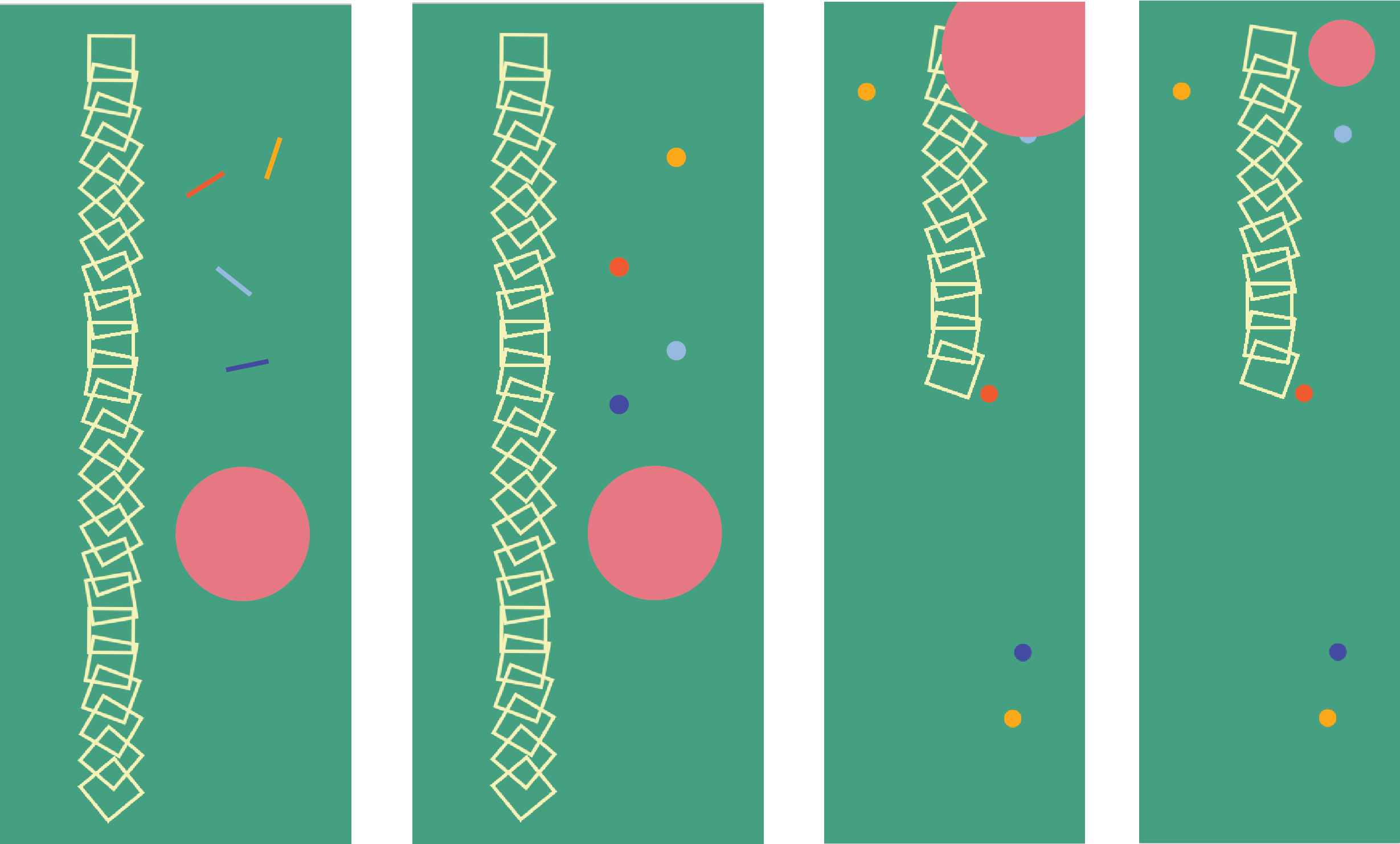
I wanted my designs to follow the concept of visualizing “time left” as opposed to “time passed”. We often view the positive space of things (the black ink that forms the letter) as opposed to the negative space (the white around a letter that comes together to form the black). I played with various geometric shapes and compositions, and had fun experimenting with color.

The rotating squares represent the number of hours left in the day; the confetti circles represent the number of minutes left in the hour, and the size of the blinking circle, which appears and disappears every second, correlates to the number of seconds left in the minute.

The confetti circles was a bit of a challenge. I had tried using a for loop to initialize an array of x and y coordinates; however, I had initially put the for loop in the draw function. As a result, the circles kept on being redrawn and “spazzing”. After trying (with no avail) to set conditions for when the for loop would redraw, I learn that I’d needed to put the for loop in the setup function.

Something I still don’t quite understand is that even though the setup function is called once, the array still changes with the minute. Thus, does the setup function change if the parameters inside it change? When I’d tried printing the minute or second in the setup function, the value in the console didn’t change even as the minute and second did.

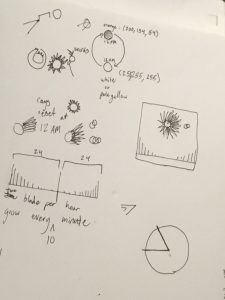
Above are some sketches I did for color and composition

ifv-Project-06-Clock

sketch

//Isabelle Vincent
//Section E
//ifv@andrew.cmu.edu
//Project-06
function setup() {
  createCanvas(480,480);
  var H = hour();
  var cChange = map(H,0,23,0,50)
  background(31+cChange,30+cChange,72+cChange);
}


function draw() {
  var H = hour();
  var M = minute();
  var S = second();
    //change color in relation to hours
    var cChange = map(H,0,23,0,50)
    background(31+cChange,30+cChange,72+cChange,20);
    var c=color(200+cChange,134+cChange,54+cChange);
    fill(c)

    //SunRays
    for(var i=0; i < 60;i++){
      strokeWeight(3);
      var col = color(c);
      if(minute() == i) {
        col = color(200+cChange,134+cChange,54+cChange,40);
      }
      drawRay(i, color(col));
    }
    //sun center
    noStroke();
    ellipse(width/2,height/3,width/8,height/8);

    //Glare
    push();
    translate(width/2,height/3);
    var secondz = map(S,0,59,0,360);
    rotate(radians(secondz));
    fill(255,255,255,70);
    ellipse(width/3.5,0,15,15);
    ellipse(width/3.7,0,10,10);
    pop();
      //triangle
      fill(255,255,255,40);
      noStroke();
      var hgt =0;
      var sc = map(S,0,59,0,height/7);
      hgt +=sc
      triangle(0,height,width/2,height-hgt,width,height)

}
//Instruction on how draw Ray
function drawRay(count,col) {
  push();
  translate(width/2,height/3);
  rotate(radians(count*6));
  stroke(col);
  var H = hour();
  var rayH = map(H,0,0,140);
  line(0,0,(width/10),height/5);
  pop();
}

The color of the sun and the background color are affected by the hour. One of the rays changes color according to the minute. The white “flare” circles around the sun in relation to the passing seconds. The triangle and flare leave a ghostly trail because a semi-transparent background is being drawn on top of past iterations. My result was very different from my original idea, I made some compromises for simplicity. I was happy with the changes I met and the result has the same general tone I originally intended when making my sketch.

agusman-LookingOutwards-06-Randomness

IAAC-Institute for Advanced Architecture of Catalonia
STIGMETRIC SYSTEMS by the Advanced Architecture Group

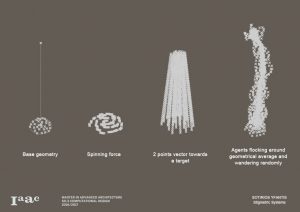
Stigmetric Systems Simulation

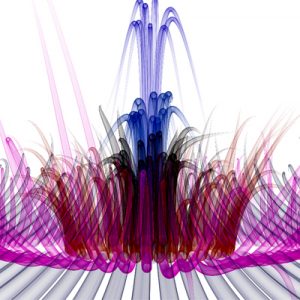
This project is an exploration of stigmetric systems and multi-agent based systems. Using a group of agents, which are often used to represent organically behaviored bodies in a larger “flock” (birds, bees, fish, etc.), the program randomly distributes these across different surfaces, spinning forces, and vectors with specific targets are applied to them.

What’s excellent about agent-based computational design is that it is a field that merges the seemingly arbitrary and random nature of the organic and the mechanized, calculated nature of computer software. Randomness fits well into computational design because in a simulation, random values can fill in the unimportant blanks and can be used the emphasize the algorithm over the results. In that way, we can enhance the seemingly arbitrary patterns in nature through very calculated, yet somewhat random, simulations.

ssharada-project-06-abstract-clock

project06-3.js

//shariwa sharada
//ssharada@andrew.cmu.edu
//project 06
//section a 


//creating global var to be used in varyingly in different functions
var diameter;
//array of points for x point of second ellipses - 60 variables for 60 seconds 
var placeX = [300,305,310,320,325,330,340,345,350,360,365,370,380,385,390,400,405,410,420,425,430,440,445,450,460,465,470,480,485,490,500,505,510,520,525,530,540,545,550,560,565,570,580,585,590,600,605,610,620,625,630,640,645,650,660,665,670,680,690,700]
//array of points for y point of second ellipses - 60 variables for 60 seconds 
var placeY = [300,305,310,320,325,330,340,345,350,360,365,370,380,385,390,400,405,410,420,425,430,440,445,450,460,465,470,480,485,490,500,505,510,520,525,530,540,545,550,560,565,570,580,585,590,600,605,610,620,625,630,640,645,650,660,665,670,680,690,700]
//array of points for x point of minute ellipses - 60 variables for 60 minutes 
var placeXMin = [50,60,75,85,100,110,125,135,150,160,175,185,200,210,225,235,250,260,275,285,300,310,325,335,350,360,375,385,400,410,425,435,450,460,475,485,500,510,525,550,575,600,625,650,675,700,725,750,775,800,825,850,875,900,925,950]
//array of points for y point of hour lines - 24 variables for 24 hours
var placeYHr = [50,75,121,150,176,200,253,300,350,375,450,473,500,550,600,675,699,737,775,803,825,869,900,925]


function setup(){
	createCanvas(500,500);	
}

function draw(){
	background(0);

	var hr = hour(); //hour variable 
	var mn = minute(); //minute variable 
	var sc = second();//second variable 

	//creating the ellipses for the seconds
	//this draws the same number of ellipses at the given second 
	//the ellipses position change with each second  
	push();
	for (var i = 0; i<sc; i++){ //for loop relative to the number of seconds 
		var diameter = random(20,180);
		frameRate(1);
		fill(random(214,254), random(92,132), random(131,171), random(0,70)); //adding transparencies to the fill 
		stroke(random(214,254), random(92,132), random(131,171), random(120,225));
		strokeWeight(random(0.5, 2.3));
		ellipseX = random(placeX); //making the index value chosen from the array random 
		ellipseY = random(placeY); //making the index value chosen from the array random 
		ellipse(ellipseX/2, ellipseY/2, diameter/2, diameter/2); //drawing the ellipses 
	}
	pop();

	//making the minutes ellipses 
	//the position of the ellipses in the y axis does not change 
	//this draws the same number of ellipses at the given minute.
	push();
	for (var j = 0; j<mn; j++){ //for loop relative to the number of minutes 
		stroke(random(215,255), random(174,214), random(5,45), random(70,100));//randomising stroke colours
		fill(255, 194, 25, 70);
		strokeWeight(random(0.1, 1.2));
		drawMin(placeXMin[j]/2); //making it relaitive to the x value of the ellipse and the for loop  
		//calling it from another functions that defines what to draw
	}
	pop();

	//making the hour lines/blobs
	//the position of these blobs does not change in the x direction 
	//this draws the same number of lines as the number of hours in a range of 1-24
	push();
	for (var k = 0; k<hr; k++){ //making the for loop relative to the hour 
		stroke(random(0,40), random(137,177), random(155,195));
		fill(20, 157, 175, 10);
		strokeWeight(random(5, 10));//making the lines blobs 
		drawHr(placeYHr[k]/2);//making it relative to hour variable, the for loop, y position array
	}
	pop();
}

//giving the parameters for the ellipses drawn for the minutes representation 
function drawMin(x){
	var diameter = random(10,50);
	ellipse(x, width/2, diameter/2, diameter/2);//only calling fro the x position to be changed. 
}

//giving the parameters for the lines drawn for the hours representation 
function drawHr(y){
	var diameter = random(30,70);
	line(height/2, y, height/2, y+5); //only calling the y value to be changed 
}


For this project I was inspired by the gear system that watches have. The way the ellipses interact represent the complexity of a traditional gear system.

Everything is relative to the second values which is why everything moves as the second changes but the objects are only added as the individual variable changes. This is similar to the idea that in a gear system, if even one part if off by the slightest bit, everything is affected.

The pink ellipses depict the seconds – the number of these ellipses show the number of seconds that have passed, and every second that goes by the placement of these ellipses randomises while adding another ellipse i.e.: a second.

The yellow ellipses represent the minutes with the number of minutes increasing from left to right as the number of minutes increase.

The central blobs represent the hours in a 24 hours clock with the number increasing from top to bottom as the number of hours increase.