![[OLD FALL 2017] 15-104 • Introduction to Computing for Creative Practice](../../../../wp-content/uploads/2020/08/stop-banner.png)
SYN-Phon is a sound performance based on graphical notation by Candaş Şişman that reflects role of art in communication and comprehension. The performance is based on intimate collective findings in Budapest by Candas himself. In communicating music through visual graphics, the project hopes to reach out for audience through sensual expressive language. The project is inspiring in that it reflects the creator’s artistic sensibilities through his representation of certain type of music that allows the audience to explore and question how the graphical representation ties in with the sound. While watching the video, the viewer can also think through how he or she will represent the atmosphere of the sound and understand the vibe of the music through visual representation through algorithm.
Month: November 2017
Project 11 – Yugyeong Lee
aerubin-Project-11-Composition
For this project, I was inspired by the intricacies of different snowflakes. Each snowflake is made out of a pattern that repeats throughout the design of the snowflake. I first made an initial leg of a snowflake, and afterward I put them into a for loop to make them repeat in a circular pattern to replicate a snowflake.
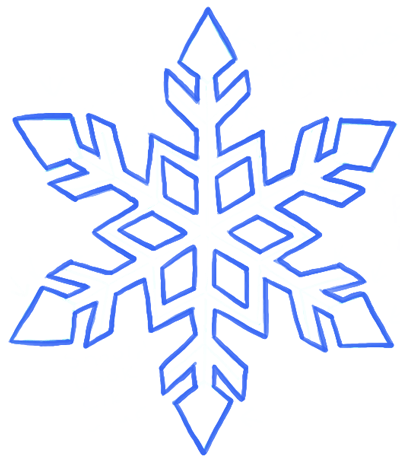
Attached are two images that inspired two of my snowflake designs. I am very pleased with the final result and I think I made it just in time for Pittsburgh’s first snow!

//Angela Rubin
//Section C
//aerubin@andrew.cmu.edu
//Project-11-Playing with Turtles

//initial x and y positions of snowflakes
var x1 = 40;
var y1 = 10;
var x2 = 200;
var y2 = 50;
var x3 = 330;
var y3 = 50;
var x4 = 250;
var y4 = 200;

//velocities for snowflakes
var yvel1 = 1;
var yvel2 = .75;
var yvel3 = 1.5;
var yvel4 = .5;

function setup() {
    createCanvas(400, 400);
}

function draw() {
    background(148, 164, 183);
    strokeJoin(MITER);
    strokeCap(PROJECT);

    //first snowflake on left
    var turtle = makeTurtle(x1, y1); //initial position of snowflake
    turtle.penDown();
    turtle.setWeight(1);
    turtle.setColor(255);
    var ed1 = 5;
    var ed2 = ed1 * 2;
    var ed3 = ed1 * 3;

    for (var i = 0; i < 6; i++) {
        turtle.right(25);
        turtle.forward(ed3-ed1);
        turtle.left(115);
        turtle.forward(ed1+(ed1/5)*3);
        turtle.left(40);
        turtle.forward(ed2);
        turtle.right(40);
        turtle.forward(ed1+ed1);
        turtle.right(140);
        turtle.forward(ed2);
        turtle.left(140);
        turtle.forward(ed2-ed1);
        turtle.left(40);
        turtle.forward(ed2-ed1);
        turtle.right(75);
        turtle.forward(ed2+ed1);
        //after tip of snowflake
        turtle.right(105);
        turtle.forward(ed2+ed1);
        turtle.right(75);
        turtle.forward(ed2-ed1);
        turtle.left(35);
        turtle.forward(ed2-ed1);
        turtle.left(140);
        turtle.forward(ed2);
        turtle.right(140);
        turtle.forward(ed1+ed1);
        turtle.right(40);
        turtle.forward(ed2);
        turtle.left(40);
        turtle.forward(ed1+(ed1/5)*3);
        turtle.left(115);
        turtle.forward(ed3-ed1);
        turtle.right(85);
    }
    turtle.penUp();
    turtle.right(60);
    turtle.forward(ed2);
    for(var n = 0; n < 6; n++) {
        turtle.penDown();
        turtle.left(30);
        turtle.forward(ed2-(ed1/5)*2);
        turtle.right(60);
        turtle.forward(ed2-(ed1/5)*2);
        turtle.right(120);
        turtle.forward(ed2-(ed1/5)*2);
        turtle.right(60);
        turtle.forward(ed2-(ed1/5)*2);
        turtle.penUp();
        turtle.right(90);
        turtle.forward(20);
        turtle.right(120);
    }

    //second snowflake in middle
    var turtle2 = makeTurtle(x2, y2); //initial position of snowflake
    turtle2.penDown();
    turtle2.setWeight(2);
    turtle2.setColor(255);
    var s1 = 6;
    var s2 = (s1 * 2)-2;
    var s3 = s1 * 5;

    for(a = 0; a < 4; a++) {
        turtle2.forward(s3);
        turtle2.back(s1);
        turtle2.left(50)
        turtle2.forward(s2)
        turtle2.back(s2);
        turtle2.right(110);
        turtle2.forward(s2);
        turtle2.back(s2);
        turtle2.right(120);
        turtle2.forward(s2+s1/3);
        turtle2.left(130);
        //start of inner diamond shape
        turtle2.forward(s2);
        turtle2.right(116);
        turtle2.forward(s2);
        turtle2.right(55);
        turtle2.forward(s3-s2-s1);
        turtle2.back(s3-s2-s1);
        turtle2.back(s3);
        turtle2.forward(s1);
        turtle2.left(130);
        turtle2.forward(s2);
        turtle2.back(s2);
        turtle2.left(100);
        turtle2.forward(s2);
        turtle2.back(s2);
        turtle2.left(130);
        turtle2.forward(s1);
        turtle2.right(130);
        turtle2.forward(s2+s1/2);
        turtle2.back(s2+s1/2);
        turtle2.right(100);
        turtle2.forward(s2+s1/2);
        turtle2.back(s2+s1/2);
        turtle2.right(130);
        turtle2.forward(s2+s2/1.3);
        turtle2.left(120);
        turtle2.forward(s2);
        turtle2.right(110);
        turtle2.forward(s2);
        turtle2.right(55);
        turtle2.forward(s2+s1/.8);
    }

    //third snowflake right
    var turtle3 = makeTurtle(x3, y3); //initial position of snowflake
    turtle3.setWeight(1);
    turtle3.setColor(255);

    var w1 = 5;
    var w2 = w1*2;
    var w3 = w1*7;
    var w4 = w1*3;
    var w5 = w1*4;
    var w6 = w1*8;
    var w7 = w1*6;

    for (m = 0; m < 6; m++) {
        turtle3.penUp();
        turtle3.left(180);
        turtle3.forward(w6);
        turtle3.right(45); //changes closeness of petals
        turtle3.penDown();
        turtle3.forward(w2);
        turtle3.right(90);
        turtle3.forward(w2);
        turtle3.left(110);
        turtle3.forward(w4);
        turtle3.right(65);
        //tip of snowflake
        turtle3.forward(w5);
        turtle3.right(90);
        turtle3.forward(w5);
        turtle3.right(60);
        turtle3.forward(w4);
        turtle3.penUp();
        turtle3.forward(w6);
    }
    //inner diamonds
    turtle3.left(60);
    turtle3.forward(w1);
    turtle3.right(48);
    for(var q = 0; q < 6; q++) {
        turtle3.penDown();
        turtle3.forward(w7);
        turtle3.left(50);
        turtle3.forward(w1);
        turtle3.left(90);
        turtle3.forward(w1);
        turtle3.left(53);
        turtle3.forward(w7);
        turtle3.penUp();
        turtle3.forward(w2+w1);
        turtle3.left(120);
        turtle3.forward(w2);
        turtle3.right(11);
    }

    //fourth turtle (smaller version of first snowflake)
    var turtle = makeTurtle(x4, y4); //initial position of snowflake
    turtle.penDown();
    turtle.setWeight(1);
    turtle.setColor(255);
    var ed1 = 4;
    var ed2 = ed1 * 2;
    var ed3 = ed1 * 3;

    for (var i = 0; i < 6; i++) {
        turtle.right(25);
        turtle.forward(ed3-ed1);
        turtle.left(115);
        turtle.forward(ed1+(ed1/5)*3);
        turtle.left(40);
        turtle.forward(ed2);
        turtle.right(40);
        turtle.forward(ed1+ed1);
        turtle.right(140);
        turtle.forward(ed2);
        turtle.left(140);
        turtle.forward(ed2-ed1);
        turtle.left(40);
        turtle.forward(ed2-ed1);
        turtle.right(75);
        turtle.forward(ed2+ed1);
        //after tip of snowflake
        turtle.right(105);
        turtle.forward(ed2+ed1);
        turtle.right(75);
        turtle.forward(ed2-ed1);
        turtle.left(35);
        turtle.forward(ed2-ed1);
        turtle.left(140);
        turtle.forward(ed2);
        turtle.right(140);
        turtle.forward(ed1+ed1);
        turtle.right(40);
        turtle.forward(ed2);
        turtle.left(40);
        turtle.forward(ed1+(ed1/5)*3);
        turtle.left(115);
        turtle.forward(ed3-ed1);
        turtle.right(85);
    }
    turtle.penUp();
    turtle.right(65);
    turtle.forward(ed2+2);

    //inner part of snowflake
    for(var n = 0; n < 6; n++) {
        turtle.penDown();
        turtle.left(30);
        turtle.forward(ed2-(ed1/5)*2);
        turtle.right(60);
        turtle.forward(ed2-(ed1/5)*2);
        turtle.right(120);
        turtle.forward(ed2-(ed1/5)*2);
        turtle.right(60);
        turtle.forward(ed2-(ed1/5)*2);
        turtle.penUp();
        turtle.right(90);
        turtle.forward(15);
        turtle.right(120);
    }

    //make snowflake 1 fall at rate of yvel1
    y1+=yvel1;

    //if snowflake falls beyond canvas, start again at the top
    if (y1>height+40) {
        y1 = 0;
    }

    //make snowflake 2 fall at rate of yvel2
    y2+=yvel2;

    //if snowflake falls beyond canvas, start again at the top
    if (y2>height+40) {
        y2 = 0;
    }

    //make snowflake 3 fall at rate of yvel3
    y3+=yvel3;

    //if snowflake falls beyond canvas, start again at the top
    if (y3>height+40) {
        y3 = 0;
    }

    //make snowflake 4 fall at rate of yvel4
    y4+=yvel4;

    //if snowflake falls beyond canvas, start again at the top
    if (y4>height+40) {
        y4 = 0;
    }

    //make the snow covered ground
    fill(255);
    ellipse(width/2, 400, 500, 200);
}

function turtleLeft(d) {
    this.angle -= d;
}


function turtleRight(d) {
    this.angle += d;
}


function turtleForward(p) {
    var rad = radians(this.angle);
    var newx = this.x + cos(rad) * p;
    var newy = this.y + sin(rad) * p;
    this.goto(newx, newy);
}


function turtleBack(p) {
    this.forward(-p);
}


function turtlePenDown() {
    this.penIsDown = true;
}


function turtlePenUp() {
    this.penIsDown = false;
}


function turtleGoTo(x, y) {
    if (this.penIsDown) {
      stroke(this.color);
      strokeWeight(this.weight);
      line(this.x, this.y, x, y);
    }
    this.x = x;
    this.y = y;
}


function turtleDistTo(x, y) {
    return sqrt(sq(this.x - x) + sq(this.y - y));
}


function turtleAngleTo(x, y) {
    var absAngle = degrees(atan2(y - this.y, x - this.x));
    var angle = ((absAngle - this.angle) + 360) % 360.0;
    return angle;
}


function turtleTurnToward(x, y, d) {
    var angle = this.angleTo(x, y);
    if (angle < 180) {
        this.angle += d;
    } else {
        this.angle -= d;
    }
}


function turtleSetColor(c) {
    this.color = c;
}


function turtleSetWeight(w) {
    this.weight = w;
}


function turtleFace(angle) {
    this.angle = angle;
}


function makeTurtle(tx, ty) {
    var turtle = {x: tx, y: ty,
                  angle: 0.0,
                  penIsDown: true,
                  color: color(128),
                  weight: 1,
                  left: turtleLeft, right: turtleRight,
                  forward: turtleForward, back: turtleBack,
                  penDown: turtlePenDown, penUp: turtlePenUp,
                  goto: turtleGoTo, angleto: turtleAngleTo,
                  turnToward: turtleTurnToward,
                  distanceTo: turtleDistTo, angleTo: turtleAngleTo,
                  setColor: turtleSetColor, setWeight: turtleSetWeight,
                  face: turtleFace};
    return turtle;
}LookingOutwards11-jooheek
The Classyfier – AI detects situation and appropriates music
Website: http://www.creativeapplications.net/processing/the-classyfier-ai-detects-situation-and-appropriates-music/
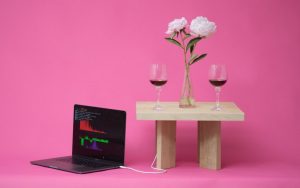
This project is called “The Classyfier”, a table that detects what beverages people are drinking around them, and chooses music that fits with that certain beverage. There is a microphone on the table that catches the characteristic sounds of the beverage, and goes through a pre-inputed list of songs that are categorized as hot beverages, wine, and beer. It goes through and chooses a song that fits your beverage, and you can choose the song in the certain category by knocking on the table. The objective of this project is to create a smart object that combines machine learning and natural sounds to create an ambience of different situations.
I thought this project was interesting because it uses computation to create a musical environment that is dependent on an object, in this case a beverage. The thought and idea of a computer analyzing what you are drinking and creating music that fits that drink is very innovative and clever. Now, you won’t have to go through all of your music to find the right music for your mood; you can just use “The Classyfier”.
jooheek-Project11-Composition
eeryan-project-11-turtles
var t1;
var startFrame;

function setup() {
    createCanvas(400, 400);
    background(0);
    //initializes and sets the weight and color of 6 turtles
    t1 = makeTurtle(width / 2, height / 2);
    t1.setColor(color(255, 200, 200));
    t1.setWeight(2);
    t1.penDown();
    t2 = makeTurtle(width/2, height/2);
    t2.setColor(color(0,0,255));
    t2.setWeight(2);
    t2.penDown();
    t3 = makeTurtle(width/2, height/2);
    t3.setColor(color(255,0,0));
    t3.setWeight(2);
    t3.penDown();
    t4 = makeTurtle(width/2, height/2);
    t4.setColor(color(0,255,0));
    t4.setWeight(1);
    t4.penDown();
    t5 = makeTurtle(width/2, height/2);
    t5.setColor(255);
    t5.setWeight(2);
    t5.penDown();
    t6 = makeTurtle(width/2, height/2);
    t6.setColor(color(255,255,0));
    t6.setWeight(1);
    t6.penDown();
    resetCanvas();
    frameRate(10);
}

function draw() {
    var s = second(); // makes a time based variable
    var step = (frameCount - startFrame)/30.0;//creates a varying amount to move forward
    var angle1 = -100/s;//creates different angles based on the second (time)
    var angle2 = 50/s;
    var angle3 = -100/(s * 2);
    var angle4 = 200/(s * 2);
    var angle5 = -180/(s * 3);
    var angle6 = 400/(s * 3);
    t1.forward(step);
    t1.left(angle1);
    t2.forward(step);
    t2.left(angle2);
    t3.forward(step);
    t3.left(angle3);
    t4.forward(step);
    t4.left(angle4);
    t5.forward(step);
    t5.left(angle5);
    t6.forward(step);
    t6.left(angle6);
}

function resetCanvas() {
    background(0);
    startFrame = frameCount;
}


function turtleLeft(d){this.angle-=d;}function turtleRight(d){this.angle+=d;}
function turtleForward(p){var rad=radians(this.angle);var newx=this.x+cos(rad)*p;
var newy=this.y+sin(rad)*p;this.goto(newx,newy);}function turtleBack(p){
this.forward(-p);}function turtlePenDown(){this.penIsDown=true;}
function turtlePenUp(){this.penIsDown = false;}function turtleGoTo(x,y){
if(this.penIsDown){stroke(this.color);strokeWeight(this.weight);
line(this.x,this.y,x,y);}this.x = x;this.y = y;}function turtleDistTo(x,y){
return sqrt(sq(this.x-x)+sq(this.y-y));}function turtleAngleTo(x,y){
var absAngle=degrees(atan2(y-this.y,x-this.x));
var angle=((absAngle-this.angle)+360)%360.0;return angle;}
function turtleTurnToward(x,y,d){var angle = this.angleTo(x,y);if(angle< 180){
this.angle+=d;}else{this.angle-=d;}}function turtleSetColor(c){this.color=c;}
function turtleSetWeight(w){this.weight=w;}function turtleFace(angle){
this.angle = angle;}function makeTurtle(tx,ty){var turtle={x:tx,y:ty,
angle:0.0,penIsDown:true,color:color(128),weight:1,left:turtleLeft,
right:turtleRight,forward:turtleForward, back:turtleBack,penDown:turtlePenDown,
penUp:turtlePenUp,goto:turtleGoTo, angleto:turtleAngleTo,
turnToward:turtleTurnToward,distanceTo:turtleDistTo, angleTo:turtleAngleTo,
setColor:turtleSetColor, setWeight:turtleSetWeight,face:turtleFace};
return turtle;}
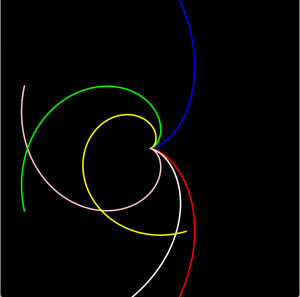
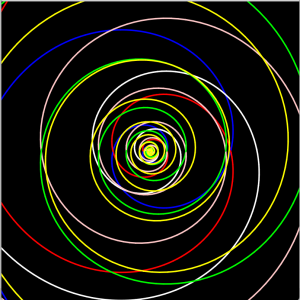
I originally started this by modifying my abstract clock project from week 6, because I had wanted to make an element like this but hadn’t known how to. Because the angle of the turtle is determined by a time based variable, as opposed to a for loop, the composition will generate differently based on what time you load it, which I found interesting. The screenshots below are the same code generated at different times.
NatalieKS-LookingOutwards-11
This is a video of a performance using The Reactable in Turin, Italy, 2009.
—
The Reactable is an electronic instrument created in 2003 by a research team in Pompeu Fabra University in Barcelona, Spain. The system has an interactive interface, where players can place and move objects. These objects, when placed on the interface and connected to other objects, play different sounds. The instrument utilizes the various sound waves and synthesizers connected to the objects to display the sounds on the interface. By moving and reconnecting different objects together, players can create unique compositions of various sounds. While I’m not sure specifically what algorithms the researchers used, I understand they utilized samples and soundbites and programmed physical objects to be able to interact with and produce those sounds.
This product is especially cool because it is a new instrument. You can use it to create songs or sound effects, and the multi-purpose aspects of it make it really accessible and fun. I love how it is first-and-foremost designed to entertain, and how user-focused it is. Not only does it feature an interesting set of sounds and controls, it utilizes those sounds to create a visual composition upon the interface.
Fun Fact: Icelandic musician Björk incorporated this instrument into her world tour performances in 2008-2009.
dnam-project11
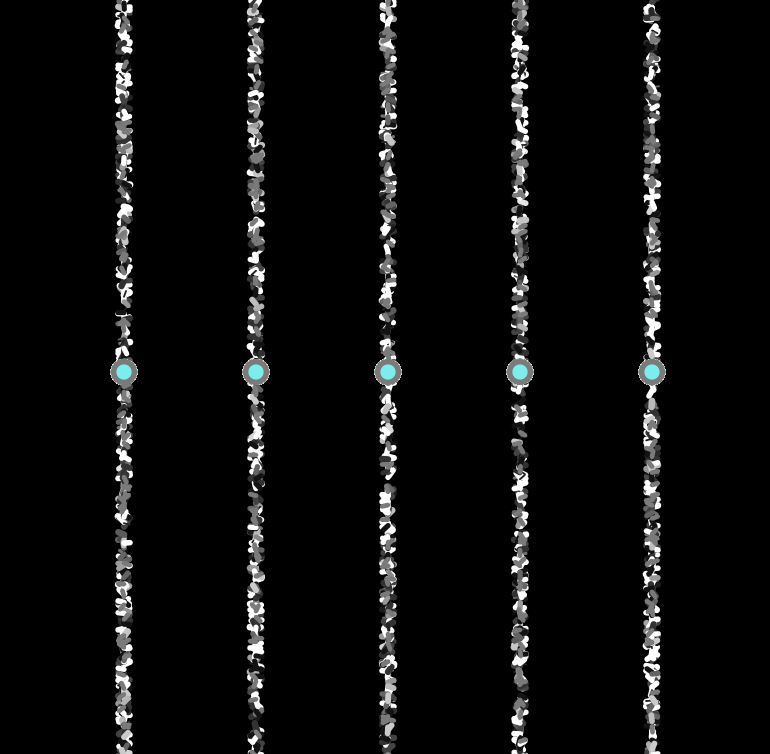
var circPositions = [33, 66, 132, 198, 264, 330]; //5 dots in the middle

function setup() {
  createCanvas(400, 400);
  background(0);
  frameRate(10); //reduce lag, choose frequency of updates
}

function draw() {
  fill(mouseX, mouseY, mouseY) //color interacts with mouse position
  for(var i = 1; i < 6; i++) { //create the dots
    ellipse(circPositions[i], 200, 10, 10);
  }
  for(var b = 1; b < 100; b++){ //create turtle lines / marks with loop
    var turtle = makeTurtle(circPositions[b], random(0, 400)); //set variable for turtle
     turtle.penDown();
     turtle.setColor(mouseX); //shade depending on the mouse position
     turtle.setWeight(0.1 * mouseY / 10); //changes weight depending on mouse position
     turtle.right(random(1, 360)); //mark changes depending on a random factor
     turtle.forward(3); //small mark

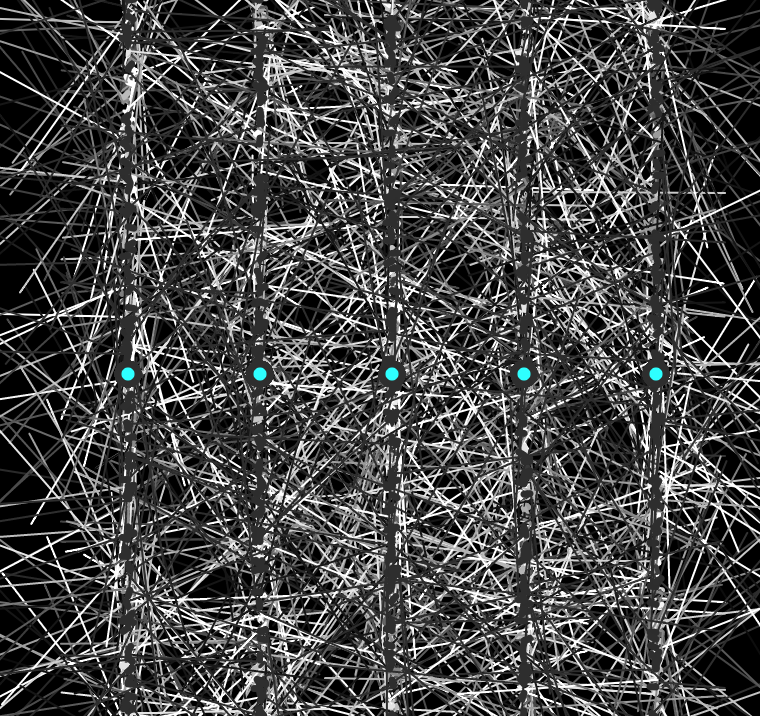
  if (mouseIsPressed === true) { //when mouse is pressed, make large web like lines
  makeTurtle(circPositions[b], 100);
  turtle.penUp();
  turtle.right(90);
  turtle.setWeight(1);
  turtle.penDown();
  turtle.forward(100);
}

  if (keyIsPressed === true){ //clear and reset canvas
       background(0);
}
}


// turtle graphics ----------------------------------------------
function turtleLeft(d){this.angle-=d;}function turtleRight(d){this.angle+=d;}
function turtleForward(p){var rad=radians(this.angle);var newx=this.x+cos(rad)*p;
var newy=this.y+sin(rad)*p;this.goto(newx,newy);}function turtleBack(p){
this.forward(-p);}function turtlePenDown(){this.penIsDown=true;}
function turtlePenUp(){this.penIsDown = false;}function turtleGoTo(x,y){
if(this.penIsDown){stroke(this.color);strokeWeight(this.weight);
line(this.x,this.y,x,y);}this.x = x;this.y = y;}function turtleDistTo(x,y){
return sqrt(sq(this.x-x)+sq(this.y-y));}function turtleAngleTo(x,y){
var absAngle=degrees(atan2(y-this.y,x-this.x));
var angle=((absAngle-this.angle)+360)%360.0;return angle;}
function turtleTurnToward(x,y,d){var angle = this.angleTo(x,y);if(angle< 180){
this.angle+=d;}else{this.angle-=d;}}function turtleSetColor(c){this.color=c;}
function turtleSetWeight(w){this.weight=w;}function turtleFace(angle){
this.angle = angle;}function makeTurtle(tx,ty){var turtle={x:tx,y:ty,
angle:0.0,penIsDown:true,color:color(128),weight:1,left:turtleLeft,
right:turtleRight,forward:turtleForward, back:turtleBack,penDown:turtlePenDown,
penUp:turtlePenUp,goto:turtleGoTo, angleto:turtleAngleTo,
turnToward:turtleTurnToward,distanceTo:turtleDistTo, angleTo:turtleAngleTo,
setColor:turtleSetColor, setWeight:turtleSetWeight,face:turtleFace};
return turtle;}}
I wanted to create something like a spider web using the turtle tool we were given. I allowed for two different types of art to be created. The results differ depending on the user and their mouse movements.
ssharada-lookingoutwards11
^Cope’s Emmy Bach style prelude.
David Copeis an American author, composer, scientist, and former professor of music at the University of California, Santa Cruz. His primary area of research involves artificial intelligence and music; he writes programs and algorithms that can analyse existing music and create new compositions in the style of the original input music. His EMI (Experiments in Musical Intelligence) software has produced works in the style of various composers, some of which have been commercially recorded (Cockrell 2001)—ranging from short pieces to full length operas. As a composer, Cope’s own work has encompassed a variety of styles—from the traditional to the avant-garde—and techniques, such as unconventional manners of playing, experimental musical instrument, and microtonal scales, including a 33-note system of just intonation he developed himself (Cockrell 2001). Most recently, all of his original compositions have been written in collaboration with the computer—based on an input of his earlier works. He seeks a synergy between composer creativity and computer algorithm as his principal creative direction
jdperez Project 11
Although I wouldn’t say that this project is polished or complete, I think it was a great learning opportunity for me. While playing around with a turtle, or many turtles, creating hundreds of thin lines, I realized that turtle graphics (or at least that style of turtle graphics) allowed me to create an entirely different aesthetic — one reminiscent of hand drawing.
This is a bit ironic, since the final product is not that reminiscent of hand drawing…
After I had gotten all excited about making these pencil sketch images, I began to play around with more abstract drawings. There were a bunch of these that I was playing around with, and honestly I’m not sure which I like best compositionally, but the last one I worked on was this eyeball-esque shape.
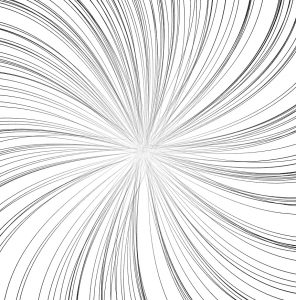
The program takes a bunch of straight lines, and bends them towards the center, creating the illusion of a hard circle filled with a bunch of ellipses.
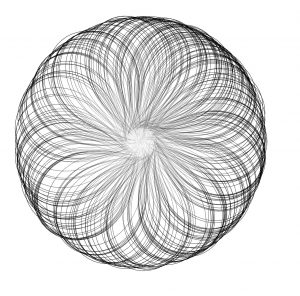
Then, as the line reaches the center, sin() switches from positive to negative, and it bends in the other direction, moving out towards the parameter.
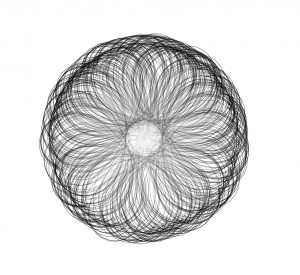
The lines then proceed to curl again towards the center, creating a sort of loose rim around the circle. I enjoy the slowing effect as the line curls, since it creates the feeling of tension or elasticity. I hope you enjoy!
//Jonathan Perez
//Section B
//jdperez@andrew.cmu.edu
//Project 11
var t1; //turtle
var r0 = [] //initialized random radii from center
var face1 = [] //initialized random face
var face2 = [] //second initialzed face before drawing line
var w = .25 //starting angle

function curl(d) {
    //function that produces the furling and unfurling effect
    //the w variable is incremented to return values from 1 to -1 smoothly
    //and the value is scaled by d / 9
    return sin(2 * PI * (w)) * d / 9;
}


function drawLine() {
    t1.penDown();
    for (var i = 0; i < 53; i++) {
        var d = t1.distanceTo(240, 240); //turtle distance from center
        t1.setWeight(d / 400 + 0.00); //line thickens as it gets further from center
        t1.forward(10);
        t1.left(curl(d)); //
        if (t1.x > width || t1.x < 0 || t1.y > height || t1.y < 0) {
            return;
        }
    }
}


function setup() {
    createCanvas(480, 480);
    t1 = makeTurtle(240, 240);
    for (var i = 0; i < 250; i++) {
        //create the starting points for each line
        face1.push(random(360));
        r0.push(random(0 + random(20)));
        face2.push(random(360));
    }
}

function draw() {
    //background(200, 200, 170);
    background(255)
    //fill(0);
    //ellipse(width/2, height/2, 37, 37)
    t1.setColor(0);
    t1.setWeight(0.3);
    for (var i = 0; i < 250; i++) {
        t1.penUp();
        //go to respective starting position
        t1.goto(width/2, height/2);
        t1.face(face1[i]);
        t1.forward(r0[i]);
        t1.face(face2[i]);
        //draw line
        drawLine();
    }
    w += .0025
}

//------------------------------------------

function turtleLeft(d) {
    this.angle -= d;
}


function turtleRight(d) {
    this.angle += d;
}


function turtleForward(p) {
    var rad = radians(this.angle);
    var newx = this.x + cos(rad) * p;
    var newy = this.y + sin(rad) * p;
    this.goto(newx, newy);
}


function turtleBack(p) {
    this.forward(-p);
}


function turtlePenDown() {
    this.penIsDown = true;
}


function turtlePenUp() {
    this.penIsDown = false;
}


function turtleGoTo(x, y) {
    if (this.penIsDown) {
      stroke(this.color);
      strokeWeight(this.weight);
      line(this.x, this.y, x, y);
    }
    this.x = x;
    this.y = y;
}


function turtleDistTo(x, y) {
    return sqrt(sq(this.x - x) + sq(this.y - y));
}


function turtleAngleTo(x, y) {
    var absAngle = degrees(atan2(y - this.y, x - this.x));
    var angle = ((absAngle - this.angle) + 360) % 360.0;
    return angle;
}


function turtleTurnToward(x, y, d) {
    var angle = this.angleTo(x, y);
    if (angle < 180) {
        this.angle += d;
    } else {
        this.angle -= d;
    }
}


function turtleSetColor(c) {
    this.color = c;
}


function turtleSetWeight(w) {
    this.weight = w;
}


function turtleFace(angle) {
    this.angle = angle;
}


function makeTurtle(tx, ty) {
    var turtle = {x: tx, y: ty,
                  angle: 0.0,
                  penIsDown: true,
                  color: color(128),
                  weight: 1,
                  left: turtleLeft, right: turtleRight,
                  forward: turtleForward, back: turtleBack,
                  penDown: turtlePenDown, penUp: turtlePenUp,
                  goto: turtleGoTo, angleto: turtleAngleTo,
                  turnToward: turtleTurnToward,
                  distanceTo: turtleDistTo, angleTo: turtleAngleTo,
                  setColor: turtleSetColor, setWeight: turtleSetWeight,
                  face: turtleFace};
    return turtle;
}