heeseoc-Project-11-Composition

sketch

//Steph Chun
//Section A
//heeseoc@andrew.cmu.edu
//Project-11

var turtle, turtle2;
var angle = 20;
var side = 5;
var angle2 = 160;
var side2 = 10;

function setup(){
    createCanvas(400,400);
    background(20,20,50);
	frameRate(10);
	//circular geometric shape
	turtle = makeTurtle(random(0,width), random(0,height));
	//spikey geometric shape expanding from the center
	turtle2 = makeTurtle(width/2, height/2);
}

function draw(){
	stroke(255);
	strokeWeight(.8);
	textSize(14);
	text("click anywhere!", 5, 20);

	//circular geometric shape 
	for (var i = 0; i < 30; i++){
		turtle.setColor(color(random(150,255), random(200,255), random(200,255)));
	    turtle.penDown();
	    turtle.setWeight(.2);
	    turtle.left(angle);
	    turtle.forward(side);
}
	turtle.right(10);
    side += .5;

    //spikey geometric shape expanding from the center
	turtle2.setColor(color(random(150,255), random(200,255), random(100,255)));
    turtle2.penDown();
    turtle2.setWeight(.3);
    turtle2.left(angle2);
    turtle2.forward(side2);
    turtle2.right(5);
    side2 += 2;

}

//creating spiral shape on mouseclick 
function mousePressed(){
	turtle = makeTurtle(mouseX, mouseY);
}


function turtleLeft(d){this.angle-=d;}function turtleRight(d){this.angle+=d;}
function turtleForward(p){var rad=radians(this.angle);var newx=this.x+cos(rad)*p;
var newy=this.y+sin(rad)*p;this.goto(newx,newy);}function turtleBack(p){
this.forward(-p);}function turtlePenDown(){this.penIsDown=true;}
function turtlePenUp(){this.penIsDown = false;}function turtleGoTo(x,y){
if(this.penIsDown){stroke(this.color);strokeWeight(this.weight);
line(this.x,this.y,x,y);}this.x = x;this.y = y;}function turtleDistTo(x,y){
return sqrt(sq(this.x-x)+sq(this.y-y));}function turtleAngleTo(x,y){
var absAngle=degrees(atan2(y-this.y,x-this.x));
var angle=((absAngle-this.angle)+360)%360.0;return angle;}
function turtleTurnToward(x,y,d){var angle = this.angleTo(x,y);if(angle< 180){
this.angle+=d;}else{this.angle-=d;}}function turtleSetColor(c){this.color=c;}
function turtleSetWeight(w){this.weight=w;}function turtleFace(angle){
this.angle = angle;}function makeTurtle(tx,ty){var turtle={x:tx,y:ty,
angle:0.0,penIsDown:true,color:color(128),weight:1,left:turtleLeft,
right:turtleRight,forward:turtleForward, back:turtleBack,penDown:turtlePenDown,
penUp:turtlePenUp,goto:turtleGoTo, angleto:turtleAngleTo,
turnToward:turtleTurnToward,distanceTo:turtleDistTo, angleTo:turtleAngleTo,
setColor:turtleSetColor, setWeight:turtleSetWeight,face:turtleFace};
return turtle;}

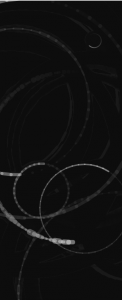
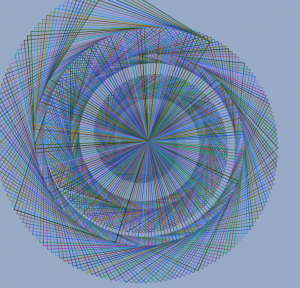
While I was exploring what I can do with turtles, I noticed how I can make interesting spirals through drawing lines and manipulating angles. At first, I was trying to execute these (not-so-exactly) circular spirals with some random factors on mouseclick, but then it looked somewhat boring with only those on a dark background. So I re-generated one of the spirals that I thought was interesting and placed it at the center. After a while I left the code alone, it made this interesting circular shape even though it started off as a rather angular and spikey shape, which I thought resonated with the circular shapes that are being created on mouseclick. I liked how it has an interactive component, but later on, the user is like swallowed by the dense spiral and notice the connection between the two seemingly different elements.

ssharada-project11-composition

sketch-132.js

//shariwa sharada 
//ssharada@andrew.cmu.edu
//section a 
//project 11

//setting initial starting points for the turtles
dx = 127
dX = 127

function setup(){
  createCanvas(200, 480);

//creating the turtles using the below trutle commands
  turtle  = new makeTurtle(dx+20, 50);
  turtle2  = new makeTurtle(dx+50, 305);
  turtle3  = new makeTurtle(dx+90, 255);
  turtle4  = new makeTurtle(dx-60, 285);
  turtle5  = new makeTurtle(dx-90, 0);
  turtle6  = new makeTurtle(dx-110, 275);
  turtle7  = new makeTurtle(dx+100, 575);

}

function draw(){

  background(0, 10);
  noFill();

//drawing turtle shapes
  drawShape1();
  drawShape2();
  drawShape3();
  drawShape4();
  drawShape5();
  drawShape6();
  drawShape7();

}

//creating the different circles 
//sizing is varied using  the size of the object moving forward
//speed of the circles moving is depedent on the angle

//the stroke weight of each line depends on the position of the y point of the cursor
//radius of each circle is dependent on the mouseX cursor position

function drawShape1(){
    turtle.setWeight(1 + mouseY/30)
    turtle.right(2 + mouseX/100);
    turtle.forward(1);
}

function drawShape2(){
    turtle2.setWeight(random(2 + mouseY/30,9 + mouseY/30))
    turtle2.right(-3 );
    turtle2.forward(4 + mouseX/100);
}

function drawShape3(){
    turtle3.setWeight(random(1 + mouseY/30, 2 + mouseY/30))
    turtle3.right(6 + mouseX/150);
    turtle3.forward(10);
}

function drawShape4(){
    turtle4.setWeight(random(3 + mouseY/30,6 + mouseY/30))
    turtle4.right(10);
    turtle4.forward(6 + mouseX/175);
}

function drawShape4(){
    turtle4.setWeight(random(4 + mouseY/30, 2 + mouseY/30))
    turtle4.right(10);
    turtle4.forward(6 + mouseX/200);
}

function drawShape5(){
    turtle5.setWeight(random(3 + mouseY/30,6 + mouseY/30))
    turtle5.right(7);
    turtle5.forward(20 + mouseX/225);
}

function drawShape6(){
    turtle6.setWeight(random(1 + mouseY/30, 5 + mouseY/30))
    turtle6.right(-7);
    turtle6.forward(13 + mouseX/250);
}

function drawShape7(){
    turtle7.setWeight(random(1 + mouseY/30, 5 + mouseY/30))
    turtle7.right(-4);
    turtle7.forward(10 + mouseX/250);
}


//-----------------------------------------------------------------------
//-----------------------------------------------------------------------

function turtleLeft(d) {
    this.angle -= d;
}


function turtleRight(d) {
    this.angle += d;
}


function turtleForward(p) {
    var rad = radians(this.angle);
    var newx = this.x + cos(rad) * p;
    var newy = this.y + sin(rad) * p;
    this.goto(newx, newy);
}


function turtleBack(p) {
    this.forward(-p);
}


function turtlePenDown() {
    this.penIsDown = true;
}


function turtlePenUp() {
    this.penIsDown = false;
}


function turtleGoTo(x, y) {
    if (this.penIsDown) {
      stroke(this.color);
      strokeWeight(this.weight);
      line(this.x, this.y, x, y);
    }
    this.x = x;
    this.y = y;
}


function turtleDistTo(x, y) {
    return sqrt(sq(this.x - x) + sq(this.y - y));
}


function turtleAngleTo(x, y) {
    var absAngle = degrees(atan2(y - this.y, x - this.x));
    var angle = ((absAngle - this.angle) + 360) % 360.0;
    return angle;
}


function turtleTurnToward(x, y, d) {
    var angle = this.angleTo(x, y);
    if (angle < 180) {
        this.angle += d;
    } else {
        this.angle -= d;
    }
}


function turtleSetColor(c) {
    this.color = c
}


function turtleSetWeight(w) {
    this.weight = w;
}


function turtleFace(angle) {
    this.angle = angle;
}


function makeTurtle(tx, ty) {
    var turtle = {x: tx, y: ty,
                  angle: 0.0, 
                  penIsDown: true,
                  color: color(255, random(40, 110)),
                  weight: 5,
                  left: turtleLeft, right: turtleRight,
                  forward: turtleForward, back: turtleBack,
                  penDown: turtlePenDown, penUp: turtlePenUp,
                  goto: turtleGoTo, angleto: turtleAngleTo,
                  turnToward: turtleTurnToward,
                  distanceTo: turtleDistTo, angleTo: turtleAngleTo,
                  setColor: turtleSetColor, setWeight: turtleSetWeight,
                  face: turtleFace};
    return turtle;
}

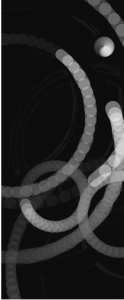
For this project I was inspired by brush strokes and watercolour paint because of which I tried to create these circles by making the flow of the circles the brush stroke style. As the cursor moved, the thickness of the stroke changes like the brush stroke.

^thin line weights with a lower mouseY value

^thick line weights with a higher mouseY value

heeseoc-LookingOutwards-11

I happened to stumble upon this piece named Automatic Orchestra while I was browsing the internet for algorithmic or computational compositions. It is basically an audio installation, orchestrated by networked machines and people. Students from the University of the Arts, Bremen and the Copenhagen Institute of Interaction Design created the setup, which consists of twelve pods, each with a controller attached to speakers. All pods are wired together to form a network transmitting musical data. Therefore the data travels through each unit before it is passed on to the next one. An interesting part of this project is that each pod will interpret and alter the same data that has been passed on based on its individual algorithmic rule set, which is like having their own personalities as instruments. So the music takes on different qualities depending upon the artist who programmed it. In contrary to the immediate impression of “computational music” that feels very robotic and cyber, this piece has some humanistic attributes that adds an extra point of interest.

http://resonate.io/2015/projects/automatic-orchestra/

abradbur – Looking Outwards – 11

For this Looking Outwards I wanted to find some musical pieces that couldn’t be reproduced with physical instruments and would instead need to be played entirely electronically. I started out looking for some artists who had perhaps made a specialized synthesizer when I came across an artist that, although utilizing a program that they hadn’t created themselves, they instead created a new genre of music. “Black Midi” is a music genre defined in that if you were to write the sheet music of a song in that genre, you would end up with a black piece of paper because so many notes are played in the song. It’s not just the magnitude of the music that makes Black Midi so interesting, but also the visual aspect of it. Rendering the notes in such a way that in video the music is mesmerizing to look at. “Pi, The Song With 3.1415 Million Notes” by TheSuperMarioBros2 on Youtube, is a particularly mesmerizing piece. Uploaded on March 14, 2015, the visuals include the symbol of Pi itself, morse code, and swirling visuals composed of the notes on Synthesia. It’s truly impressive, and while the music may not be everyone’s cup of tea, I find it enjoyable. It’s like video game music.

(The song duration is also 3:14)

dnoh-sectionD-lookingoutwards11

Project: Generating Music with RNN

This project is similar to what I wrote about in Looking Outwards 4. By using the same programming logic as the one I previously wrote about (Reoccurring Neural Networks), a program was able to come up with the final “composed piece” at the end of the video. The program first took many samples of Bach’s pieces. Then, the program analyzed it and created a random “piece” as its first iteration. Through the samples it was provided, it slowly “improved” to match melodies and chords more similar to that of the original samples to create a whole new piece in the style of Bach.

Honestly, I couldn’t really find an interesting computational music project that was not already written about, so I went with this one. There seems to be no artistic mind behind this because it was literally all computer generated without any specific parameters.

However, before I looked into this project, I remembered a YouTuber called Andrew Huang. He creates a lot of music through many audio samples he records and edits/organizes each file into different harmonies and sounds. I found this to be fascinating, however not very computational, as it is basically creating music manually.

Ziningy1-project 11

sketch

//Zining Ye 
//15104 lecture 1 recitation C
//ziningy1@andrew.cmu.edu 
//Project-10 

var mturtle;
var angle=90;
var path=10;

function setup(){
    createCanvas(480,480);
    background(150,170,200);
    frameRate(20); //set the framerate 
    mturtle=makeTurtle(width/2,height/2);
}

function draw(){
 
        
        for(var i=0;i<4;i++){ //make the turtle draw a square
        
        mturtle.setWeight(1)
        mturtle.left(angle);
        mturtle.forward(path);
    }

 mturtle.setColor(color(random(0,150),random(50,150),random(0,255))); //set the randomness of the color 
    mturtle.penUp();
    mturtle.right(2); //turn 2 degree every time it loops 
    path+=0.3 //the length of the square increases 
    mturtle.penDown(); 
    

}


function turtleLeft(d){this.angle-=d;}function turtleRight(d){this.angle+=d;}
function turtleForward(p){var rad=radians(this.angle);var newx=this.x+cos(rad)*p;
var newy=this.y+sin(rad)*p;this.goto(newx,newy);}function turtleBack(p){
this.forward(-p);}function turtlePenDown(){this.penIsDown=true;}
function turtlePenUp(){this.penIsDown = false;}function turtleGoTo(x,y){
if(this.penIsDown){stroke(this.color);strokeWeight(this.weight);
line(this.x,this.y,x,y);}this.x = x;this.y = y;}function turtleDistTo(x,y){
return sqrt(sq(this.x-x)+sq(this.y-y));}function turtleAngleTo(x,y){
var absAngle=degrees(atan2(y-this.y,x-this.x));
var angle=((absAngle-this.angle)+360)%360.0;return angle;}
function turtleTurnToward(x,y,d){var angle = this.angleTo(x,y);if(angle< 180){
this.angle+=d;}else{this.angle-=d;}}function turtleSetColor(c){this.color=c;}
function turtleSetWeight(w){this.weight=w;}function turtleFace(angle){
this.angle = angle;}function makeTurtle(tx,ty){var turtle={x:tx,y:ty,
angle:0.0,penIsDown:true,color:color(128),weight:1,left:turtleLeft,
right:turtleRight,forward:turtleForward, back:turtleBack,penDown:turtlePenDown,
penUp:turtlePenUp,goto:turtleGoTo, angleto:turtleAngleTo,
turnToward:turtleTurnToward,distanceTo:turtleDistTo, angleTo:turtleAngleTo,
setColor:turtleSetColor, setWeight:turtleSetWeight,face:turtleFace};
return turtle;}


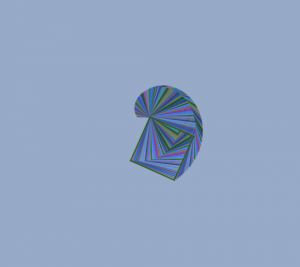
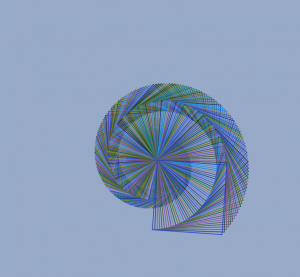
This composition is inspired by one of the lecture notes where we put put the turtle codes in the draw function, so this way it loops and draws the pattern gradually. I made the square shape rotates certain degree everytime, while it is also growing in size.

ifv-LookingOutwards-11

 Ge Wang makes computer music aiming to use computers and phones to make new kinds of instruments. He created a computer music programming language called ChucK. Programs made with this language can be run with various interfaces. In the embedded TedTalk he showcases various instruments he has made. One example is a repurposed game controller that can be set to create a variety of noises (mostly futuristic/science fiction sounding) the other is a ‘wind’ instrument which is played by blowing into the phones microphone and can be altered by holding various buttons on the screen that mimic holes/buttons that would exist on a traditional instrument.

abradbur – Project – 11

sketch


function setup() {
    createCanvas(480, 480);
    frameRate(5);

}


function draw() {
    //sunset palette
    var r = 255 + 25 * sin(millis() / 1000.0 );
    var g = 200 + 25 * sin(millis() / 1000.0 + HALF_PI);
    var b = 150 + 25 * sin(millis() / 1000.0 - HALF_PI);
    background (r,g,b);
    //make a hill
    noStroke();
    fill(0);
    arc(235, 480, 500, 200, PI, 0, OPEN);

    //tree
    t1 = makeTurtle(240,380);
    t2 = makeTurtle(240, 230);
    t3 = makeTurtle(240, 230);
    t4 = makeTurtle(240, 230);
    t5 = makeTurtle(240, 230);
    t6 = makeTurtle(240, 230);
    t7 = makeTurtle(240, 230);
    t8 = makeTurtle(200, 230);
    t1.setColor(0);
    t1.setWeight(10);
    t2.setWeight(4);
    t2.setColor(0);
    t3.setWeight(2);
    t3.setColor(0);
    t4.setColor(0);
    t4.setWeight(4);
    t5.setColor(0);
    t5.setWeight(5);
    t6.setColor(0);
    t6.setWeight(3);
    t7.setColor(0);
    t7.setWeight(4);
    t8.setColor(255);
    t8.setWeight(3);
    t7.left(95);
    t7.forward(100);
    t1.left(90);
    t1.forward(150);
    t2.left(150);
    t2.forward(100);
    t3.right(175);
    t3.forward(130);
    t4.left(175);
    t4.forward(130);
    t5.left(5);
    t5.forward(130);
    t6.left(25);
    t6.forward(140);
    t8.left(25);
    t8.forward(140);
    var i = 0;
    while(i < 10){
    
        
        t2.right(random(82, 90));
        t2.forward(60);
        t2.back(random(60, 70));
        t2.left(55);
        t2.forward(20);

        
        t3.right(90);
        t3.forward(random(40,60));
        t3.back(30);
        t3.left(45);
        t3.forward(30);
        
        t4.right(90);
        t4.forward(60);
        t4.back(60);
        t4.left(45);
        t4.forward(30);
        
        t5.left(90);
        t5.forward(60);
        t5.back(60);
        t5.left(45);
        t5.forward(30);
        
        t6.left(90);
        t6.forward(60);
        t6.back(60);
        t6.left(45);
        t6.forward(30);
        
        t7.right(90);
        t7.forward(60);
        t7.back(random(30,60));
        t7.left(130);
        t7.forward(30);

        t8.right(90);
        t8.forward(60);
        t8.back(60);
        t8.left(130);
        t8.forward(random(10,30));

        i ++;
    }


}
//turtle graphics template
function turtleLeft(d){this.angle-=d;}function turtleRight(d){this.angle+=d;}
function turtleForward(p){var rad=radians(this.angle);var newx=this.x+cos(rad)*p;
var newy=this.y+sin(rad)*p;this.goto(newx,newy);}function turtleBack(p){
this.forward(-p);}function turtlePenDown(){this.penIsDown=true;}
function turtlePenUp(){this.penIsDown = false;}function turtleGoTo(x,y){
if(this.penIsDown){stroke(this.color);strokeWeight(this.weight);
line(this.x,this.y,x,y);}this.x = x;this.y = y;}function turtleDistTo(x,y){
return sqrt(sq(this.x-x)+sq(this.y-y));}function turtleAngleTo(x,y){
var absAngle=degrees(atan2(y-this.y,x-this.x));
var angle=((absAngle-this.angle)+360)%360.0;return angle;}
function turtleTurnToward(x,y,d){var angle = this.angleTo(x,y);if(angle< 180){
this.angle+=d;}else{this.angle-=d;}}function turtleSetColor(c){this.color=c;}
function turtleSetWeight(w){this.weight=w;}function turtleFace(angle){
this.angle = angle;}function makeTurtle(tx,ty){var turtle={x:tx,y:ty,
angle:0.0,penIsDown:true,color:color(128),weight:1,left:turtleLeft,
right:turtleRight,forward:turtleForward, back:turtleBack,penDown:turtlePenDown,
penUp:turtlePenUp,goto:turtleGoTo, angleto:turtleAngleTo,
turnToward:turtleTurnToward,distanceTo:turtleDistTo, angleTo:turtleAngleTo,
setColor:turtleSetColor, setWeight:turtleSetWeight,face:turtleFace};
return turtle;}

I started out by wanting to draw some spooky skeletal trees, but then I got bored of drawing straight lines the whole time and decided to make it a Dr. Seus-esque tree instead. I enjoyed making circular pathways with different branches. Best Quality: Its wiggles.

keuchuka – looking outwards – 11


Circuli in action

Circuli is a generative musical instrument conceptualized and developed by Batuhan Bozkurt in 2012, and is now an IOS app. The circles on the interface grow at a constant rate, and do not overlap. Bigger circles push and shrink smaller circles when in contact. A circle pops and makes noise when its boundary intersects the center of another circle. The pitch is decided by the position of the circle on the background. The bigger the hole is, the higher the pitch. The envelope of the produced sound seems to be determined by a number of parameters including the final circle size and the time of interaction between two involved circles. This project to me seems to make sense visually and is coherent to its audio component. It creates a multi-sense concert in a way.

source : https://earslap.com/page/circuli.html

Ziningy1-section c-Looking Outwards 11


SugarCube, developed by researcher samanda ghassaei at the MIT Media Lab, is an open source, grid-based, standalone MIDI instrument that can be booted up into various musical applications. With the built in accelerometer and gyroscope, SugarCube integrates the physical interaction of tilting, pushing and shaking etc. with the digital music MIDI Notes(shown in the video). It immediately gave a very tangle aspect of computational sound effect. On the other hand, Sugar Cube also afford a variety of ways that users can compose music through the interaction. Such as in the boiling app interaction, users will be able to experiment and create interesting polyrhythms with visual bouncing lights. While the users are pushing the cube buttons to add note to the rhythms, the visual Bounce direction is based on y tilt and Speed and MIDI velocity (loudness) controlled by pots. I assumed that the creators may originally concern with the variety of interaction getting too complex, there is a very user-friendly shake to ease function added to the product. Overall, I am very impress how Sugar cube links the digital music generating aspect with lighting visuals and analog interaction in a very intuitive way.