keuchuka – project – 11

project11

//Fon Euchukanonchai
//15-104 Section A
//keuchuka@andrew.cmu.edu
//Project-11

//variables for shape change
var addCai = 0
var addDe = 0
var addFu = 0
var addXi = 0
var addAi = 0
var c = 10
var jitter;

//for differnt turtles
var pX = 40 
var pY = 0
var pYMove = 1

var fX = 130
var fY = 100
var fYMove = 1

var tX = 225
var tY = 0
var tYMove = 1

var cX = 310
var cY = 100
var cYMove = 1

var dX = 405
var dY = 0
var dYMove = 1

//loading Chinese character images
function preload(){

	aiPic = loadImage("https://i.imgur.com/o5xIMAW.png")
	fuPic = loadImage("https://i.imgur.com/GA5Rnem.png")
	xiPic = loadImage("https://i.imgur.com/5sx0vnR.png")
	caiPic = loadImage("https://i.imgur.com/LJIdHCA.png")
	dePic = loadImage("https://i.imgur.com/iuYqMLD.png")

}

function setup() {
    createCanvas(480, 100);
}

function draw(){
    frameRate(40);
    var backC = 255
    //creating "drag" effect with transaparent bg
    background(backC,60);

	noFill();
	stroke(255,0,0);
	strokeWeight(3)
    rect(0,0,width,height,30)

    noStroke();

////////////AI//////////////

var turtlec = new Turtle(pX + 23, pY - 19);

	//drawing the shape
    for(var i = 0; i < 20; i ++){
    turtlec.penUp();
    turtlec.forward(5)
    turtlec.penDown();
    turtlec.setColor(color(255,0,0,10));
    turtlec.setWeight(2);
    turtlec.forward(c);
    turtlec.right(30+addAi);
    turtlec.forward(c);
    turtlec.right(30+addAi);
    turtlec.forward(c)
    turtlec.right(30+addAi);
    turtlec.forward(c);
    turtlec.left(30+addAi);

    c = random(10,11)
    
    //changing the shape when mouse is pressed
    if (mouseIsPressed){
	addAi = addAi += 1
	}

	if (addAi == 20){
		addAi = 0
	}
}

//inserting the image of character, adding jitter, and reverse motion when it hits walls
image(aiPic, pX+jitter, pY+jitter)
tint(255, 127);    

    pY = pY += pYMove
    jitter = random(1,3)

    if(pY > height-50){
    	pYMove = -1
    } else if (pY < 20){
    	pYMove = 1
    }

// above comments can be used for all following characters

////////////XI//////////////

var turtlec2 = new Turtle(tX + 23, tY - 19);

    for(var i = 0; i < 20; i ++){
    turtlec2.penUp();
    turtlec2.forward(5)
    turtlec2.penDown();
    turtlec2.setColor(color(255,0,0,10));
    turtlec2.setWeight(2);
    turtlec2.forward(c);
    turtlec2.right(30+addXi);
    turtlec2.forward(c);
    turtlec2.right(30+addXi);
    turtlec2.forward(c)
    turtlec2.right(30+addXi);
    turtlec2.forward(c);
    turtlec2.left(30+addXi);

    c = random(10,11)
    if (mouseIsPressed){
	addXi = addXi += 1
	}

	if (addXi == 20){
		addXi = 0
	}

}


image(xiPic, tX+jitter, tY+jitter)
tint(255, 127);

    tY = tY += tYMove

    jitter = random(1,3)


    if(tY > height-50){
    	tYMove = -1
    } else if (tY < 20){
    	tYMove = 1
    }


///////////FU//////////

var turtlec3 = new Turtle(fX + 28, fY - 19);

    for(var i = 0; i < 20; i ++){
    turtlec3.penUp();
    turtlec3.forward(5)
    turtlec3.penDown();
    turtlec3.setColor(color(255,0,0,10));
    turtlec3.setWeight(2);
    turtlec3.forward(c);
    turtlec3.right(30+addFu);
    turtlec3.forward(c);
    turtlec3.right(30+addFu);
    turtlec3.forward(c)
    turtlec3.right(30+addFu);
    turtlec3.forward(c);
    turtlec3.left(30+addFu);

    c = random(10,11)
  
  if (mouseIsPressed){
	addFu = addFu += 1
	}

	if (addFu == 20){
		addFu = 0
	}

}


image(fuPic, fX+jitter, fY+jitter)
tint(255, 127);

    fY = fY += fYMove


    jitter = random(1,3)


    if(fY > height-50){
    	fYMove = -1
    } else if (fY < 25){
    	fYMove = 1
    }


///////////CAI//////////

var turtlec4 = new Turtle(cX + 28, cY - 19);

    for(var i = 0; i < 20; i ++){
    turtlec4.penUp();
    turtlec4.forward(5)
    turtlec4.penDown();
    turtlec4.setColor(color(255,0,0,10));
    turtlec4.setWeight(2);
    turtlec4.forward(c);
    turtlec4.right(30+addCai);
    turtlec4.forward(c);
    turtlec4.right(30+addCai);
    turtlec4.forward(c)
    turtlec4.right(30+addCai);
    turtlec4.forward(c);
    turtlec4.left(30+addCai);

    c = random(10,11)
  
  if (mouseIsPressed){
	addCai = addCai += 1
	}

	if (addCai == 20){
		addCai = 0
	}

}


image(caiPic, cX+jitter, cY+jitter)
tint(255, 127);

    cY = cY += cYMove

    jitter = random(1,3)


    if(cY > height-50){
    	cYMove = -1
    } else if (cY < 25){
    	cYMove = 1
    }

///////////DE//////////

var turtlec5 = new Turtle(dX + 28, dY - 19);

    for(var i = 0; i < 20; i ++){
    turtlec5.penUp();
    turtlec5.forward(5)
    turtlec5.penDown();
    turtlec5.setColor(color(255,0,0,10));
    turtlec5.setWeight(2);
    turtlec5.forward(c);
    turtlec5.right(30+addDe);
    turtlec5.forward(c);
    turtlec5.right(30+addDe);
    turtlec5.forward(c)
    turtlec5.right(30+addDe);
    turtlec5.forward(c);
    turtlec5.left(30+addDe);

    c = random(10,11)

  if (mouseIsPressed){
	addDe = addDe += 1
	}

	if (addDe == 20){
		addDe = 0
	}


}


image(dePic, dX+jitter, dY+jitter)
tint(255, 127);

    dY = dY += dYMove

    jitter = random(1,3)


    if(dY > height-50){
    	dYMove = -1
    } else if (dY < 20){
    	dYMove = 1
    }


}


//=======================================================
// TURTLE GRAPHICS IMPLEMENTATION

function Turtle(x, y) {
  this.x = x;
  this.y = y;
  this.angle = 0.0;
  this.penIsDown = true;
  this.color = color(128);
  this.weight = 1;
 
  this.left = function(d) {
    this.angle -= d;
  };
  this.right = function(d) {
    this.angle += d;
  };
  this.forward = function(p) {
    var rad = radians(this.angle);
    var newx = this.x + cos(rad) * p;
    var newy = this.y + sin(rad) * p;
    this.goto(newx, newy);
  };
  this.back = function(p) {
    this.forward(-p);
  };
  this.penDown = function() {
    this.penIsDown = true;
  };
  this.penUp = function() {
    this.penIsDown = false;
  };
  this.goto = function(x, y) {
    if (this.penIsDown) {
      stroke(this.color);
      strokeWeight(this.weight);
      line(this.x, this.y, x, y);
    }
    this.x = x;
    this.y = y;
  };
  this.distanceTo = function(x, y) {
    return sqrt(sq(this.x - x) + sq(this.y - y));
  };
  this.angleTo = function(x, y) {
    var absAngle = degrees(atan2(y - this.y, x - this.x));
    var angle = ((absAngle - this.angle) + 160) % 160.0;
    return angle;
  };
  this.turnToward = function(x, y, d) {
    var angle = this.angleTo(x, y);
    if (angle < 180) {
      this.angle += d;
    } else {
      this.angle -= d;
    }
  };
  this.setColor = function(c) {
    this.color = c;
  };
  this.setWeight = function(w) {
    this.weight = w;
  };
  this.face = function(angle) {
    this.angle = angle;
  }
}

The shape that turtle graphics can make really reminded me of the stamps of lucky red Chinese stamps (they’re flower-like radial compositions). I tried to replicate that in this project, having these stamps bounce in a banner type organization and taking advantage of turtle graphics in loop, have it change shape slightly when the mouse is pressed.
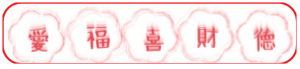

normal state of shape

changed state of shape when mouse is pressed
juyeonk-LookingOutwards-11

Title: The Classyfier

Artist: Benedict Hubener, Stephanie Lee, Kelvyn Marte, with the help of Andreas Refsgaard

Year of Creation: 2017

Link to the Article: http://www.creativeapplications.net/processing/the-classyfier-ai-detects-situation-and-appropriates-music/

The Classyfier is a machine that chooses an appropriate song that suits your mood. It does so by detecting the kind of beverages people are consuming by using the built-in microphone to catch the characteristic sounds and comparing it to the pre-trained examples (ex: clinking of the wine glasses or opening a can of beer), and the main programs used to create the algorithms were Wekinator, Processing and the OFX collection. The Classyfier will then “classify” the drinks into one of the three categories: hot beverages, wine, and beer, then it would start playing the music from the playlist that is designated to each category. The user could also knock on the table to navigate through the playlist.

It is interesting to me how machines could help us in social situations and help everything to go naturally with the flow when machines are generally expected to be a hindrance to interactions between people. It’s exciting to see how technology is getting more and more seamlessly integrated to our lives.


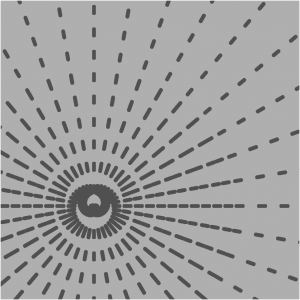
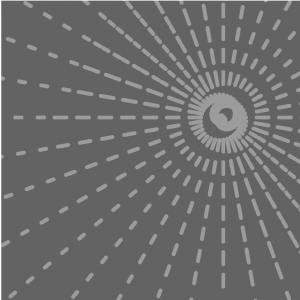
ifv-Project-11

sketch

//Isabelle Vincent
//Section E
//ifv@andrew.cmu.edu
//Project-11

function turtleLeft(d) {
    this.angle -= d;
}


function turtleRight(d) {
    this.angle += d;
}


function turtleForward(p) {
    var rad = radians(this.angle);
    var newx = this.x + cos(rad) * p;
    var newy = this.y + sin(rad) * p;
    this.goto(newx, newy);
}


function turtleBack(p) {
    this.forward(-p);
}


function turtlePenDown() {
    this.penIsDown = true;
}


function turtlePenUp() {
    this.penIsDown = false;
}


function turtleGoTo(x, y) {
    if (this.penIsDown) {
      stroke(this.color);
      strokeWeight(this.weight);
      line(this.x, this.y, x, y);
    }
    this.x = x;
    this.y = y;
}


function turtleDistTo(x, y) {
    return sqrt(sq(this.x - x) + sq(this.y - y));
}


function turtleAngleTo(x, y) {
    var absAngle = degrees(atan2(y - this.y, x - this.x));
    var angle = ((absAngle - this.angle) + 360) % 360.0;
    return angle;
}


function turtleTurnToward(x, y, d) {
    var angle = this.angleTo(x, y);
    if (angle < 180) {
        this.angle += d;
    } else {
        this.angle -= d;
    }
}


function turtleSetColor(c) {
    this.color = c;
}


function turtleSetWeight(w) {
    this.weight = w;
}


function turtleFace(angle) {
    this.angle = angle;
}


function makeTurtle(tx, ty) {
    var turtle = {x: tx, y: ty,
                  angle: 0.0,
                  penIsDown: true,
                  color: color(128),
                  weight: 1,
                  left: turtleLeft, right: turtleRight,
                  forward: turtleForward, back: turtleBack,
                  penDown: turtlePenDown, penUp: turtlePenUp,
                  goto: turtleGoTo, angleto: turtleAngleTo,
                  turnToward: turtleTurnToward,
                  distanceTo: turtleDistTo, angleTo: turtleAngleTo,
                  setColor: turtleSetColor, setWeight: turtleSetWeight,
                  face: turtleFace};
    return turtle;
}

function lines(t1){
  for(var j = 0; j<4;j++){
    t1.penDown();
    t1.forward(10);
    t1.left(180);
  }
}

function setup(){
  createCanvas(480,480);
}

function draw(){
  //inverse the stroke and bg colors
  var v = map(mouseY,0,height,0,255);
  var b = map(mouseY,height,0,0,255);
  background(v);
  var t1 = makeTurtle(mouseX,mouseY);
  t1.setColor(b);
  t1.setWeight(6);
  t1.penUp();
  //t1.forward(20);
  //t1.penDown();
  //t1.left(90);
  //t1.left(10);
  for(var i=0; i<1000; i++){
      t1.penUp();
      //go out from center
      var dist=(-(mouseY+mouseX)/2) +1 + i *1
      t1.forward(dist);
      //draw
      lines(t1);
      //come back
      t1.penUp();
      t1.left(180);
      t1.forward(dist);
      t1.left(180);

      //rotate by some angle
      t1.left(10);
  }
}

jennyzha – project 11

sketch

// Jenny Zhang
// jennyzha@andrew.cmu.edu
// Section D 
// Project 11

function setup() {
    createCanvas(480, 380);
    background(165,236,250);

//making the hilly background

    noStroke();
    fill(0,255,0);
    ellipse(300,380,650,650);

    noStroke();
    fill(0,200,0);
    ellipse(100,380,550,550);

    noStroke();
    fill(178, 255,102);
    ellipse(400,380,850,350);
}

function mousePressed(){
    
    var flower = makeFlower(mouseX,mouseY); //creates flowers wherever you click 
    flower.setColor(color(random(220,255),random(50,255),random(50,100))); //sets random colors ranging from red to orange to yellow
    flower.setWeight(1) //sets the weight for the lines of the flowers
    var size = random(1,15); //setting random sizes for the flowers
   
    for(var i = 0; i < 1000; i++) {
        flower.penDown();
        flower.forward(size);
        flower.right(30);
        flower.forward(size);
        flower.right(30);
        flower.forward(size);
        flower.right(30);
        flower.forward(size);
        flower.right(30);
        flower.forward(size);
        flower.right(30);
        flower.forward(size);
        flower.penUp();
        flower.right(100);
        flower. right(30);
        flower.setWeight(1);    
    }
}

function turtleLeft(d){
  this.angle-=d;
}

function turtleRight(d){
  this.angle+=d;
}

function turtleForward(p){
  var rad=radians(this.angle);
  var newx=this.x+cos(rad)*p;
  var newy=this.y+sin(rad)*p;
  this.goto(newx,newy);
}

function turtleBack(p){
this.forward(-p);
}

function turtlePenDown(){
  this.penIsDown=true;
}

function turtlePenUp(){
  this.penIsDown = false;
}

function turtleGoTo(x,y){
  if(this.penIsDown){
    stroke(this.color);
    strokeWeight(this.weight);
    line(this.x,this.y,x,y);
  }
  this.x = x;this.y = y;
}

function turtleDistTo(x,y){
  return sqrt(sq(this.x-x)+sq(this.y-y));
}

function turtleAngleTo(x,y){
  var absAngle=degrees(atan2(y-this.y,x-this.x));
  var angle=((absAngle-this.angle)+360)%360.0;return angle;
}

function turtleTurnToward(x,y,d){
  var angle = this.angleTo(x,y);
  if(angle< 180){
    this.angle+=d;
  }
  else{
    this.angle-=d;
  }
}

function turtleSetColor(c){
  this.color=c;
}

function turtleSetWeight(w){
  this.weight=w;
}

function turtleFace(angle){
  this.angle = angle;
}

function makeFlower(tx,ty){
  var turtle={x:tx,y:ty,angle:0.0,penIsDown:true,color:color(0),weight:1,left:turtleLeft,
  right:turtleRight,forward:turtleForward, back:turtleBack,penDown:turtlePenDown,
  penUp:turtlePenUp,goto:turtleGoTo, angleto:turtleAngleTo,
  turnToward:turtleTurnToward,distanceTo:turtleDistTo, angleTo:turtleAngleTo,
  setColor:turtleSetColor, setWeight:turtleSetWeight,face:turtleFace};
  return turtle;
}

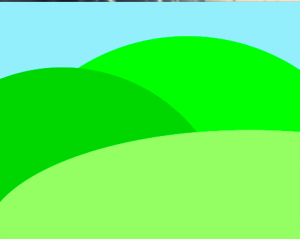
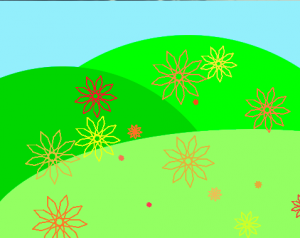
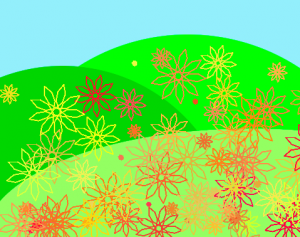
I created a hilly spring terrain, where the user’s clicks create flowers wherever they click. With each click, the color is varied randomly between colors of red to yellow, as are the sizes. I kept the stroke weight consistent since when varied, if it is too thick the large flowers look too blurry and when too thin you can’t see them as well.

aerubin-LookingOutwards-11-Section-C

A very interesting new instrument that is generated computationally is called the dub-step board. This is a board with buttons that light up that are placed in rows and columns. Each button is linked to a different sound, song, or beat that is pre-programed with computer software. As a result of its preprogramed nature, it is an instrument of infinite possibilities that can feature live and unique performances. Many of the videos and performances done utilizing this board mix different songs and beats together to make a piece of music.

I really admire the versatility of the board and how user friendly it is. Many of the antiquated instruments that are in the standard orchestra only have specific pitches for strings and can only perform a specific group of sounds (such as the sound of a piano). The dub-step board allows the performer to play different sounds from diverse instruments and even do a drum beat at the same time all in the reach of one’s two hands. As it is personable, one can program a certain group of pitches in the reach of their own hand, as each individual has different sized hands. One of the many challenges standard orchestral instrumentalist’s face is the ability to reach the notes with their own hand, especially for those who have smaller hands that play larger instruments (such as the double bass or piano). Although the dub-step board will probably never solo with the Berlin Philharmonic, it is definitely an innovative devise that combines both music and technology into a user friendly instrument.

Click to learn more about Dubstep

yoonyouk-project11-Composition

sketch

//Yoon Young Kim
//Section E
//yoonyouk@andrew.cmu.edu
//Assignment10-A


var turtle;


function setup() {
    var heartmeterangle = random(40, 70);
    var heartmeterlength = random(75, 150);
    createCanvas(480, 360);
    background(random(170, 255));
    frameRate(10);
    turtle = makeTurtle(0, height/2);
    turtle.penDown();
    turtle.setColor(0);
    turtle.setWeight(random(5, 20));


    for(i = 0; i < 8; i++) {

        //rainbow colors
        var r = random(50, 200);
        var g = random(50, 200);
        var b = random(50, 200);
      

        turtle.setColor(color(r, g, b));
        turtle.setWeight(50);


       // turtle.right(sqrt(sq(floor(mouseX - turtle.x))+sq(floor(mouseY-turtle.y))));
        //turtle.forward(floor(mouseX - turtle.x), floor(mouseY-turtle.y));

    turtle.penDown();
    turtle.left(heartmeterangle);
    turtle.forward(heartmeterlength);
    turtle.right(180-heartmeterangle);
    turtle.forward(2*heartmeterlength);
    turtle.left(180-heartmeterangle);
    turtle.forward(heartmeterlength);   
    turtle.right(120-heartmeterangle);

    }

}


function draw() {


}


function turtleLeft(d){this.angle-=d;}function turtleRight(d){this.angle+=d;}
function turtleForward(p){var rad=radians(this.angle);var newx=this.x+cos(rad)*p;
var newy=this.y+sin(rad)*p;this.goto(newx,newy);}function turtleBack(p){
this.forward(-p);}function turtlePenDown(){this.penIsDown=true;}
function turtlePenUp(){this.penIsDown = false;}function turtleGoTo(x,y){
if(this.penIsDown){stroke(this.color);strokeWeight(this.weight);
line(this.x,this.y,x,y);}this.x = x;this.y = y;}function turtleDistTo(x,y){
return sqrt(sq(this.x-x)+sq(this.y-y));}function turtleAngleTo(x,y){
var absAngle=degrees(atan2(y-this.y,x-this.x));
var angle=((absAngle-this.angle)+360)%360.0;return angle;}
function turtleTurnToward(x,y,d){var angle = this.angleTo(x,y);if(angle< 180){
this.angle+=d;}else{this.angle-=d;}}function turtleSetColor(c){this.color=c;}
function turtleSetWeight(w){this.weight=w;}function turtleFace(angle){
this.angle = angle;}function makeTurtle(tx,ty){var turtle={x:tx,y:ty,
angle:0.0,penIsDown:true,color:color(128),weight:1,left:turtleLeft,
right:turtleRight,forward:turtleForward, back:turtleBack,penDown:turtlePenDown,
penUp:turtlePenUp,goto:turtleGoTo, angleto:turtleAngleTo,
turnToward:turtleTurnToward,distanceTo:turtleDistTo, angleTo:turtleAngleTo,
setColor:turtleSetColor, setWeight:turtleSetWeight,face:turtleFace};
return turtle;}

For this turtle graphics project, I made a heart meter like graphic that changes whenever refreshed. A new turtle is drawn after each jump. When refreshed, the colors and positions and lengths change color as well. 

rsp1-LookingOutwards

NSynth: Neural Audio Synthesis

NSynth is Google Magenta’s—a small team of Google AI researchers —latest project. Their main pitch was that this new system will provide musicians with an entirely new range of tools for making music. It take different sounds from different instruments, and blends them together creating an entirely new sound as the creator can also alter how much of one sound is used.

According to an article in the New York Times, “The project is part of a growing effort to generate art through a set of A.I. techniques that have only recently come of age. Called deep neural networks, these complex mathematical systems allow machines to learn specific behavior by analyzing vast amounts of data. ” (https://www.nytimes.com/2017/08/14/arts/design/google-how-ai-creates-new-music-and-new-artists-project-magenta.html)

Image result for nsynth google
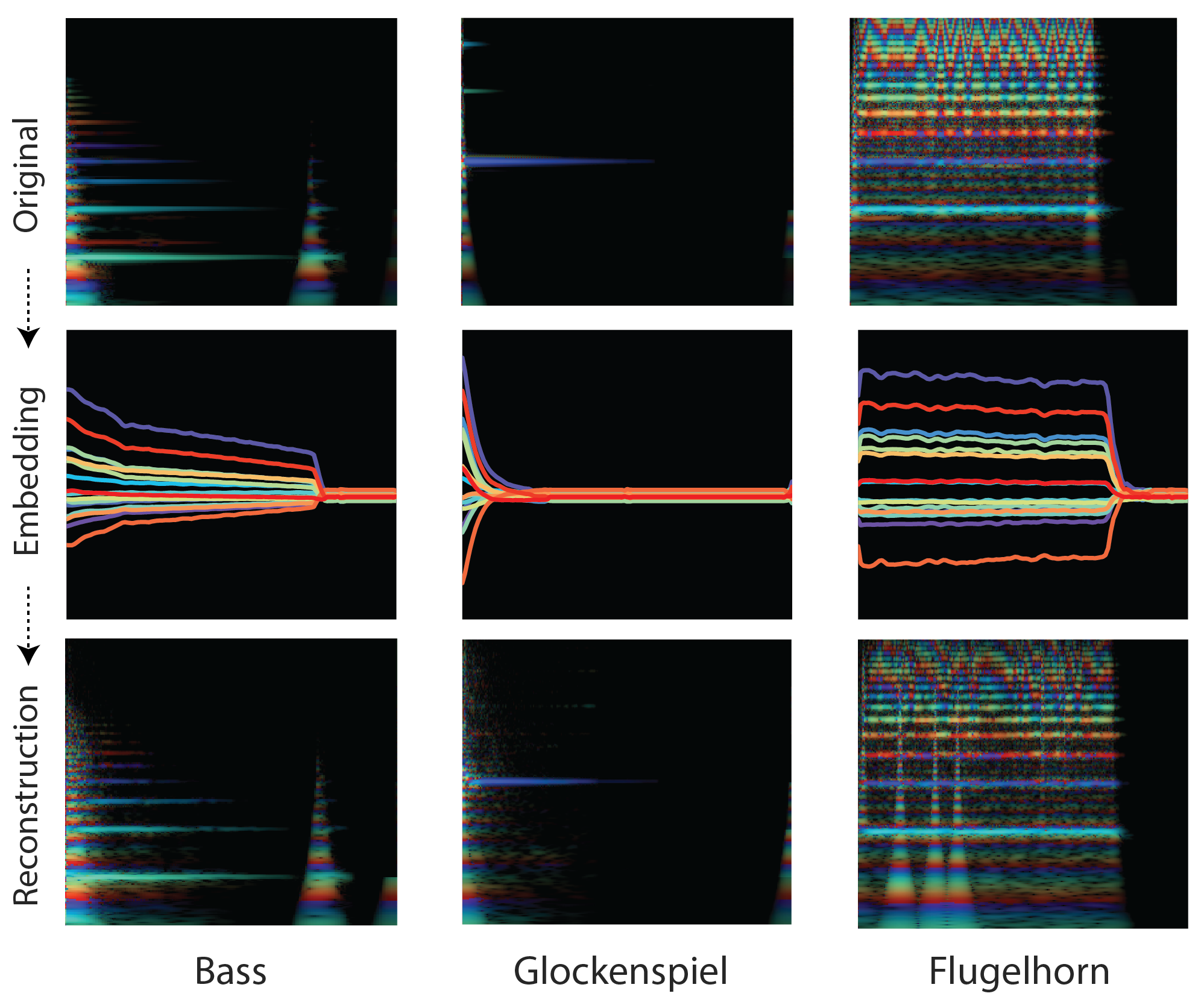
images of soundwaves from the original file to the altered file


The following link below contains samples of the types of sounds that NSynth can generate:

https://magenta.tensorflow.org/nsynth

Below is an interactive page where you can mix and match your own sounds:

https://experiments.withgoogle.com/ai/sound-maker/view/


mecha-project11-composition

sketch

//sets up an empty arrays for turtles
var turtleArray = [];
var turtleArray2 = [];
var turtleArray3 = [];
var turtleMouse = [];
var turtleX;
var turtleY;
var x;
var y;

function setup() {
    createCanvas(480, 480);
    background(220);
}

function draw() {
    turtles();
    turtles2();
    turtles3();
}

//when mouse is pressed, new turtles are pushed into array
//(with same x and y values)
function mousePressed() {
    turtleX = 0;
    //allows for stair cases to be at every part of canvas
    turtleY = random(-height, height);
    turtleArray.push(makeTurtle(turtleX, turtleY));
    turtleArray2.push(makeTurtle(turtleX, turtleY));
    turtleArray3.push(makeTurtle(turtleX, turtleY));
}

function turtles() {
    //for every turtle in array, sets new color
    for (var i = 0; i < turtleArray.length; i++) {
        turtleArray[i].penDown();
        turtleArray[i].setColor(random(0, 255));
        turtleArray[i].setWeight(2);

        //will fill up canvas by creating staircase
        for (var j = 0; j <= 12; j++) {
            turtleArray[i].forward(width / 12);
            turtleArray[i].right(90);
            turtleArray[i].forward(width / 12);
            turtleArray[i].left(90);
        }

        turtleArray[i].penUp();
    }
}

function turtles2() {
    for (var i = 0; i < turtleArray.length; i++) {
        turtleArray2[i].penDown();
        turtleArray2[i].setColor(random(0, 255));
        turtleArray2[i].setWeight(2);

        for (var j = 0; j <= 24; j++) {
            turtleArray2[i].forward(width / 24);
            turtleArray2[i].right(90);
            turtleArray2[i].forward(width / 24);
            turtleArray2[i].left(90);
        }

        turtleArray[i].penUp();
    }
}

function turtles3() {
    for (var i = 0; i < turtleArray.length; i++) {
        turtleArray3[i].penDown();
        turtleArray3[i].setColor(random(0, 255));
        turtleArray3[i].setWeight(2);

        for (var j = 0; j <= 36; j++) {
            turtleArray3[i].forward(width / 36);
            turtleArray3[i].right(90);
            turtleArray3[i].forward(width / 36);
            turtleArray3[i].left(90);
        }

        turtleArray[i].penUp();
    }
}

function turtleLeft(d) {
    this.angle -= d;
}


function turtleRight(d) {
    this.angle += d;
}


function turtleForward(p) {
    var rad = radians(this.angle);
    var newx = this.x + cos(rad) * p;
    var newy = this.y + sin(rad) * p;
    this.goto(newx, newy);
}


function turtleBack(p) {
    this.forward(-p);
}


function turtlePenDown() {
    this.penIsDown = true;
}


function turtlePenUp() {
    this.penIsDown = false;
}


function turtleGoTo(x, y) {
    if (this.penIsDown) {
        stroke(this.color);
        strokeWeight(this.weight);
        line(this.x, this.y, x, y);
    }
    this.x = x;
    this.y = y;
}


function turtleDistTo(x, y) {
    return sqrt(sq(this.x - x) + sq(this.y - y));
}


function turtleAngleTo(x, y) {
    var absAngle = degrees(atan2(y - this.y, x - this.x));
    var angle = ((absAngle - this.angle) + 360) % 360.0;
    return angle;
}


function turtleTurnToward(x, y, d) {
    var angle = this.angleTo(x, y);
    if (angle < 180) {
        this.angle += d;
    } else {
        this.angle -= d;
    }
}


function turtleSetColor(c) {
    this.color = c;
}


function turtleSetWeight(w) {
    this.weight = w;
}


function turtleFace(angle) {
    this.angle = angle;
}


function makeTurtle(tx, ty) {
    var turtle = {
        x: tx,
        y: ty,
        angle: 0.0,
        penIsDown: true,
        color: color(128),
        weight: 1,
        left: turtleLeft,
        right: turtleRight,
        forward: turtleForward,
        back: turtleBack,
        penDown: turtlePenDown,
        penUp: turtlePenUp,
        goto: turtleGoTo,
        angleto: turtleAngleTo,
        turnToward: turtleTurnToward,
        distanceTo: turtleDistTo,
        angleTo: turtleAngleTo,
        setColor: turtleSetColor,
        setWeight: turtleSetWeight,
        face: turtleFace
    };
    return turtle;
}

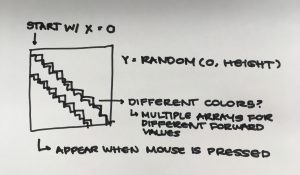
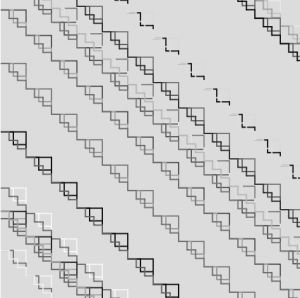
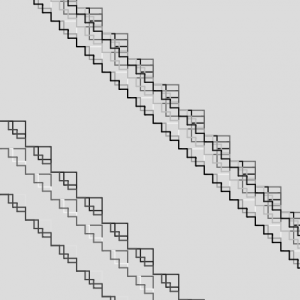
For this assignment, I decided that I wanted to try and make an interesting pattern with my turtles. At first, I started with a basic staircase which generated at a random y value in between -480 and 480. Once I was able to figure out the code for that, I started to make new turtle arrays that ended up resembling a snowy mountain peak based on the color and the way that each of the lines intersected.

Every time a user clicks inside of the canvas, three turtles will generate with different color values.


sketch process


examples of turtle compositions

rsp1-Project-Compostion-Turtle-Freestyle

sketch

/*Rachel Park
rsp1@andrew.cmu.edu
Section B @ 10:30AM
Project 11: Turtle...anything*/

var myTurtle;//global variable for defining a new name for the turtle
function setup() {
  createCanvas(330,400);
  background(0);
  noLoop();
  myTurtle = new makeTurtle(width/2-50,20)//the turtle
}

function draw() {
  var dragon = dragonCurve(14);//variable to substitute in for function
  turtleDraw(dragon,200,90,2);//drawing the line
}

function dragonCurve(depth){//using L-system logic to create pattern
    if(depth === 0){
      return 'FX';}

    var turtle = dragonCurve(depth - 1);
    var newTurtle = '';
    for(var i = 0; i < turtle.length; i++){
        if(turtle.charAt(i) === 'X'){
            newTurtle += 'X+YF+';
        }
        else if (turtle.charAt(i) === 'Y'){
            newTurtle += '-FX-Y';
        }
        else {
            newTurtle += turtle.charAt(i);
        }
    }
    return newTurtle;
}


//------------------------------------------------
function turtleDraw(text, startx, starty, length) {//using turtle functions to draw out the patterns
    var direction = 0;
    var x = startx;//initial horizontal position of line
    var y = starty;//initial verticle position of line

    for(var i = 0; i < text.length; i++){

        if(text.charAt(i) === 'F'){
            //'F', draw forward length in direction
            var endx = x + length * Math.cos(direction * 0.017453292519);
            var endy = y + length * Math.sin(direction * 0.017453292519);

            var red = x/400 * 255;
            var green = y/400 * 255;
            var blue = (x + y + 300)/400 * 255;
            c = stroke(red,green,blue);
            myTurtle.setColor(c);//setting gradient color of lines

            line(x,y,endx,endy);//drawing the line
            x = endx;//reinitializing to new horizontal position
            y = endy;//reinitializing to new verticle position
        }
        else if(text.charAt(i) === '-'){
            //90 degrees added to direction
            direction += 90;
        }
        else if(text.charAt(i) === '+'){
            //90 degrees substracted from direction
            direction -= 90;
        }
    }
}
//-------------------------------------------------------
//other turtle functions

function turtleLeft(d){
  this.angle-=d;
}

function turtleRight(d){
  this.angle+=d;
}

function turtleForward(p){
  var rad=radians(this.angle);
  var newx=this.x+cos(rad)*p;
  var newy=this.y+sin(rad)*p;
  this.goto(newx,newy);
}

function turtleBack(p){
this.forward(-p);
}

function turtlePenDown(){
  this.penIsDown=true;
}

function turtlePenUp(){
  this.penIsDown = false;
}

function turtleGoTo(x,y){
  if(this.penIsDown){stroke(this.color);strokeWeight(this.weight);
    line(this.x,this.y,x,y);
  }
  this.x = x;
  this.y = y;
}

function turtleDistTo(x,y){
return sqrt(sq(this.x-x)+sq(this.y-y));
}

function turtleAngleTo(x,y){
  var absAngle=degrees(atan2(y-this.y,x-this.x));
  var angle=((absAngle-this.angle)+360)%360.0;return angle;
}

function turtleTurnToward(x,y,d){
  var angle = this.angleTo(x,y);
    if(angle< 180){
      this.angle+=d;
    } else{
      this.angle-=d;
      }
}

function turtleSetColor(c){
  this.color=c;
}

function turtleSetWeight(w){
  this.weight=w;
}

function turtleFace(angle){
this.angle = angle;
}

function turtleReset(){
  this.reset = 0;
}

function makeTurtle(tx,ty){
  var turtle={x:tx,y:ty,
    angle:0.0,penIsDown:true,color:color(128),weight:1,left:turtleLeft,
    right:turtleRight,forward:turtleForward, back:turtleBack,penDown:turtlePenDown,
    penUp:turtlePenUp,goto:turtleGoTo, angleto:turtleAngleTo,
    turnToward:turtleTurnToward,distanceTo:turtleDistTo, angleTo:turtleAngleTo,
    setColor:turtleSetColor, setWeight:turtleSetWeight,face:turtleFace,
    reset:turtleReset};

    return turtle;}

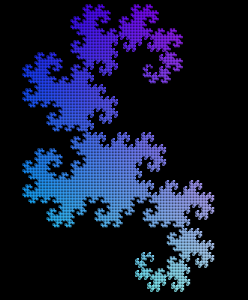
In searching for inspiration, I happened across the notion of the L-systems. I really liked how the visual of this specific patterned looked and wanted to try it out for myself. Although I did find resources to help me with the L-systems logic to generate the pattern because of its specific equations and such, I found that the over code was pretty straightforward in its use of the turtle graphics functions.

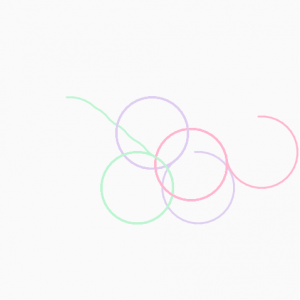
screenshot of final turtle graphic

katieche-project 11

katieche-10

var t1;
var t2;
var t3;

function setup() {
    createCanvas(480, 480);
    background(250);

    // starts the turtle at a random location in the canvas
    t1 = makeTurtle(random(0, 480), random(0, 480));
    t2 = makeTurtle(random(0, 480), random(0, 480));
    t3 = makeTurtle(random(0, 480), random(0, 480));

    //puts pen down and sets colors and weight of each line
    t1.penDown();
    t1.setColor(color(190, 210, 240));
    t1.setWeight(3);
    t2.penDown();
    t2.setColor(color(200, 240, 210));
    t2.setWeight(3);
    t3.penDown();
    t3.setColor(color(250, 190, 210));
    t3.setWeight(3);
    frameRate(10);
}
 
function draw() {
    //starts making the turtle move
    t1.forward(10);
    t2.forward(10);
    t3.forward(10);
    //makes the turtle turn towards the mouse
    t1.turnToward(mouseX, mouseY, 10);
    t2.turnToward(mouseX, mouseY, 10);
    t3.turnToward(mouseX, mouseY, 10);

}

function turtleLeft(d){this.angle-=d;}function turtleRight(d){this.angle+=d;}
function turtleForward(p){var rad=radians(this.angle);var newx=this.x+cos(rad)*p;
var newy=this.y+sin(rad)*p;this.goto(newx,newy);}function turtleBack(p){
this.forward(-p);}function turtlePenDown(){this.penIsDown=true;}
function turtlePenUp(){this.penIsDown = false;}function turtleGoTo(x,y){
if(this.penIsDown){stroke(this.color);strokeWeight(this.weight);
line(this.x,this.y,x,y);}this.x = x;this.y = y;}function turtleDistTo(x,y){
return sqrt(sq(this.x-x)+sq(this.y-y));}function turtleAngleTo(x,y){
var absAngle=degrees(atan2(y-this.y,x-this.x));
var angle=((absAngle-this.angle)+360)%360.0;return angle;}
function turtleTurnToward(x,y,d){var angle = this.angleTo(x,y);if(angle< 180){
this.angle+=d;}else{this.angle-=d;}}function turtleSetColor(c){this.color=c;}
function turtleSetWeight(w){this.weight=w;}function turtleFace(angle){
this.angle = angle;}function makeTurtle(tx,ty){var turtle={x:tx,y:ty,
angle:0.0,penIsDown:true,color:color(128),weight:1,left:turtleLeft,
right:turtleRight,forward:turtleForward, back:turtleBack,penDown:turtlePenDown,
penUp:turtlePenUp,goto:turtleGoTo, angleto:turtleAngleTo,
turnToward:turtleTurnToward,distanceTo:turtleDistTo, angleTo:turtleAngleTo,
setColor:turtleSetColor, setWeight:turtleSetWeight,face:turtleFace};
return turtle;}

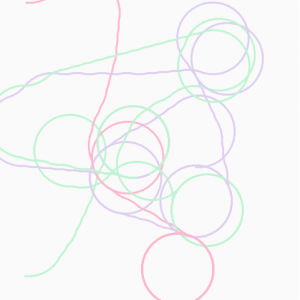
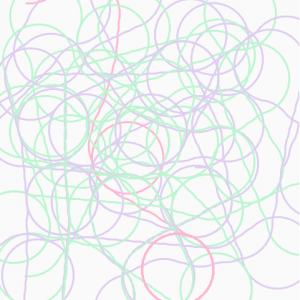
I just wanted to do something that reminded me of like things flying in the air, so I went with powerpuff girls colored lines that fly and do spins in the air. They fly following your mouse, and do circles in place when you mouse is not in motion.