thlai-LookingOutwards11-Computer-Music

Yuri Suzuki

The artist I am choosing for this Looking Outwards is actually the same from my Looking Outwards 08: Yuri Suzuki. I wanted to explore his projects more in depth and choose another one that drew me in.

Suzuki’s project This Looks Like Music takes a whimsical approach to computational music. Suzuki created an audiovisual installation for Mudam Publics Summer Project – the project consists of a mini robot that detects and follows a black line on paper. The robot responds to colored reference points and translates it into sound. I imagine that the robots sense and calculate the color of the markers (kind of like this week’s assignment) and outputs a sound that corresponds to it.

The best part about this installation is that it invites the audience to co-create the music (the audience includes small children!). Having an interactive installation makes it much more relatable and tangible, especially for something like music.

rgroves – LookingOutwards – 11

I found a sound art project to write about because my submission for Looking Outwards 04 was really about music.

Deep Listening Room is a sound installation by Pauline Oliveros at the 2014 Whitney Biennial. Live feed from the main lobby was broadcast onto three walls in a small gallery. The audio from the footage was heavily manipulated and distorted. In addition, Oliveros sat and played a improvised accordion part, matching the doom-like tone of the processed noise from the crowd; the soundtrack became a mixture of low drones, screeches, and vibrating wails. The installation was a commentary on the ubiquity of surveillance. The evil nature of the sound forces the viewer to confront the voyeurism of filming and watching this type of footage.

svitoora-Project-11- Petri Dish

Petri Dish

// 
// Supawat Vitoorapakorn
// Svitoora@andrew.cmu.edu
// Section E
// Petri Dish

// Create Node
function makeTurtle(tx, ty) {
	var turtle = {
		x: tx,
		y: ty,
		life_index: random(-.5, .5) //random seem for bug bheavior
	};
	return turtle;
}

var time = 1; // Time variable
var w = 480;
var h = 480;
var turtles = []

function setup() {
	createCanvas(w, h);
	background(255);
	num_node = 15;
	for (i = 0; i < num_node; i++) {
		t = makeTurtle(random(0, w), random(0, h));
		turtles.push(t);
	}
}

// Ease turtles towards mouse
function turtle_move() {
	speed = .045;
	for (i in turtles) {
		if (turtles[i].x < mouseX) {
			dx = abs(turtles[i].x - mouseX)
			turtles[i].x += dx * speed
		} else {
			dx = abs(turtles[i].x - mouseX)
			turtles[i].x -= dx * speed
		}
		if (turtles[i].y < mouseY) {
			dy = abs(turtles[i].y - mouseY)
			turtles[i].y += dy * speed
		} else {
			dy = abs(turtles[i].y - mouseY)
			turtles[i].y -= dy * speed
		}
	}
}

// Add Perlin noise to movement of turtle
function add_life() {
	if (mouseIsPressed == false) {
		SIZE = 10; //magnitude of noise movement add
	} else {
		SIZE = 30;
	}
	for (i in turtles) {
		life = turtles[i].life_index
		turtles[i].x += (noise(time * life) - .5) * SIZE;
		turtles[i].y += (noise(time * life / 2) - .5) * SIZE;
	}
}

// Draws membrane of turtles
function membrane() {
	strokeWeight(1);
	fill(0, 0, 0, 255 * .1);
	beginShape(TRIANGLE_STRIP);
	for (i in turtles) {
		x = turtles[i].x
		y = turtles[i].y
		curveVertex(x, y);
	}
	endShape(CLOSE);
}

// Connect lines
function connect_lines() {
	stroke(0, 0, 0, 255 * .25)
	for (i in turtles) {
		x_0 = turtles[i].x
		y_0 = turtles[i].y
		for (i in turtles) {
			x_1 = turtles[i].x
			y_1 = turtles[i].y
			line(x_0, y_0, x_1, y_1);
		}
	}
}

function draw() {
	time += .1;
	background(255, 255, 255, 255 * .75);
	turtle_move();
	add_life()
	for (i in turtles) {
		fill(0, 0, 0, 255 * .75);
		ellipse(turtles[i].x, turtles[i].y, 10, 10)
	}
	membrane();
	connect_lines();
}

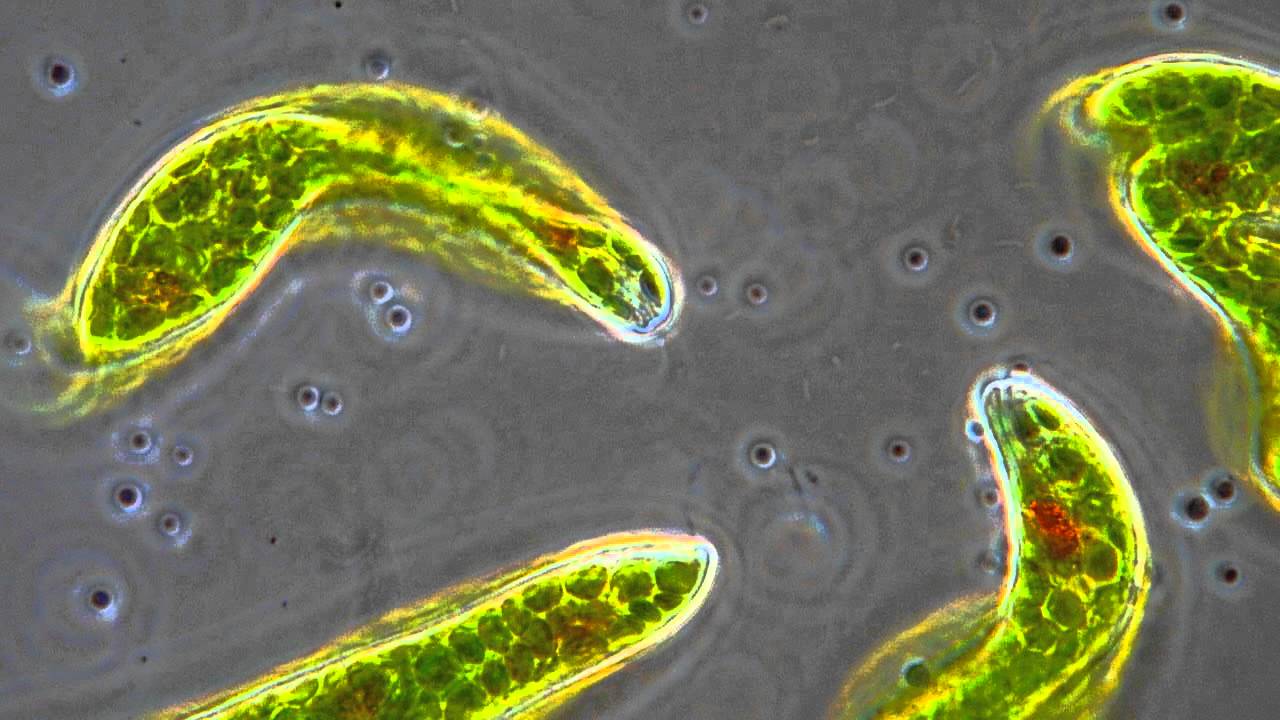
This is my first time playing with the noise() function and I absolutely love it! Try clicking and moving your mouse around the canvas. I wanted to create a digital petri dish inspired by seeing Euglena protist under the microscope:

Image result for euglena


SaveSave

SaveSave

jiaxinw-Project-11-Composition

sketch

function preload(){
    img = loadImage("https://i.imgur.com/TKrbX1X.jpg")
}

function setup(){
    createCanvas(480,480);
    background(40);
    img.loadPixels();
}

var d = 20;
var c;
var w = 5;
function draw(){
    frameRate(10);
    var x = width/2;
    var y = height;
    //let the tree grow from the center of the bottom
    myTurtle=makeTurtle(x,y)
    //get random color for each branch
    c = img.get(random(x*2),random(y));
    if (d>=600){
        d =10
        w = 5
    }
    //when the tree is too big, grow black branches to erase the tree
    if (d>400 & d<600){
        c=40
        w=50;
    }
    myTurtle.setColor(c);
    myTurtle.setWeight(w);
    //draw a randomly growing tree
    myTurtle.left(90);
    myTurtle.forward(50);
    myTurtle.turnToward(random(200,280),100,20);
    myTurtle.forward(random(d));
    d += 2;
    myTurtle.turnToward(random(100,380),height,30);
    myTurtle.forward(random(d));
    myTurtle.turnToward(random(width),10,50);
    myTurtle.forward(random(d));
    
};

function mousePressed(){
    //press mouse to draw white fruits 
    var x1 = mouseX;
    var y1 = mouseY; 
    var t1 = makeTurtle(x1,y1);
    t1.setColor(color(255));
    t1.setWeight(1);
    for (var i = 0; i < 50; i++) {
        t1.forward(random(5,7));
        t1.right(random(10,30));
        
    }
    
}


function turtleLeft(d) {
    this.angle -= d;
}


function turtleRight(d) {
    this.angle += d;
}


function turtleForward(p) {
    var rad = radians(this.angle);
    var newx = this.x + cos(rad) * p;
    var newy = this.y + sin(rad) * p;
    this.goto(newx, newy);
}


function turtleBack(p) {
    this.forward(-p);
}


function turtlePenDown() {
    this.penIsDown = true;
}


function turtlePenUp() {
    this.penIsDown = false;
}


function turtleGoTo(x, y) {
    if (this.penIsDown) {
      stroke(this.color);
      strokeWeight(this.weight);
      line(this.x, this.y, x, y);
    }
    this.x = x;
    this.y = y;
}


function turtleDistTo(x, y) {
    return sqrt(sq(this.x - x) + sq(this.y - y));
}


function turtleAngleTo(x, y) {
    var absAngle = degrees(atan2(y - this.y, x - this.x));
    var angle = ((absAngle - this.angle) + 360) % 360.0;
    return angle;
}


function turtleTurnToward(x, y, d) {
    var angle = this.angleTo(x, y);
    if (angle < 180) {
        this.angle += d;
    } else {
        this.angle -= d;
    }
}


function turtleSetColor(c) {
    this.color = c;
}


function turtleSetWeight(w) {
    this.weight = w;
}


function turtleFace(angle) {
    this.angle = angle;
}


function makeTurtle(tx, ty) {
    var turtle = {x: tx, y: ty,
                  angle: 0.0, 
                  penIsDown: true,
                  color: color(128),
                  weight: 1,
                  left: turtleLeft, right: turtleRight,
                  forward: turtleForward, back: turtleBack,
                  penDown: turtlePenDown, penUp: turtlePenUp,
                  goto: turtleGoTo, angleto: turtleAngleTo,
                  turnToward: turtleTurnToward,
                  distanceTo: turtleDistTo, angleTo: turtleAngleTo,
                  setColor: turtleSetColor, setWeight: turtleSetWeight,
                  face: turtleFace};
    return turtle;
}

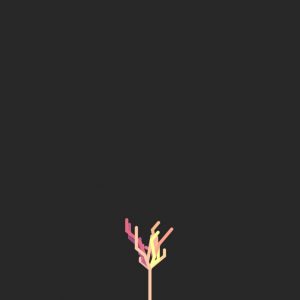
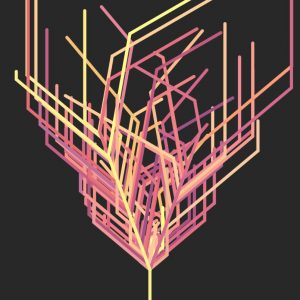
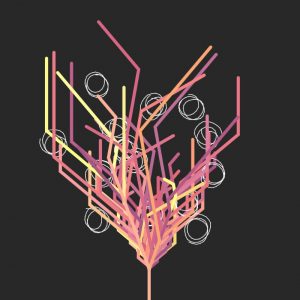
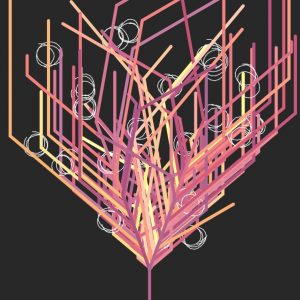
My original thought was to draw a growing tree with Turtles. I wanted the branches to grow on the canvas. So I began to use the turtle to draw a branch.  And then I think about because I needed a trunk, so I made the first “forward” longer to make a trunk. I needed the branches going spreadly on the canvas, so I made them randomly go around the center line of the canvas. And then I figured out if I let the tree just growing forever, the canvas would be a mess. That’s why I added when the tree is big enough, black branches will grow and “erase” the previous ones. Also, for making the work more interesting, I added when the mouse is pressed, an abstract white “fruit” will be drawn on the tree.

The tree grows from small to big, and fruits can be added to the tree when the mouse is clicked.

merlebac Looking Outward-11

Link to the Original Video: “https://vimeo.com/36742259”

A piece of computer music that I found to be incredibly interesting was Playable Decagons / MaxMSP by Melissa Pons. The video shows a mouse clicking on a 3D decagon and playing sounds based on where the mouse clicked. I thought that this was an extremely creative way to create music. By the appearance of the setup it appearsthey tried to have the decagon imitate a piano. I find this amazing since I find playing the piano to be hard enough (in fact I can’t play at all), but to play it using an unlabeled polygon is another feat entirely. The code that they used was likely very complicated. I would assume that they mapped certain sounds to the surface of the decagon using if statements involving the mouse. While the project may not seem very creative it bears further examination. I feel that coming up with the idea to do this was incredibly creative, and is something that I wouldn’t come up with in a million years.

thlai-Project11-Composition

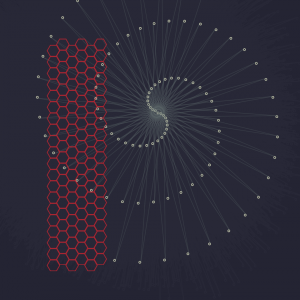
I still have trouble creating compositions using turtle graphics, but this project certainly helped me learn a lot. I created a hexagonal grid (inspired by a past assignment) and a spiral web that responds to the mouse position. The web and hive are both natural phenomena created by small creatures and have unique and distinctive shapes.
sketch

// Tiffany Lai
// 15-104, Section A
// thlai@andrew.cmu.edu
// Project 11 - Turtle

var ox = 80; // offset of x position
var oy = 90; // offset of y position
var tw = 15; // spacing between hexagons (width)
var th = 18; // spacing between hexagons (height)

function setup() {
  createCanvas(480, 480);
}

function draw() {
	background(35, 36, 49, 50);
	// draw hexagons
  for (var x = 0; x < 6; x++) {
		for (var y = 0; y < 20; y++) {
			var t1 = makeTurtle(ox + x * tw, oy + y * th);
			hexagon(t1);
		}
		if (x%2 == 0) { // offset every other column
			oy = 80;
		} else {
			oy = 90;
		}
	}

	// draw spiral of circles
	var t2 = makeTurtle(0, 0);
	var translateX = map(mouseX, 0, width, 100, 200);
	var translateY = map(mouseY, 0, height, 100, 200);
	var radius = map(mouseX, 0, width, 160, 170);

	translate(translateX, translateY); // translate based on mouse position
	for (var i = 0; i < 100; i++) {
		t2.setColor(color(97, 121, 120, 20)); // yellow-y color
		t2.forward(i * 5); // creating spiral
		t2.left(radius);
		circle(t2);
	}
	pop();

function hexagon(t1) {
	for (var i = 0; i < 6; i++) {
		t1.setColor(color(175, 35, 45));
		t1.forward(10);
		t1.left(60);
	}
}

function circle(t2) {
	for (var i = 0; i < 20; i++) {
		t2.setColor(color(213, 215, 181, 60));
		t2.forward(0.5);
		t2.left(360/20);
	}
}

//======= CONDENSED TURTLE CODE =======//
function turtleLeft(d){this.angle-=d;}function turtleRight(d){this.angle+=d;}
function turtleForward(p){var rad=radians(this.angle);var newx=this.x+cos(rad)*p;
var newy=this.y+sin(rad)*p;this.goto(newx,newy);}function turtleBack(p){
this.forward(-p);}function turtlePenDown(){this.penIsDown=true;}
function turtlePenUp(){this.penIsDown = false;}function turtleGoTo(x,y){
if(this.penIsDown){stroke(this.color);strokeWeight(this.weight);
line(this.x,this.y,x,y);}this.x = x;this.y = y;}function turtleDistTo(x,y){
return sqrt(sq(this.x-x)+sq(this.y-y));}function turtleAngleTo(x,y){
var absAngle=degrees(atan2(y-this.y,x-this.x));
var angle=((absAngle-this.angle)+360)%360.0;return angle;}
function turtleTurnToward(x,y,d){var angle = this.angleTo(x,y);if(angle< 180){
this.angle+=d;}else{this.angle-=d;}}function turtleSetColor(c){this.color=c;}
function turtleSetWeight(w){this.weight=w;}function turtleFace(angle){
this.angle = angle;}function makeTurtle(tx,ty){var turtle={x:tx,y:ty,
angle:0.0,penIsDown:true,color:color(128),weight:1,left:turtleLeft,
right:turtleRight,forward:turtleForward, back:turtleBack,penDown:turtlePenDown,
penUp:turtlePenUp,goto:turtleGoTo, angleto:turtleAngleTo,
turnToward:turtleTurnToward,distanceTo:turtleDistTo, angleTo:turtleAngleTo,
setColor:turtleSetColor, setWeight:turtleSetWeight,face:turtleFace};
return turtle;}}

Jdbrown – Project 11 – I Like Turtles (Mosaic)

sketch

// Joshua Brown
// Jdbrown@andrew.cmu.edu
// Section C
// Project 11: Turtle Fun

// makeTurtle(x, y) -- make a turtle at x, y, facing right, pen down
// left(d) -- turn left by d degrees
// right(d) -- turn right by d degrees
// forward(p) -- move forward by p pixels
// back(p) -- move back by p pixels
// penDown() -- pen down
// penUp() -- pen up
// goto(x, y) -- go straight to this location
// setColor(color) -- set the drawing color
// setWeight(w) -- set line width to w
// face(d) -- turn to this absolute direction in degrees
// angleTo(x, y) -- what is the angle from my heading to location x, y?
// turnToward(x, y, d) -- turn by d degrees toward location x, y
// distanceTo(x, y) -- how far is it to location x, y?

function setup () {
    createCanvas (480, 480);
    background (0);

    var t1 = makeTurtle(270, 120);
    var t2 = makeTurtle(255, 160);
    var t3 = makeTurtle(330, 340);
    var t4 = makeTurtle(30, 280);

    for (var i = 0; i < 1000; i++) {
        
        makeMoz(t1);    // makes the mini-med sized pattern;
        makeMaz(t2);    // makes the smallest patter;
        makeMax(t3);    // makes the largest pattern;
        makeThing(t4);  // makes the larger-med sized pattern
    }
}

function makeThing (t4) {

    t4.forward(10);
    t4.left(45);
    t4.forward(25);
    t4.left(90);
    t4.forward(50);
    t4.left(135);
    t4.forward(75);
    t4.left(180);
    t4.forward(150);
    t4.right(45);
    t4.forward(50);
    t4.right(90);

}


function makeMax (t3, a1) {

    t3.forward(200);
    t3.left(90);
    t3.forward(180);
    t3.left(90);
    t3.forward(160);
    t3.left(45);
    t3.forward(140);
    t3.left(90);
    t3.forward(120);
    t3.left(90);
    t3.forward(100);
    t3.left(45);
    t3.forward(80);
    t3.left(90);
    t3.forward(60);
    t3.left(90);
    t3.forward(40);
    t3.left(45);
    t3.forward(20);
    t3.left(90);
}

function makeMoz (t1) {
   
    t1.forward(50);
    t1.right(90);
    t1.forward(50);
    t1.right(45);
    t1.forward(50);
    t1.right(90);
    t1.forward(50);
    t1.right(90);
    t1.forward(50);
    t1.right(90);
    t1.forward(50);
    t1.right(45);
    t1.forward(50);
    t1.right(90);
    t1.forward(50);
    t1.right(90);
    t1.forward(50);
    t1.right(90);
    t1.forward(50);
    t1.right(45);
    t1.forward(50);
    t1.right(90);
    t1.forward(50);
    t1.right(90);
    t1.forward(50);
    t1.right(90);
    t1.forward(50);
    t1.right(45);
    t1.forward(50);
    t1.right(90);
    t1.forward(50);
    t1.right(90);
    t1.forward(50);
    t1.forward(50);
    t1.right(90);
    t1.forward(50);
    t1.right(45);
    t1.forward(50);
    t1.right(90);
    t1.forward(50);
}

function makeMaz (t2) {

    t2.forward(25);
    t2.right(90);
    t2.forward(25);
    t2.right(45);
    t2.forward(25);
    t2.right(90);
    t2.forward(25);
    t2.right(90);
    t2.forward(25);
    t2.right(90);
    t2.forward(25);
    t2.right(45);
    t2.forward(25);
    t2.right(90);
    t2.forward(25);
    t2.right(90);
    t2.forward(25);
    t2.right(90);
    t2.forward(25);
    t2.right(45);
    t2.forward(50);
    t2.right(90);
    t2.forward(50);
    t2.right(90);
    t2.forward(50);
    t2.right(90);
    t2.forward(50);
    t2.right(45);
    t2.forward(50);
    t2.right(90);
    t2.forward(50);
    t2.right(90);
    t2.forward(50);
    t2.forward(50);
    t2.right(90);
    t2.forward(50);
    t2.right(45);
    t2.forward(50);
    t2.right(90);
    t2.forward(50);
}

function turtleLeft(d) {
    this.angle -= d;
}


function turtleRight(d) {
    this.angle += d;
}


function turtleForward(p) {
    var rad = radians(this.angle);
    var newx = this.x + cos(rad) * p;
    var newy = this.y + sin(rad) * p;
    this.goto(newx, newy);
}


function turtleBack(p) {
    this.forward(-p);
}


function turtlePenDown() {
    this.penIsDown = true;
}


function turtlePenUp() {
    this.penIsDown = false;
}


function turtleGoTo(x, y) {
    if (this.penIsDown) {
      stroke(this.color);
      strokeWeight(this.weight);
      line(this.x, this.y, x, y);
    }
    this.x = x;
    this.y = y;
}


function turtleDistTo(x, y) {
    return sqrt(sq(this.x - x) + sq(this.y - y));
}


function turtleAngleTo(x, y) {
    var absAngle = degrees(atan2(y - this.y, x - this.x));
    var angle = ((absAngle - this.angle) + 360) % 360.0;
    return angle;
}


function turtleTurnToward(x, y, d) {
    var angle = this.angleTo(x, y);
    if (angle < 180) {
        this.angle += d;
    } else {
        this.angle -= d;
    }
}


function turtleSetColor(c) {
    this.color = c;
}


function turtleSetWeight(w) {
    this.weight = w;
}


function turtleFace(angle) {
    this.angle = angle;
}


function makeTurtle(tx, ty) {
    var turtle = {x: tx, y: ty,
                  angle: 0.0, 
                  penIsDown: true,
                  color: color(255),
                  weight: 1,
                  left: turtleLeft, right: turtleRight,
                  forward: turtleForward, back: turtleBack,
                  penDown: turtlePenDown, penUp: turtlePenUp,
                  goto: turtleGoTo, angleto: turtleAngleTo,
                  turnToward: turtleTurnToward,
                  distanceTo: turtleDistTo, angleTo: turtleAngleTo,
                  setColor: turtleSetColor, setWeight: turtleSetWeight,
                  face: turtleFace};
    return turtle;
}

There’s something simplistic and beautiful about these turtle designs. I’ve chosen to go a simpler route and just explore the shapes turtles can effortlessly create. I really enjoy these mosaic-shapes.

agusman-Project11-TurtleGraphicsFreestyle

sketch

//Anna Gusman
//agusman@andrew.cmu.edu
//Section E
//Turtle Graphics


function turtleLeft(d) {
    this.angle -= d;
}


function turtleRight(d) {
    this.angle += d;
}


function turtleForward(p) {
    var rad = radians(this.angle);
    var newx = this.x + cos(rad) * p;
    var newy = this.y + sin(rad) * p;
    this.goto(newx, newy);
}


function turtleBack(p) {
    this.forward(-p);
}


function turtlePenDown() {
    this.penIsDown = true;
}


function turtlePenUp() {
    this.penIsDown = false;
}


function turtleGoTo(x, y) {
    if (this.penIsDown) {
      stroke(this.color);
      strokeWeight(this.weight);
      line(this.x, this.y, x, y);
    }
    this.x = x;
    this.y = y;
}


function turtleDistTo(x, y) {
    return sqrt(sq(this.x - x) + sq(this.y - y));
}


function turtleAngleTo(x, y) {
    var absAngle = degrees(atan2(y - this.y, x - this.x));
    var angle = ((absAngle - this.angle) + 360) % 360.0;
    return angle;
}


function turtleTurnToward(x, y, d) {
    var angle = this.angleTo(x, y);
    if (angle < 180) {
        this.angle += d;
    } else {
        this.angle -= d;
    }
}


function turtleSetColor(c) {
    this.color = c;
}


function turtleSetWeight(w) {
    this.weight = w;
}


function turtleFace(angle) {
    this.angle = angle;
}


function makeTurtle(tx, ty) {
    var turtle = {x: tx, y: ty,
                  angle: 0.0,
                  penIsDown: true,
                  color: color(128),
                  weight: 1,
                  left: turtleLeft, right: turtleRight,
                  forward: turtleForward, back: turtleBack,
                  penDown: turtlePenDown, penUp: turtlePenUp,
                  goto: turtleGoTo, angleto: turtleAngleTo,
                  turnToward: turtleTurnToward,
                  distanceTo: turtleDistTo, angleTo: turtleAngleTo,
                  setColor: turtleSetColor, setWeight: turtleSetWeight,
                  face: turtleFace};
    return turtle;
}

var t1;

function setup() {
    createCanvas(400,400);
    background(0);
    t1 = makeTurtle(200, 200);
    t1.setColor(255);
    t1.setWeight(1);
    t1.penDown();

    var sideLength = 20;
    for(var i = 0; i < 100; i++) {
        t1.penDown();
        sideLength = sideLength - 20;
        t1.right(2);
        makeSquare(sideLength);

    }
  }

function makeSquare(sideLength)
    {t1.forward(sideLength);
    t1.right(90);
    t1.forward(sideLength);
    t1.right(90);
    t1.forward(sideLength);
    t1.right(90);
    t1.forward(sideLength);
    t1.right(90);

    ellipse(t1.x,t1.y,10,10)
    t1.penUp();
    t1.right(90);
    t1.forward(sideLength)
    t1.right(90);
    t1.forward(sideLength)

    ellipse(t1.x,t1.y,10,10)
}

Inspired by my struggles with the lab this week, I wanted to dive a bit further into the mechanism of iterated rotation. Here’s a simple transformation I thought looked really lovely.

elizabew – Looking Outwards – 11 – sectionE

Atlås from binaura on Vimeo.

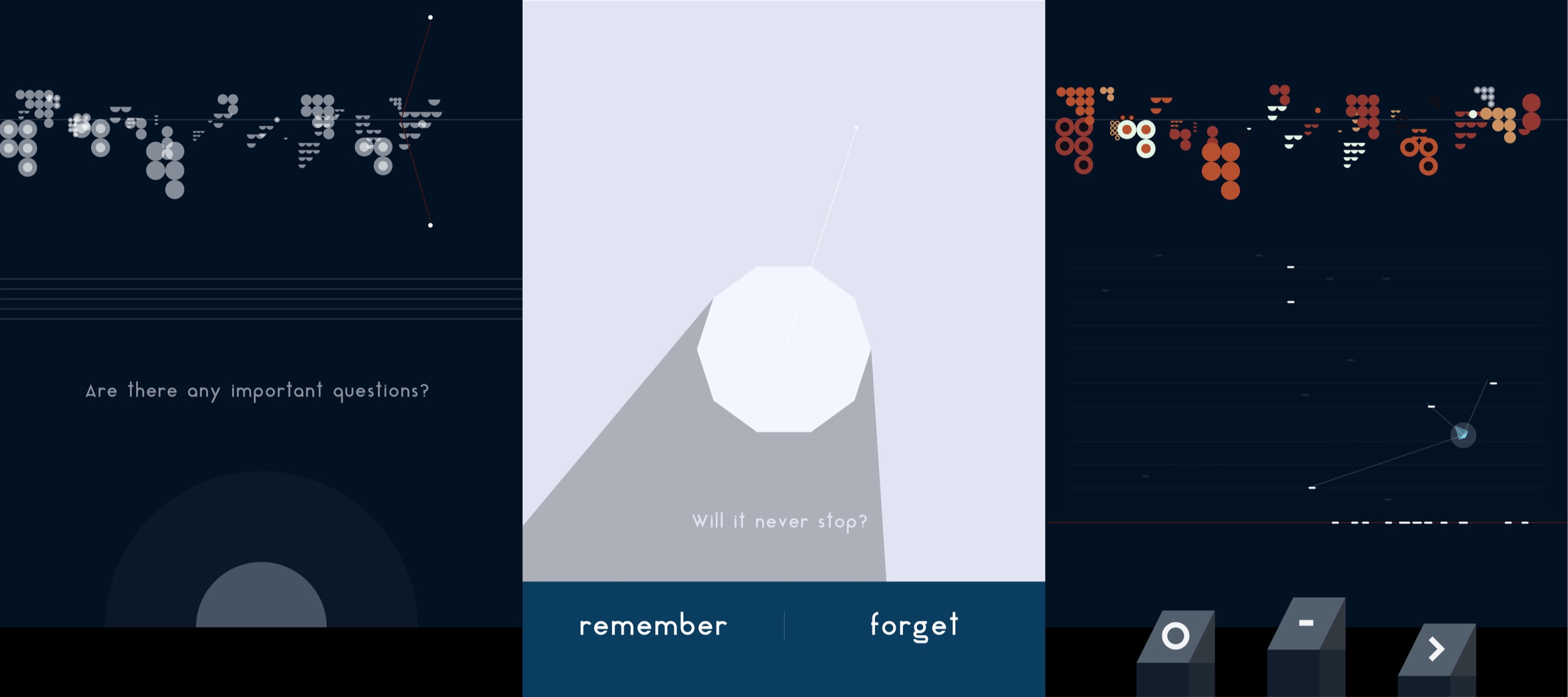
For a computational music piece, I decided to look into Agoston Nagy’s work, Atlås—a guided and generative music experience made for iOS. What I really admire about this application is that not only does it let users discover and create music with “interactive sonic sounds”, but it allows users to be transferred to a beautiful digital environment that is visually unlike traditional music. It generates tasks in between spaces that are solved by the application itself within the digital environment ( without the need for users to know how to solve it) which helps to make the application more than just a “music maker.

The app is made using javascript and the p5js library that is embedded in a Swift iOS application. The sound is written in Pure Data—”a graphical programming language to develop interactive sonic events”.

Agoston Nagy says that he wanted to create something that creates a narrative which would help to guide users through an experience. He wanted to bring up thought provoking questions that are focused on communication between people. He applied these thoughts into the app by bringing up these questions in between the music experiences.

Screenshots of the application—questions appear throughout the computational music experience

Sheenu-Project 11-Composition

sketch

var myTurtle;
var startFrame;
function setup() {
    createCanvas(400, 400);
    background(220);
    myTurtle=makeTurtle(width/2,height/2);
    myTurtle.setColor(color(0))
    myTurtle.setWeight(2);
    myTurtle.penDown();
    myTurtle.left(90);
    myTurtle.forward(10);

}
function draw() {
	var rand = random(0,10);
	if(rand>5){
		myTurtle.left(45);
		myTurtle.forward(5);
		//myTurtle.penUp();
	} else if (rand<5){
		myTurtle.right(45);
		myTurtle.forward(5);
		//myTurtle.penUp();
	}
}


function turtleLeft(d){this.angle-=d;}function turtleRight(d){this.angle+=d;}
function turtleForward(p){var rad=radians(this.angle);var newx=this.x+cos(rad)*p;
var newy=this.y+sin(rad)*p;this.goto(newx,newy);}function turtleBack(p){
this.forward(-p);}function turtlePenDown(){this.penIsDown=true;}
function turtlePenUp(){this.penIsDown = false;}function turtleGoTo(x,y){
if(this.penIsDown){stroke(this.color);strokeWeight(this.weight);
line(this.x,this.y,x,y);}this.x = x;this.y = y;}function turtleDistTo(x,y){
return sqrt(sq(this.x-x)+sq(this.y-y));}function turtleAngleTo(x,y){
var absAngle=degrees(atan2(y-this.y,x-this.x));
var angle=((absAngle-this.angle)+360)%360.0;return angle;}
function turtleTurnToward(x,y,d){var angle = this.angleTo(x,y);if(angle< 180){
this.angle+=d;}else{this.angle-=d;}}function turtleSetColor(c){this.color=c;}
function turtleSetWeight(w){this.weight=w;}function turtleFace(angle){
this.angle = angle;}function makeTurtle(tx,ty){var turtle={x:tx,y:ty,
angle:0.0,penIsDown:true,color:color(128),weight:1,left:turtleLeft,
right:turtleRight,forward:turtleForward, back:turtleBack,penDown:turtlePenDown,
penUp:turtlePenUp,goto:turtleGoTo, angleto:turtleAngleTo,
turnToward:turtleTurnToward,distanceTo:turtleDistTo, angleTo:turtleAngleTo,
setColor:turtleSetColor, setWeight:turtleSetWeight,face:turtleFace};
return turtle;}

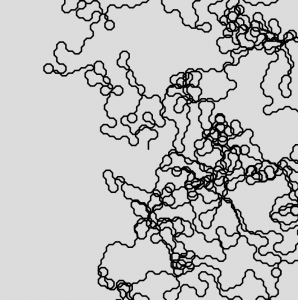
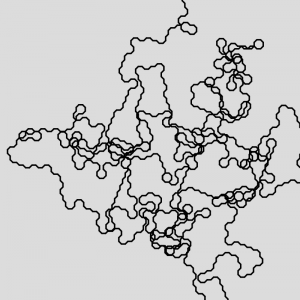
This is a project that didn’t come out as planned, yet looked very interesting in the end. I originally tried to make the turtle generate structures that looked similar to trees or tree roots using arrays. I was planning to find a way to make the program create a turtle using a For loop and push that turtle into the array on command. Although, I admit that I wasn’t sure where to start when thinking about this, I still tried my best to do what I wanted to do and got started. I was working on the code and wanted to give the program a test run. When I ran the program, it generated these octagonal structures and lines all over the canvas. That is when I realized that this structure was more interesting than the tree structure I had in mind.