Project-11-Composition

Move and Press Mouse!

sketch

//Hanna Jang
//Section B 
//hannajan@andrew.cmu.edu; 
//Project 11

function setup(){
	createCanvas(400, 400); 
	background(12, 24, 76); 
}

function draw(){
	
	//make tree
	var t1=makeTurtle(width/2, height/2);

//color and stroke weight of tree
	t1.setColor(74, 246, 126);
	t1.setWeight(10);
	
//make tree 
		t1.PenDown; 
		t1.right(100);
		t1.forward(200); 
		t1.PenUp;		
		
	//make tree side 
	var t1=makeTurtle(width/2, height/2);

//color and stroke weight of tree
	t1.setColor(74, 246, 126);
	t1.setWeight(10);
	
		t1.PenDown; 
		t1.right(80);
		t1.forward(200); 
		t1.PenUp;		
	
//make main star 
	var t2=makeTurtle(width/2, height/2);
	
//color and stroke weight of star 
	t2.setColor(255);
	t2.setWeight(3);
	
//adjust the star size according to mouseX
	var squareSize=20; 
		if (mouseX>width){
			squareSize=100;
			}
		if (mouseX<width){
			squareSize=30;
			}
			
//make many squares for making star 
	for (var j=0; j<25; j++){
		t2.right(50); 
		t2.left(30); 
		
//make the squares
		for (var i=0; i<4; i++){
			t2.PenDown; 
			t2.forward(squareSize); 
			t2.left(90);
			t2.PenUp;		
		}
	}
	
//make more stars when mouse is pressed 
if (mouseIsPressed){
	morestar(); 
}
}

function morestar() {
	t2=makeTurtle(mouseX, mouseY); 
	t2.setColor(248, 224, 127);
	t2.setWeight(1);
	
//randomize star size 
	var squareSize=random(3, 50); 

	
//make many shapes for making star 
	for (var j=0; j<8; j++){
		t2.right(50); 
		t2.left(30); 

//randomize the type of shapes being used for stars 
var sides=random(3, 5); 
			
	for (var i=0; i<sides; i++){
	t2.PenDown; 
	t2.forward(10); 
	t2.left(360/sides);
	t2.PenUp;		
			}
		}
	}
	
function makeTurtle(tx, ty) {
    var turtle = {x: tx, y: ty,
                  angle: 0.0, 
                  penIsDown: true,
                  color: color(128),
                  weight: 1,
                  left: turtleLeft, right: turtleRight,
                  forward: turtleForward, 
                  penDown: turtlePenDown, penUp: turtlePenUp,
                  goto: turtleGoTo, angleto: turtleAngleTo,
                  turnToward: turtleTurnToward,
                  distanceTo: turtleDistTo, angleTo: turtleAngleTo,
                  setColor: turtleSetColor, setWeight: turtleSetWeight};
    return turtle;
}

function turtleLeft(d) {
    this.angle -= d;
}
 
function turtleRight(d) {
    this.angle += d;
}
 
function turtleForward(p) {
    var rad = radians(this.angle);
    var newx = this.x + cos(rad) * p;
    var newy = this.y + sin(rad) * p;
    this.goto(newx, newy);
}
 
function turtleBack(p) {
    this.forward(-p);
}
 
function turtlePenDown() {
    this.penIsDown = true;
}
 
function turtlePenUp() {
    this.penIsDown = false;
}
 
function turtleGoTo(x, y) {
    if (this.penIsDown) {
      stroke(this.color);
      strokeWeight(this.weight);
      line(this.x, this.y, x, y);
    }
    this.x = x;
    this.y = y;
}
 
function turtleDistTo(x, y) {
    return sqrt(sq(this.x - x) + sq(this.y - y));
}
 
function turtleAngleTo(x, y) {
    var absAngle = degrees(atan2(y - this.y, x - this.x));
    var angle = ((absAngle - this.angle) + 360) % 360.0;
    return angle;
}
 
function turtleTurnToward(x, y, d) {
    var angle = this.angleTo(x, y);
    if (angle < 180) {
        this.angle += d;
    } else {
        this.angle -= d;
    }
}
 
function turtleSetColor(c) {
    this.color = c;
}
 
function turtleSetWeight(w) {
    this.weight = w;
}
 
function turtleFace(angle) {
    this.angle = angle;
}

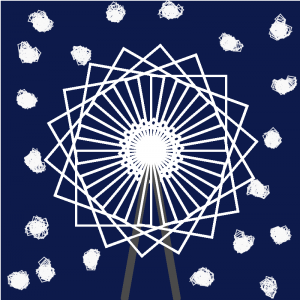
When thinking about what to do, I thought of an idea to make a star object, and theme it around a simple christmas tree. I then experimented using turtle graphics to make a unique looking object and added extra twinkling stars in the background when the mouse is pressed.
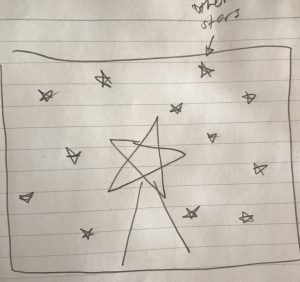
Original Idea Sketch

hyt-Project-11: Turtle Abstract Drawing

hyt-project-11

// helen tsui
// 15-104 section d
// hyt@andrew.cmu.edu
// project-11-turtles-freestyle


var img; 
var px = 0; // set one variable as x position 
var py = 0; // set one variable as y position
    
// preload image onto canvas
function preload() {
    img = loadImage("https://i.imgur.com/BRPnejy.jpg");    
}

// basic setup, load pixels and display image
function setup() {
    createCanvas(480, 480);
    background(0);
    img.loadPixels();
    image(img, 0, 0);
}

function draw() {

    // retrieve brightness value
    var rgb = img.get(px, py);
    var brightnessVal = brightness(rgb);

    // create new turtle pixel + other properties
    var pixel = makeTurtle(px, py);
    pixel.setWeight(5);
    print(brightnessVal)

    // restrain px position within canvas
    if (px <= width) { 

        // draw in the lighter zones
        if (brightnessVal >= 92 & brightnessVal < 100) { 
            pixel.setColor(color(200, 191, 201, 150));
            pixel.forward(1);

        } 
        // draw in dark zones
        if (brightnessVal < 92) {
            pixel.setColor(color(128, 122, 128, 150));
            pixel.forward(1);
        }

        // draw in gray-ish zones
        if (brightnessVal >= 100) {
            pixel.setColor(color(251, 244, 238, 150));
            pixel.forward(1);
        }
    }

    // if out of canvas then reset
    if (px > width) {
        px = 0;
        py += 8;
    }

    // make the turtles move! 
    px += 2;
}


// turtle function
function turtleLeft(d){this.angle-=d;}function turtleRight(d){this.angle+=d;}
function turtleForward(p){var rad=radians(this.angle);var newx=this.x+cos(rad)*p;
var newy=this.y+sin(rad)*p;this.goto(newx,newy);}function turtleBack(p){
this.forward(-p);}function turtlePenDown(){this.penIsDown=true;}
function turtlePenUp(){this.penIsDown = false;}function turtleGoTo(x,y){
if(this.penIsDown){stroke(this.color);strokeWeight(this.weight);
line(this.x,this.y,x,y);}this.x = x;this.y = y;}function turtleDistTo(x,y){
return sqrt(sq(this.x-x)+sq(this.y-y));}function turtleAngleTo(x,y){
var absAngle=degrees(atan2(y-this.y,x-this.x));
var angle=((absAngle-this.angle)+360)%360.0;return angle;}
function turtleTurnToward(x,y,d){var angle = this.angleTo(x,y);if(angle< 180){
this.angle+=d;}else{this.angle-=d;}}function turtleSetColor(c){this.color=c;}
function turtleSetWeight(w){this.weight=w;}function turtleFace(angle){
this.angle = angle;}function makeTurtle(tx,ty){var turtle={x:tx,y:ty,
angle:0.0,penIsDown:true,color:color(128),weight:1,left:turtleLeft,
right:turtleRight,forward:turtleForward, back:turtleBack,penDown:turtlePenDown,
penUp:turtlePenUp,goto:turtleGoTo, angleto:turtleAngleTo,
turnToward:turtleTurnToward,distanceTo:turtleDistTo, angleTo:turtleAngleTo,
setColor:turtleSetColor, setWeight:turtleSetWeight,face:turtleFace};
return turtle;}

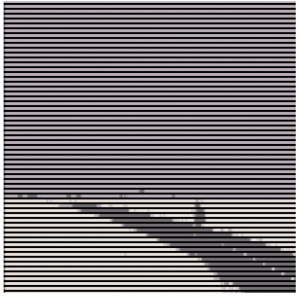
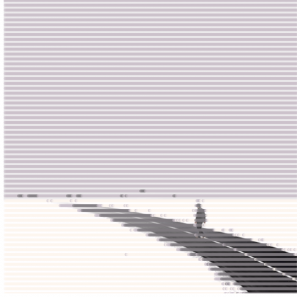
For this project, I wanted to create an abstract landscape work that’s based off of a found minimalist photo, and the turtle drawing process would imitate a machine printing out the pixelated drawing. I didn’t really have a sketch, since the found image itself is my inspiration. I think the most challenging part was to incorporate the brightness() function into turtles, which took me a long time to figure out (for quite a while the brightness value was not calling the right (px, py) position) however I am quite satisfied with the foggy, pastel painting that generated.

* i’m using a grace day for this week!

The first image is an iteration without the original image, and the second image incorporates both the original + iterated turtles. Enjoy!

yoonyouk-LookingOutwards-11


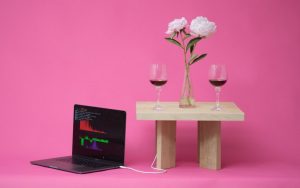
The Classifyer is a gadget that can detect the mood of a social setting and the play the appropriate music. The table can detect different drinks: beer, wine, hot beverages and even catch sounds from the environment whether it be conversations or background sounds. The creators, Benedict Huebermen, Stephanie Lee, Kelvyn Marte, wanted this gadget to enhance the ambience of each environment. The algorithm would be the detection of the different drinks and then the projection of the sounds.

I thought it was cool that the gadget could play the sounds that correlated with different drinks. I also found it particularly interesting that the students of this project determined that drinks were the indicators of the different moods of different settings. Perhaps this product would then be most appropriate in kitchen, bar, or restaurant settings.

Learn more through this link.

yushano_Project 11

sketch

function turtleLeft(d) {
    this.angle -= d;
}


function turtleRight(d) {
    this.angle += d;
}


function turtleForward(p) {
    var rad = radians(this.angle);
    var newx = this.x + cos(rad) * p;
    var newy = this.y + sin(rad) * p;
    this.goto(newx, newy);
}


function turtleBack(p) {
    this.forward(-p);
}


function turtlePenDown() {
    this.penIsDown = true;
}


function turtlePenUp() {
    this.penIsDown = false;
}


function turtleGoTo(x, y) {
    if (this.penIsDown) {
      stroke(this.color);
      strokeWeight(this.weight);
      line(this.x, this.y, x, y);
    }
    this.x = x;
    this.y = y;
}


function turtleSetColor(c) {
    this.color = c;
}


function turtleSetWeight(w) {
    this.weight = w;
}

function turtleFace(angle) {
    this.angle = angle;
}

function makeTurtle(tx, ty) {
    var turtle = {x: tx, y: ty,
                  angle: 0.0, 
                  penIsDown: true,
                  color: color(random(255),random(255),0),
                  weight: 1,
                  left: turtleLeft, right: turtleRight,
                  forward: turtleForward, back: turtleBack,
                  penDown: turtlePenDown, penUp: turtlePenUp,
                  goto: turtleGoTo, 
                  setColor: turtleSetColor, setWeight: turtleSetWeight,
                  face: turtleFace};
    return turtle;
}

function setup() {
    createCanvas(480, 480);
    background(0);

}

var turtleX = [];
var turtleY = [];
var radius = 5;

function draw() {
  for (var num=0; num<turtleX.length; num++){
    var turtle = makeTurtle(turtleX[num], turtleY[num]);
    var angle=20;
    
    for (var i=0; i<20; i++) {
        turtle.penDown();
        turtle.right(angle);
        turtle.forward(radius);
      
      turtle.penUp();
      turtle.x = turtleX[num];
      turtle.y = turtleY[num];
    }
  }
  if(radius<200){
    radius += 0.5;
  }
}

function mousePressed(){
  
  turtleX.push(random(width));
  turtleY.push(random(height));

}

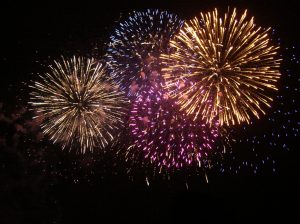
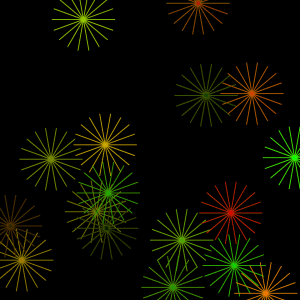
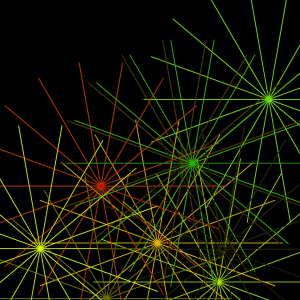
When users press the mouse on the canvas, there will be a turtle that is placed randomly on canvas generated. The size of each firework is also changing. This idea is inspired by the firework that we can see on celebration days.

rmanagad-project11-sectionE-Turtle Graphics

sketch

//Robert Managad
//Section-E
//rmanagad@andrew.cmu.edu
//Project 11 -- Turtle Graphics

var turtleWormA;


function setup() {
	createCanvas(400, 400);
	
}

function draw() {
	var mil = millis(); //use of milliseconds an automatic rotation.
	background(230, 201, 148);

	//turtle drawings below, which vary on length and placement

	push();
	translate(width/2, height/2);
	rotate(mil/500);
	turtleWormA = makeTurtle(0, 0);
	turtleWormA.setColor(color(47, 24, 57));
	turtleWormA.setWeight(3);
	for (var i = 0; i < 100; i++) {
		turtleWormA.forward(2);
		turtleWormA.left(sin(i/5) * mouseY/17);
	}
	pop();

	push();
	translate(width/4, height/4);
	rotate(mil/500);
	turtleWormA = makeTurtle(0, 0);
	turtleWormA.setColor(color(47, 24, 57));
	turtleWormA.setWeight(3);
	for (var i = 0; i < 50; i++) {
		turtleWormA.forward(2);
		turtleWormA.left(sin(i/5) * mouseY/17);
	}
	pop();
	push();
	translate(width*0.75, height*0.75);
	rotate(mil/500);
	turtleWormA = makeTurtle(0, 0);
	turtleWormA.setColor(color(47, 24, 57));
	turtleWormA.setWeight(3);
	for (var i = 0; i < 50; i++) {
		turtleWormA.forward(2);
		turtleWormA.left(sin(i/5) * mouseY/17);
	}
	pop();
	push();
	translate(width*0.75, height*0.25);
	rotate(mil/500);
	turtleWormA = makeTurtle(0, 0);
	turtleWormA.setColor(color(47, 24, 57));
	turtleWormA.setWeight(3);
	for (var i = 0; i < 50; i++) {
		turtleWormA.forward(2);
		turtleWormA.left(cos(i/5) * mouseY/17);
	}
	pop();
	push();
	translate(width*0.25, height*0.75);
	rotate(mil/500);
	turtleWormA = makeTurtle(0, 0);
	turtleWormA.setColor(color(47, 24, 57));
	turtleWormA.setWeight(3);
	for (var i = 0; i < 50; i++) {
		turtleWormA.forward(2);
		turtleWormA.left(cos(i/5) * mouseY/17);
	}
	pop();
	push();
	translate(width*0.45, height*0.35);
	rotate(mil/500);
	turtleWormA = makeTurtle(0, 0);
	turtleWormA.setColor(color(47, 24, 57));
	turtleWormA.setWeight(3);
	for (var i = 0; i < 50; i++) {
		turtleWormA.forward(2);
		turtleWormA.left(cos(i/5) * mouseY/17);
	}
	pop();
	push();
	translate(width*0.85, height*0.65);
	rotate(mil/500);
	turtleWormA = makeTurtle(0, 0);
	turtleWormA.setColor(color(47, 24, 57));
	turtleWormA.setWeight(3);
	for (var i = 0; i < 50; i++) {
		turtleWormA.forward(2);
		turtleWormA.left(cos(i/5) * mouseY/17);
	}
	pop();
	push();
	translate(width*0.15, height*0.45);
	rotate(mil/500);
	turtleWormA = makeTurtle(0, 0);
	turtleWormA.setColor(color(47, 24, 57));
	turtleWormA.setWeight(3);
	for (var i = 0; i < 50; i++) {
		turtleWormA.forward(2);
		turtleWormA.left(cos(i/5) * mouseY/17);
	}
	pop();
	push();
	translate(width*0.15, height*0.55);
	rotate(mil/500);
	turtleWormA = makeTurtle(0, 0);
	turtleWormA.setColor(color(47, 24, 57));
	turtleWormA.setWeight(3);
	for (var i = 0; i < 50; i++) {
		turtleWormA.forward(2);
		turtleWormA.left(sin(i/5) * mouseY/17);
	}
	pop();
	push();
	translate(width*0.55, height*0.95);
	rotate(mil/500);
	turtleWormA = makeTurtle(0, 0);
	turtleWormA.setColor(color(47, 24, 57));
	turtleWormA.setWeight(3);
	for (var i = 0; i < 50; i++) {
		turtleWormA.forward(2);
		turtleWormA.left(sin(i/5) * mouseY/17);
	}
	pop();
	push();
	translate(width*0.60, height*0.65);
	rotate(mil/500);
	turtleWormA = makeTurtle(0, 0);
	turtleWormA.setColor(color(47, 24, 57));
	turtleWormA.setWeight(3);
	for (var i = 0; i < 50; i++) {
		turtleWormA.forward(2);
		turtleWormA.left(cos(i/5) * mouseY/17);
	}
	pop();
	push();
	translate(width*0.40, height*0.85);
	rotate(mil/500);
	turtleWormA = makeTurtle(0, 0);
	turtleWormA.setColor(color(47, 24, 57));
	turtleWormA.setWeight(3);
	for (var i = 0; i < 50; i++) {
		turtleWormA.forward(2);
		turtleWormA.left(cos(i/5) * mouseY/17);
	}
	pop();
	push();
	translate(width*0.10, height*0.90);
	rotate(mil/500);
	turtleWormA = makeTurtle(0, 0);
	turtleWormA.setColor(color(47, 24, 57));
	turtleWormA.setWeight(3);
	for (var i = 0; i < 50; i++) {
		turtleWormA.forward(2);
		turtleWormA.left(cos(i/5) * mouseY/17);
	}
	pop();
	push();
	translate(width*0.40, height*0.60);
	rotate(mil/500);
	turtleWormA = makeTurtle(0, 0);
	turtleWormA.setColor(color(47, 24, 57));
	turtleWormA.setWeight(3);
	for (var i = 0; i < 50; i++) {
		turtleWormA.forward(2);
		turtleWormA.left(sin(i/5) * mouseY/17);
	}
	pop();
	push();
	translate(width*0.80, height*0.40);
	rotate(mil/500);
	turtleWormA = makeTurtle(0, 0);
	turtleWormA.setColor(color(47, 24, 57));
	turtleWormA.setWeight(3);
	for (var i = 0; i < 50; i++) {
		turtleWormA.forward(2);
		turtleWormA.left(sin(i/5) * mouseY/17);
	}
	pop();
	push();
	translate(width*0.90, height*0.90);
	rotate(mil/500);
	turtleWormA = makeTurtle(0, 0);
	turtleWormA.setColor(color(47, 24, 57));
	turtleWormA.setWeight(3);
	for (var i = 0; i < 50; i++) {
		turtleWormA.forward(2);
		turtleWormA.left(cos(i/5) * mouseY/17);
	}
	pop();
	push();
	translate(width*0.60, height*0.10);
	rotate(mil/500);
	turtleWormA = makeTurtle(0, 0);
	turtleWormA.setColor(color(47, 24, 57));
	turtleWormA.setWeight(3);
	for (var i = 0; i < 50; i++) {
		turtleWormA.forward(2);
		turtleWormA.left(cos(i/5) * mouseY/17);
	}
	pop();
	push();
	translate(width*0.95, height*0.15);
	rotate(mil/500);
	turtleWormA = makeTurtle(0, 0);
	turtleWormA.setColor(color(47, 24, 57));
	turtleWormA.setWeight(3);
	for (var i = 0; i < 50; i++) {
		turtleWormA.forward(2);
		turtleWormA.left(cos(i/5) * mouseY/17);
	}
	pop();
	push();
	translate(width*0.10, height*0.15);
	rotate(mil/500);
	turtleWormA = makeTurtle(0, 0);
	turtleWormA.setColor(color(47, 24, 57));
	turtleWormA.setWeight(3);
	for (var i = 0; i < 50; i++) {
		turtleWormA.forward(2);
		turtleWormA.left(cos(i/5) * mouseY/17);
	}
	pop();
}

function turtleLeft(d){this.angle-=d;}function turtleRight(d){this.angle+=d;}
function turtleForward(p){var rad=radians(this.angle);var newx=this.x+cos(rad)*p;
var newy=this.y+sin(rad)*p;this.goto(newx,newy);}function turtleBack(p){
this.forward(-p);}function turtlePenDown(){this.penIsDown=true;}
function turtlePenUp(){this.penIsDown = false;}function turtleGoTo(x,y){
if(this.penIsDown){stroke(this.color);strokeWeight(this.weight);
line(this.x,this.y,x,y);}this.x = x;this.y = y;}function turtleDistTo(x,y){
return sqrt(sq(this.x-x)+sq(this.y-y));}function turtleAngleTo(x,y){
var absAngle=degrees(atan2(y-this.y,x-this.x));
var angle=((absAngle-this.angle)+360)%360.0;return angle;}
function turtleTurnToward(x,y,d){var angle = this.angleTo(x,y);if(angle< 180){
this.angle+=d;}else{this.angle-=d;}}function turtleSetColor(c){this.color=c;}
function turtleSetWeight(w){this.weight=w;}function turtleFace(angle){
this.angle = angle;}function makeTurtle(tx,ty){var turtle={x:tx,y:ty,
angle:0.0,penIsDown:true,color:color(128),weight:1,left:turtleLeft,
right:turtleRight,forward:turtleForward, back:turtleBack,penDown:turtlePenDown,
penUp:turtlePenUp,goto:turtleGoTo, angleto:turtleAngleTo,
turnToward:turtleTurnToward,distanceTo:turtleDistTo, angleTo:turtleAngleTo,
setColor:turtleSetColor, setWeight:turtleSetWeight,face:turtleFace};
return turtle;}


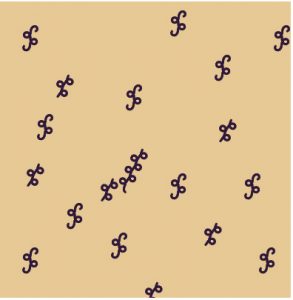
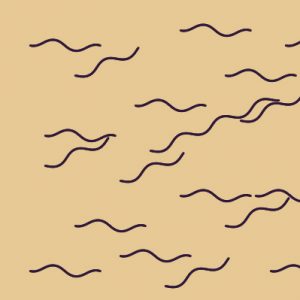
For the Turtle Composition, I wanted to play with modifying turtle paths using trigonometric functions. I also thought about elements in nature that visually present trigonometric functions to incorporate into my work as compositional elements. I came up with a handful of ideas, but ultimately saw compositional harmony with worms popping out of holes in the ground (or armpit hair).


hannahk2-Project11

sketch

//Hannah Kim
//Section A
//hannahk2@andrew.cmu.edu
//Project-11

//creates variable to be mapped
var move=500

function setup() {
    createCanvas(400, 400);
}

function draw() {
	//maps value to be used in right command
	var m = map(move, 0, mouseX, 200, 400);
    
    background(0);

    //draws darkest circular turtle which moves according to mouse
    var turtle4 = makeTurtle(mouseX, mouseY); //150
    turtle4.penDown();
    turtle4.setColor(color(20, 36, 62));
        for (var i = 0; i < 2000; i++) {
        turtle4.forward(300);
        turtle4.right(m);
        turtle4.forward(200);
    }

    //draws middle colored circular turtle which moves according to mouse
    var turtle5 = makeTurtle(mouseX+200, mouseY+200); //150
    turtle5.penDown();
    turtle5.setColor(color(85, 108, 122));
        for (var i = 0; i < 2000; i++) {
        turtle5.forward(300);
        turtle5.right(m-500);
        turtle5.forward(200);
    }

    //draws lightest colored circular turtle which moves according to mouse
    var turtle6 = makeTurtle(mouseX-200, mouseY-200); //150
    turtle6.penDown();
    turtle6.setColor(color(139, 202, 191));
        for (var i = 0; i < 2000; i++) {
        turtle6.forward(300);
        turtle6.right(m+500);
        turtle6.forward(200);
    }
}


function turtleLeft(d){this.angle-=d;}function turtleRight(d){this.angle+=d;}
function turtleForward(p){var rad=radians(this.angle);var newx=this.x+cos(rad)*p;
var newy=this.y+sin(rad)*p;this.goto(newx,newy);}function turtleBack(p){
this.forward(-p);}function turtlePenDown(){this.penIsDown=true;}
function turtlePenUp(){this.penIsDown = false;}function turtleGoTo(x,y){
if(this.penIsDown){stroke(this.color);strokeWeight(this.weight);
line(this.x,this.y,x,y);}this.x = x;this.y = y;}function turtleDistTo(x,y){
return sqrt(sq(this.x-x)+sq(this.y-y));}function turtleAngleTo(x,y){
var absAngle=degrees(atan2(y-this.y,x-this.x));
var angle=((absAngle-this.angle)+360)%360.0;return angle;}
function turtleTurnToward(x,y,d){var angle = this.angleTo(x,y);if(angle< 180){
this.angle+=d;}else{this.angle-=d;}}function turtleSetColor(c){this.color=c;}
function turtleSetWeight(w){this.weight=w;}function turtleFace(angle){
this.angle = angle;}function makeTurtle(tx,ty){var turtle={x:tx,y:ty,
angle:0.0,penIsDown:true,color:color(128),weight:1,left:turtleLeft,
right:turtleRight,forward:turtleForward, back:turtleBack,penDown:turtlePenDown,
penUp:turtlePenUp,goto:turtleGoTo, angleto:turtleAngleTo,
turnToward:turtleTurnToward,distanceTo:turtleDistTo, angleTo:turtleAngleTo,
setColor:turtleSetColor, setWeight:turtleSetWeight,face:turtleFace};
return turtle;}

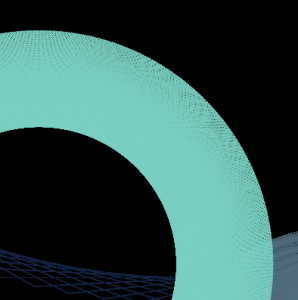
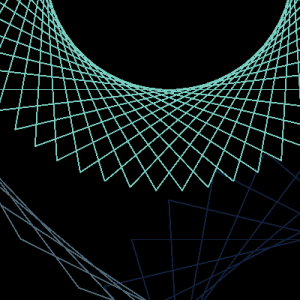
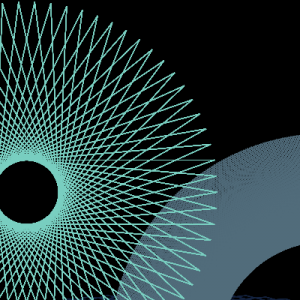
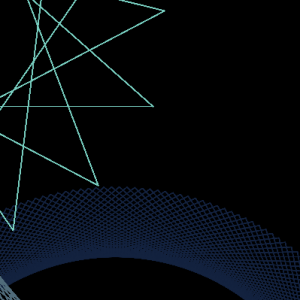
I did not make any sketches for this, but here are images of some compositions I liked.

For this project, I wanted to create a simple turtle collage which interacted with the mouse and created interesting compositions with eachother with every movement of the mouse. I am pretty happy with my results, and how the tiniest movement can create a different composition and pattern.

aboyle-Looking Outwards-11

For Looking Outwards 04, I focused on the creation of music, so I’ll use this opportunity to explore sound art.

LINES is an sound art exhibition that allows the audience to create music by interacting with colorful lines on the walls, floor, and ceiling.  You can move your hand up and down the lines on the wall to increase or decrease the pitch. You can stand in different places on the lines on the floor to adjust the tempo, and you can move your body up and down the lines hanging from the ceiling to change the dynamics of the sound. You can use checkers to create harmonies with yourself. This exhibit was created by Swedish composer Anders Lind in 2016 and was displayed in Västerbottens Museum in Umeå.

I think this exhibit was very cool because it encourages the audience to interact with the exhibit. There are so many different ways to produce different sounds, so every person will have a unique experience. With regards to the technical side, Lind mentions that sensors and electronics are used to form three novel musical instruments, and I’m sure that there are several algorithms at work to ensure musical beauty. I can definitely tell that Lin had an appreciation for the complexities of sound, the influence of color, and the ways technology can be used to heighten our appreciation of art.

rgroves – Composition – Section B

sketch

var cabin;
var turtle;
var spacing = 5;

function preload() {
	cabin = loadImage("https://i.imgur.com/vd2MDbC.jpg");
}

function setup() {
    createCanvas(437, 480);
    background(140, 90, 100);
    cabin.loadPixels();
    turtle = makeTurtle(0, 0);
    turtle.setColor(255);
    for (j = 0; j <= height; j += spacing) {
		for (i = 0; i <= width; i++) {
			var b = brightness(color(cabin.get(i, j)));
			var lineweight = map(b, 0, 255, 0, 5);
			turtle.setWeight(lineweight);
			turtle.forward(1);
		}
		turtle.goto(0, j);
	}
	noLoop();
}

function draw() {

}

function turtleLeft(d){this.angle-=d;}function turtleRight(d){this.angle+=d;}
function turtleForward(p){var rad=radians(this.angle);var newx=this.x+cos(rad)*p;
var newy=this.y+sin(rad)*p;this.goto(newx,newy);}function turtleBack(p){
this.forward(-p);}function turtlePenDown(){this.penIsDown=true;}
function turtlePenUp(){this.penIsDown = false;}function turtleGoTo(x,y){
if(this.penIsDown){stroke(this.color);strokeWeight(this.weight);
line(this.x,this.y,x,y);}this.x = x;this.y = y;}function turtleDistTo(x,y){
return sqrt(sq(this.x-x)+sq(this.y-y));}function turtleAngleTo(x,y){
var absAngle=degrees(atan2(y-this.y,x-this.x));
var angle=((absAngle-this.angle)+360)%360.0;return angle;}
function turtleTurnToward(x,y,d){var angle = this.angleTo(x,y);if(angle< 180){
this.angle+=d;}else{this.angle-=d;}}function turtleSetColor(c){this.color=c;}
function turtleSetWeight(w){this.weight=w;}function turtleFace(angle){
this.angle = angle;}function makeTurtle(tx,ty){var turtle={x:tx,y:ty,
angle:0.0,penIsDown:true,color:color(128),weight:1,left:turtleLeft,
right:turtleRight,forward:turtleForward, back:turtleBack,penDown:turtlePenDown,
penUp:turtlePenUp,goto:turtleGoTo, angleto:turtleAngleTo,
turnToward:turtleTurnToward,distanceTo:turtleDistTo, angleTo:turtleAngleTo,
setColor:turtleSetColor, setWeight:turtleSetWeight,face:turtleFace};
return turtle;}

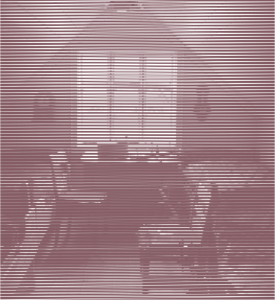
I made an image filter using a turtle that goes horizontally across the screen, its width varying based on the brightness of the pixel underneath. The result is a stripy monochrome picture. It takes a really long time to load because the turtle goes forward only one pixel at a time. Here’s a screenshot of what it looks like once it’s loaded:

atraylor – Looking Outward 11 – Section B

For this post I chose a piece by Laurie Spiegel from her 1970-80s album The Expanding Universe called “East River Dawn.” I’m inspired by this piece because it sounds complex and coherent. I don’t know much about music arrangement, but her work sounds well composed. The Expanding Universe was made in the 70s while Spiegel worked at Bell Laboratories. She used synthesizers and other prototype generation systems. Her reasoning behind using computers for music is that they are an artistic means rather than an end. In addition to being a trailblazer in computer music, her work was included on the Voyager spacecraft’s “Sounds of Earth” section of it’s gold record.

gyueunp – Looking Outwards 11

Last week, I attended Jakob Marsico and Chris Carlson’s audiovisual performance titled Body Drift. The work involved video-driven animation and multi-channel sound that created a hypnotising and ethereal effect. I also enjoyed the master class that provided a backstage look at the technologies behind the work, and that is why I chose to discuss Chris Carlson’s “Borderlands Granular,” a new musical instrument for exploring and transforming sound with granular synthesis.

A video of “Borderlands Granular” :

The software allows the user to create musical improvisations and to interact with sonic material on a fundamental level. I also appreciate its fascinating visual aspects, and how it provides a sculptural and spatial approach to making music. It is a work I wish to experiment with in the future.

More works by Chris Carlson can be found here.